A form fill API turns a stack of blank PDFs and a pile of customer data into finished, signable documents without a person manually entering values into a field. A loan application, a prior authorization form, an onboarding packet: you hand the API the form plus the values, and it detects the fields, writes them, and returns a completed document ready to route or sign. The business gets applications processed in seconds instead of hours, a support team that stops re-keying the same customer details across a dozen forms, and volume that scales without a proportional headcount increase. The end user gets a form that comes back filled correctly the first time, no manual review queue, no rejected submission over a mismatched date format or a blank required box. That is the value a form fill API delivers: the last mile of a document workflow, closed automatically, accurately, and efficiently.
TLDR:
- Field-to-field mapping breaks on conditional forms; Edit applies field-level JSON Schema rules directly, while the Workflows Router handles cross-step branches for multi-step compliance and insurance flows
- Text overflow, dropdown mismatches, and character-per-box SSN fields each fail under a naive fill; the Edit API's field-type coverage and overflow logic keep checkboxes, signatures, tables, and multi-line fields intact
- Template-based filling detects field positions once and fills deterministically at volume for fixed forms; adaptive filling maps extracted values to fields with no template for forms that vary
- Parse and Extract hand off clean, typed data, but mapping and fill logic decide whether a real-world form actually completes
- Extend's Edit API handles programmatic form filling with conditional logic and overflow support across checkboxes, signatures, text fields, tables, dropdowns, and character-per-box inputs, deployed alongside Parse and Extract in one system
Document Workflow Fundamentals: Parse, Extract, Map, Fill
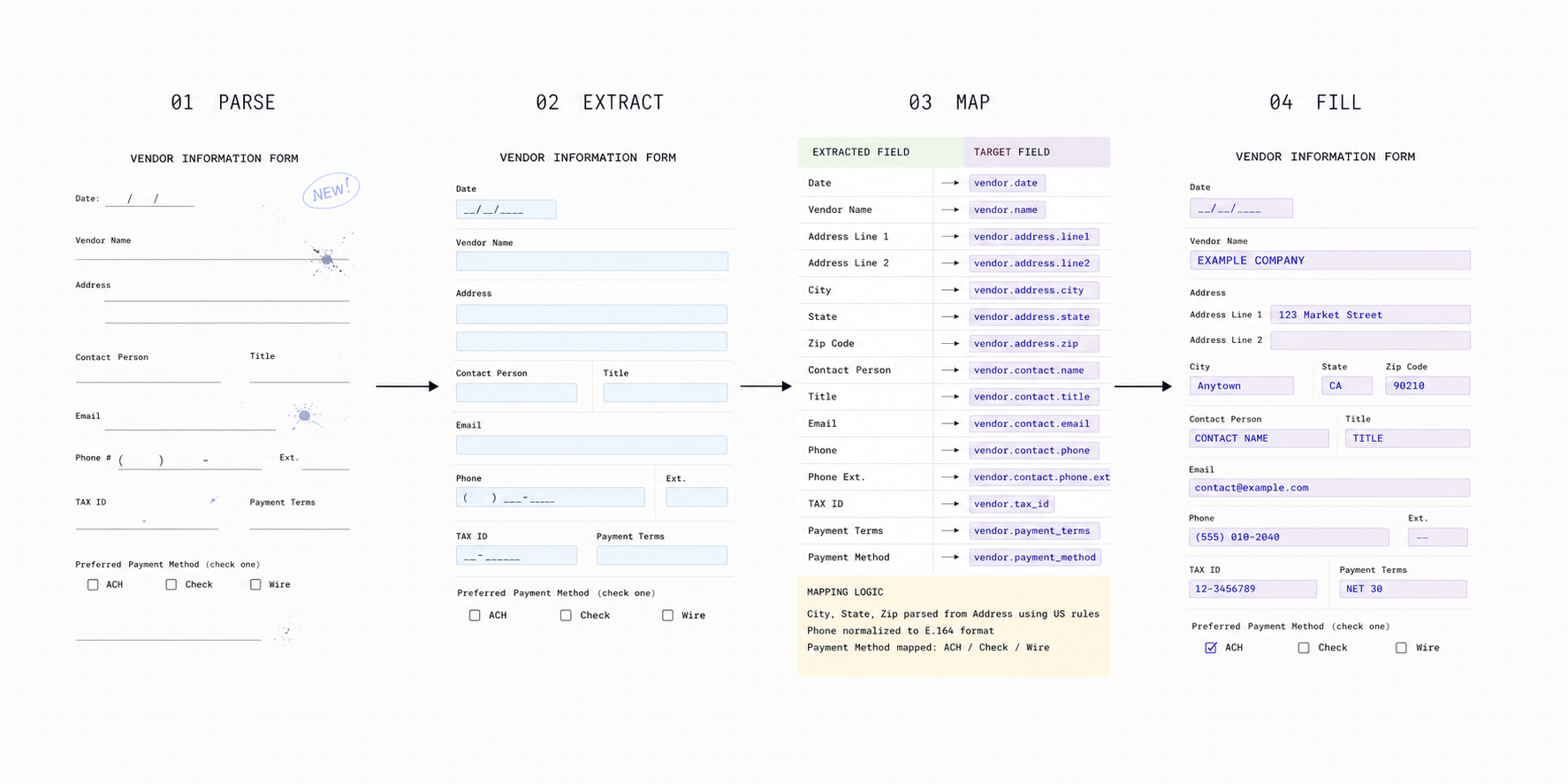
Four steps describe the complete round trip from unstructured input to finished output: parse, extract, map, fill.
The parse step converts raw files into structured representations an LLM can read. Extraction pulls specific fields into a schema. Mapping aligns those values to the target system or form. Fill closes the loop, writing that data back into a completed document.
Each step compounds on the one before it. Weak parsing degrades extraction quality. A misaligned map produces a bad fill. Document round trip automation only works when every stage holds up under real-world conditions, including messy scans, variable layouts, and edge cases that break simpler systems.
| Stage | Function | Common Edge Cases |
|---|---|---|
| Parse | Converts raw files into structured markdown, preserving layouts. | Collapsed tables, lost checkboxes, undetected handwriting. |
| Extract | Pulls specific fields into schemas for downstream systems. | Nested tables, multi-page variations, variable formats. |
| Map | Aligns extracted data to destination formats via conditional logic. | Date mismatches, separated fields, silent type failures. |
| Fill | Writes mapped data into target forms with validation handling. | Text overflow, dropdown mismatches, character-per-box fields. |
Where Edit API Input Comes From: Parse and Extract as Context
The Edit API fills a form with whatever data it receives, so the quality of that input sets the ceiling on the fill. A scanned invoice, a handwritten prior authorization form, and a multi-column bank statement each need different handling before a single field gets filled, and that handling happens upstream, in Parse and Extract. Traditional OCR reads pixels and outputs text but loses structure: tables collapse, checkboxes disappear, column layouts merge into unreadable strings, and the Edit API inherits whatever damage happened at that stage.
Parse API and Extract API exist to hand the Edit API something it can actually map: typed fields such as names, dates, totals, line items, and tax IDs, built from structure-preserving markdown instead of a flat OCR dump. The Edit API doesn't re-check that work; it maps and fills on top of it. Weak parsing means the Edit API is filling a form with fields that were already wrong before mapping started, which is why the fill problem starts upstream even though it surfaces downstream.
No single parsing model handles every document element well, which is why the value reaching the Edit API varies by document type even before mapping starts. Hybrid pipelines route standard text through one model, handwriting through another, and tables or checkboxes to purpose-built VLMs, because a generic OCR pass drops strikethroughs, low-quality scans, and cursive annotations entirely. A prior authorization form with a handwritten diagnosis code needs a different model path than a typed invoice, and the accuracy of that path decides whether the Edit API gets a clean value to map into the target form or a garbled one it has to write in anyway.
Extract to Schema: The Typed Data the Edit API Maps
What the Edit API receives is a typed schema, not raw text: document extraction AI pulls names, dates, totals, line item tables, and tax IDs out of parsed markdown before a single field gets mapped. A 95% per-field extraction rate still means one wrong value for every 20 fields on average, and the Edit API will faithfully write that error unless the pipeline stops it first. Confidence scoring is that control point: it flags uncertain fields so a misread total or truncated tax ID gets reviewed instead of landing in the target form.
The Map Step: How the Edit API Resolves Field Mismatches
Extraction outputs data in the shape of the source document. The Edit API's mapping layer reshapes it to fit the destination form, and that gap is where naive automation breaks first.
Format mismatches are the simplest failure. An extracted date field reads 2024-01-15 while the target form expects January 15, 2024. A name field arrives as one combined string where the destination has separate first and last name inputs. These mismatches create silent failures: the fill runs, the form looks complete, and the error only surfaces during an audit or a rejected submission.
Conditional logic is the harder failure. Take a workers' compensation claim form: section 4 (prior injury history) only needs filling if section 2 answers Yes to "has this employee filed a claim before." A flat field-to-field template fills section 4 every time, or skips it every time, because it has no branch logic. Extend handles field-level dependencies directly in the Edit schema with JSON Schema if/then/else, dependentRequired, allOf, oneOf, anyOf, and not. When an answer must change the pipeline itself, the Workflows Router evaluates ordered code or semantic branches and sends the document down the correct cross-step path. That separation makes the map dynamic without hiding workflow routing inside a brittle field script.
Fill Workflows: Programmatic Form Completion and Document Generation
Form Filling is where mapped data lands in its final form. Values flow into target documents, fields populate, and the output is something a human signs or a system routes downstream.
Template-based filling versus adaptive filling
Template-based filling detects field positions once against a known form layout, then applies that same field map deterministically on every run. A mortgage lender running the same 1003 loan application form thousands of times a month uses template-based filling: the field positions never move, so detecting them once and reusing that map is faster and cheaper than re-detecting fields on every document.
Adaptive filling skips that predefined configuration. The Edit API detects the form's fields and maps values to them from natural-language instructions or a schema alone, no template required. A logistics team generating delivery confirmations that vary by carrier, or a healthcare team filling prior authorization forms that differ by payer, uses adaptive filling: hundreds of form variants make template maintenance a losing proposition, and the field-detection step has to run fresh on every new layout.
The decision comes down to form volume and variance. High volume on one fixed form favors template-based filling. High variance across many form versions, or a one-off form the system has never seen, favors adaptive filling. Some workflows use both: a Bill of Lading intake pipeline runs adaptive filling on the inbound carrier documents, which vary by carrier and route, and template-based filling on the outgoing delivery confirmation, a single internal form filled the same way every time.
Field type coverage is where edge cases accumulate regardless of mode. Dropdown mismatches and character-per-box SSN fields are two of six field types that fail differently under a naive fill; the rest are checkboxes, signatures, multi-line paragraphs, and table cells. A checkbox needs a boolean read off a scanned mark, not transcribed text. A signature field needs presence detected, not written out. Multi-line paragraphs and table cells need overflow logic that keeps a long answer inside its boundary without spilling into an adjacent field or breaking the table structure.
Round Trip Automation: Complete Document Processing Cycles
Full document round trip automation chains the parse, extract, map, and fill sequence described above into a single pipeline that runs without human intervention. A Bill of Lading arrives, triggers parsing, extraction populates a TMS with shipper and consignee data, and the system fills outgoing delivery confirmations before freight moves.
The compounding effect is where value concentrates. Each stage feeds the next automatically, so volume scales without proportional headcount increases. Flatiron Health replicated six months of biomarker extraction work in two weeks with Extend, a concrete measure of what collapses when parsing, extraction, validation, and review run as one system. Every handoff that previously required a human becomes a programmatic connection, and those gains grow with document volume.
Workflow Orchestration: Where Edit API Fill Logic Fits in the Pipeline
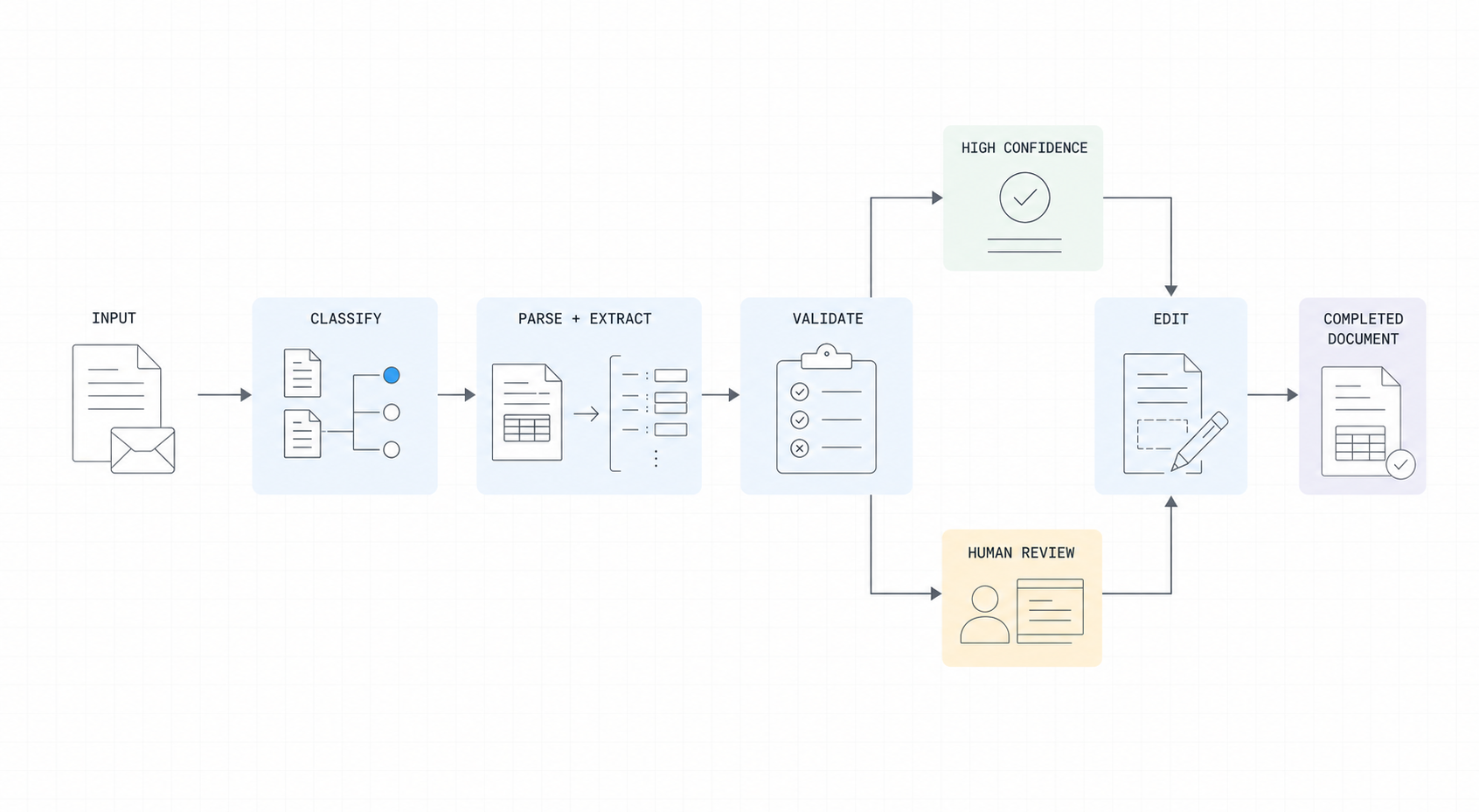
Chaining parse, extract, and fill into a single pipeline requires routing logic that knows when to branch, hand off, or pause. For new workflows, the Router step is that branch point: ordered code branches handle deterministic conditions and semantic branches handle natural-language criteria. Classification runs first to identify document type, which determines the splitting strategy, parse config, and extraction schema applied downstream. Validation checks confidence scores and business rules before output reaches the Edit API, so a fill only runs against data that has already cleared a quality bar.
Review gates insert human inspection at configurable thresholds. Low-confidence extractions route to a queue; outputs above threshold continue automatically into the fill step. Retry logic handles transient failures without collapsing the chain. The Workflows API exposes the full pipeline, including the Edit API's fill configuration, programmatically, letting teams version and run document workflows, map and fill logic included, as a single, trackable pipeline.
Accuracy Requirements and Quality Control for Mission-Critical Workflows
In document round trip automation, accuracy failures carry real costs: a misextracted field in a claims form or a misaligned mapping in a financial document can cascade into downstream errors that are expensive to remediate. Confidence scoring and validation gating, covered above, catch most of that risk before the fill runs. The production control that catches what slips through both is diff-based auditing.
- Diff-based auditing: the original parsed values are compared against final filled output to catch mapping or transformation errors introduced mid-pipeline, after confidence scoring and schema validation have already passed.
This is a recommended workflow pattern, not an automatic Edit API feature: persist the source extraction and compare it with the values returned by Edit before releasing the completed document.
Extend's Edit API, Built on the Parse and Extract APIs
Extend is the complete document processing toolkit comprised of the most accurate parsing, extraction, and splitting APIs to ship your hardest use cases in minutes, not months. Extend's suite of models, infrastructure, and tooling is the most powerful custom document solution, without any of the overhead. Agents automate the entire lifecycle of document processing, allowing your engineering teams to process your most complex documents and optimize performance at scale.
The Edit API is where that data lands: you give it a PDF plus natural-language instructions or a schema, and it detects the form's fields, fills them, and returns a completed, downloadable PDF along with the values it wrote. It covers conditional field logic, overflow handling, checkboxes, signatures, dropdowns, tables, and character-per-box inputs in both template-based and adaptive modes. Edit applies field-level JSON Schema rules directly; the Workflows Router handles cross-step branching. Use it to auto-fill applications, pre-populate documents with customer data, and generate filled forms at scale. It runs on typed input from the Parse API, which converts documents into LLM-ready markdown across 35+ supported input types through advanced PDF extraction, and the Extract API, which pulls typed values into schemas with confidence scoring. All three operate within a single system: the Workflows API deploys that same pipeline programmatically, so the map-and-fill step that used to break in production runs the same way on the ten-thousandth document as it did on the first.
Final Thoughts on Automating Document Workflows
Building document workflows that parse, extract, and fill correctly means the map and fill steps get the same engineering attention as extraction, not less. A clean extraction that lands in a form with the wrong dropdown value, a blank required field, or a broken conditional branch still fails the workflow. The Edit API closes that gap with field-level conditional schemas and overflow handling; the Workflows Router adds branch-aware cross-step routing. Together they turn a typed schema into a completed form a human signs or a system routes, without a fragile field-to-field script behind it. Get started with mapping and fill as production infrastructure, not a final afterthought.
FAQ
What is the best way to handle document round trip automation from scratch?
Start with the parse-extract-map-fill sequence as a single pipeline, not separate integrations. Parse converts documents to structured markdown, extraction pulls values into a schema, mapping handles format transformations, and fill writes data back to target forms. Each step feeds the next automatically, which is where the volume scaling actually happens.
Can a document workflow be built without writing separate parsing and extraction logic?
Yes. The Parse API and Extract API work as a unified pipeline where parsing output feeds directly into extraction without manual transformation steps. The Workflows API chains classification, parsing, extraction, and fill operations programmatically, letting teams version and deploy the entire sequence as a single pipeline.
Parse vs extract: what's the actual difference in document workflows?
Parse converts raw files (PDFs, scans, images) into LLM-ready markdown that preserves structure like tables and checkboxes. Extract pulls specific typed values from that markdown into defined schemas. Parse is the foundation layer that makes extraction possible. Weak parsing breaks downstream extraction quality.
How does the map step prevent field mismatches between extracted data and target forms?
The map step converts extracted values to match destination requirements: date formats, combined versus separated name fields, and conditional logic that routes data based on previous answers. Without this layer, type mismatches and format differences create silent failures that only surface after the fill runs.
When is template-based filling better than adaptive filling for form automation?
Use template-based filling for high volumes of the same fixed form, a 1003 loan application, a standard W-9, an internal delivery confirmation, where field positions never move. Detecting positions once and reusing that map is faster and cheaper than re-detecting fields on every run. Use adaptive filling when forms vary by source (different carriers, different payers, different states) or when a form has never been seen before. It maps extracted values to fields using AI and instructions alone, with no template to build or maintain.
What does conditional field logic look like in a real Edit API workflow?
A workers' compensation claim form fills section 4 (prior injury history) only if section 2 answers Yes to a prior claim question. Encode that field-level rule directly in the Edit schema with JSON Schema if/then/else; use the Workflows Router when the answer must send the document through a different cross-step path. The result is branch-aware filling instead of one static field map for every document.