PDFs are everywhere—contracts, invoices, reports, statements—but they remain one of the most stubborn barriers to automation. Beneath their familiar layout, PDFs often hide unstructured, inconsistently encoded data that’s difficult to extract reliably at scale. Simple copy-paste or basic OCR tools fall apart when documents vary in format, include tables, or mix scanned and digital content.
PDF extraction solves this problem by transforming static documents into structured, machine-readable data. Modern extraction techniques go far beyond text recognition, capturing tables, key-value pairs, headers, and semantic relationships while preserving context and accuracy. When combined with AI and document intelligence, PDF extraction becomes a foundational layer for workflows like automated data entry, compliance checks, analytics, and downstream decision-making.
In this guide, we’ll break down how PDF extraction works, common challenges teams face, and how modern approaches, especially API-first and AI-powered systems, enable reliable, scalable document processing across real-world use cases.
TLDR:
- PDF extraction converts locked document data into structured formats like JSON or CSV for automation.
- Traditional OCR achieves ~60% accuracy on real documents; AI-powered systems reach 99% on complex cases.
- Manual data entry costs companies more than $28,000 per employee each year when accounting for labor, errors, and review time.
- Multi-page tables, handwriting, and template drift break most systems but VLMs handle these edge cases.
- Extend uses agentic OCR and auto-optimization to achieve 99%+ accuracy in minutes versus weeks of tuning.
Why PDF Extraction Matters in 2026
The PDF format dominates business communication in ways few file types ever have. 98% of businesses default to PDF for external documents, creating a data ecosystem that continues accelerating. Over 2.5 trillion PDFs exist worldwide, with 290+ billion PDFs created annually at a 12% year-over-year growth rate.
This volume creates a pressing problem. Every PDF containing invoices, contracts, receipts, or forms represents data that organizations need but cannot easily access. Manual data entry costs companies more than $28,000 per employee each year when accounting for labor, errors, and review time. At scale, these costs become prohibitive.
Competitive pressure has shifted extraction from nice-to-have to survival requirement. Companies that automate document processing respond to customers faster, close deals quicker, and operate with leaner teams. Those still manually typing data from PDFs into systems fall behind on speed and accuracy metrics that customers now expect as baseline performance.
The accessibility angle matters equally. Data trapped in PDFs cannot fuel analytics, train models, or integrate with other systems. Extraction unlocks this information for downstream use, turning static documents into inputs for decision-making workflows that drive revenue and reduce risk.
Types of PDF Extraction
Different extraction approaches solve distinct document processing problems. Selecting the right method depends on document type, data structure, and downstream requirements.
| Extraction Type | What It Extracts | Primary Use Cases | Key Limitations |
| Text Extraction | Characters and words from digital PDFs into plain text strings | Digitizing reports, contracts, and correspondence where exact layout preservation is not critical | Fails on scanned documents without OCR pre-processing; does not preserve formatting or structure |
| Data Extraction | Specific fields like invoice totals, policy numbers, addresses into structured outputs | Accounts payable automation, claims processing, customer onboarding workflows requiring precise field mapping | Traditional template-based approaches break with layout changes; requires semantic understanding for reliability |
| Table Extraction | Tabular data with rows and columns from financial statements, purchase orders, analytical reports | Processing expense reports with line items, loan documents with amortization schedules, any row-level data analysis | Multi-page tables often break extraction when rows span page boundaries; requires document-level awareness |
| Image Extraction | Embedded graphics, charts, logos, photos, and visual elements from PDFs | Archiving product images from catalogs, extracting signature blocks for verification, isolating technical diagrams | Does not interpret image content; requires separate analysis for understanding visual information |
| Metadata Extraction | Document properties like creation date, author, page count, security settings | Document management, compliance tracking, archival systems requiring file-level information | Limited to file properties; does not access actual document content or semantic information |
Traditional OCR vs. AI-Powered PDF Extraction
Traditional OCR relies on pattern matching to recognize characters, converting pixel patterns into text through predefined templates. This approach works adequately for clean, digital-first documents with standard fonts and simple layouts. Accuracy typically plateaus around 60% on real-world documents containing noise, varied formatting, or non-standard structures.
AI-powered extraction uses LLMs and VLMs to understand document context rather than just identifying characters. These systems parse relationships between fields, interpret table structures across page breaks, and adapt to layout variations without retraining. Accuracy rates reach 99% on complex documents because the models comprehend semantic meaning alongside visual patterns.
The practical gap appears starkest on edge cases. Traditional OCR misreads handwritten annotations, splits multi-page tables incorrectly, and loses context when text spans columns or sections. AI systems handle these scenarios by maintaining document structure awareness and applying reasoning to ambiguous cases. A scanned invoice with handwritten notes in margins, a scenario where template-based OCR fails entirely, becomes routinely processable with vision-based AI models.
How PDF Extraction Technology Works
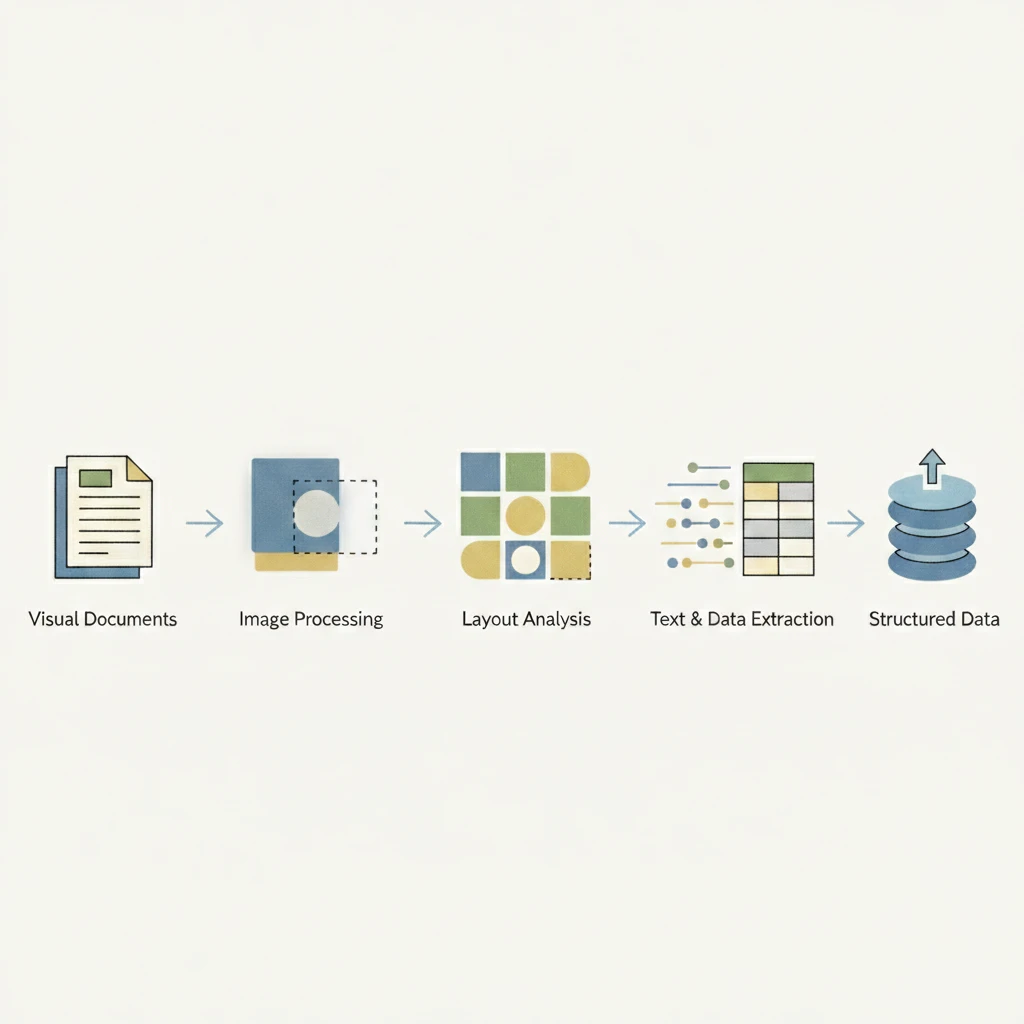
PDF extraction follows a multi-stage pipeline that converts visual documents into structured data. Each stage builds on the previous one, progressively transforming pixels into usable information.
The process begins with document ingestion and parsing. The system decodes the PDF to separate text layers, fonts, images, and metadata while determining whether pages are digital or scanned. Digital PDFs allow direct text extraction, while scanned documents require OCR to convert images into machine-readable text.
Next, layout analysis identifies the structure of the document. By analyzing spatial relationships, fonts, and whitespace, the system detects headers, body text, tables, and form fields, establishing reading order and content hierarchy.
Recognition engines then extract data from each region. OCR handles scanned text, specialized models interpret tables, checkboxes, and signatures, and LLMs infer field relationships to produce structured outputs even from inconsistent layouts.
Finally, validation applies schemas and business rules to flag low-confidence fields and ensure consistency. The validated data is serialized into formats such as JSON, CSV, or database-ready records for downstream systems.
Common PDF Extraction Challenges and Solutions
Poor image quality makes scanned documents unreliable for traditional extraction systems. Blur, skew, and low resolution cause character errors that cascade into incorrect fields. Preprocessing helps, but AI-powered OCR performs better by tolerating noise through learned pattern recognition.
Multi-page tables often break extraction when rows span page boundaries. Page-level table detection loses context and duplicates headers. Vision-language models maintain document-level awareness, allowing tables to be reconstructed across pages without manual fixes.
Handwritten content and checkboxes remain common failure points. Template-based systems struggle with writing variation and ambiguous marks. Vision models trained on diverse handwriting data achieve higher accuracy by recognizing stroke patterns instead of fixed shapes.
Template drift occurs when document layouts change. Hard-coded field positions fail immediately, increasing maintenance costs. LLM-based extraction relies on semantic understanding rather than coordinates, enabling automatic adaptation to new layouts while preserving accuracy.
Measuring PDF Extraction Accuracy
Character Error Rate (CER) measures individual character mistakes per 100 characters extracted, while Word Error Rate (WER) counts incorrect words per 100 words. These metrics work for comparing OCR engines but miss the bigger picture. A 95% WER sounds good until one wrong digit in an invoice total costs thousands in payment errors.
Field-level accuracy matters more for production systems. Track extraction correctness per field type: dates, amounts, line items, addresses. A field counts as correct only when it matches ground truth exactly. This reveals which data types need improvement and where review workflows should focus.
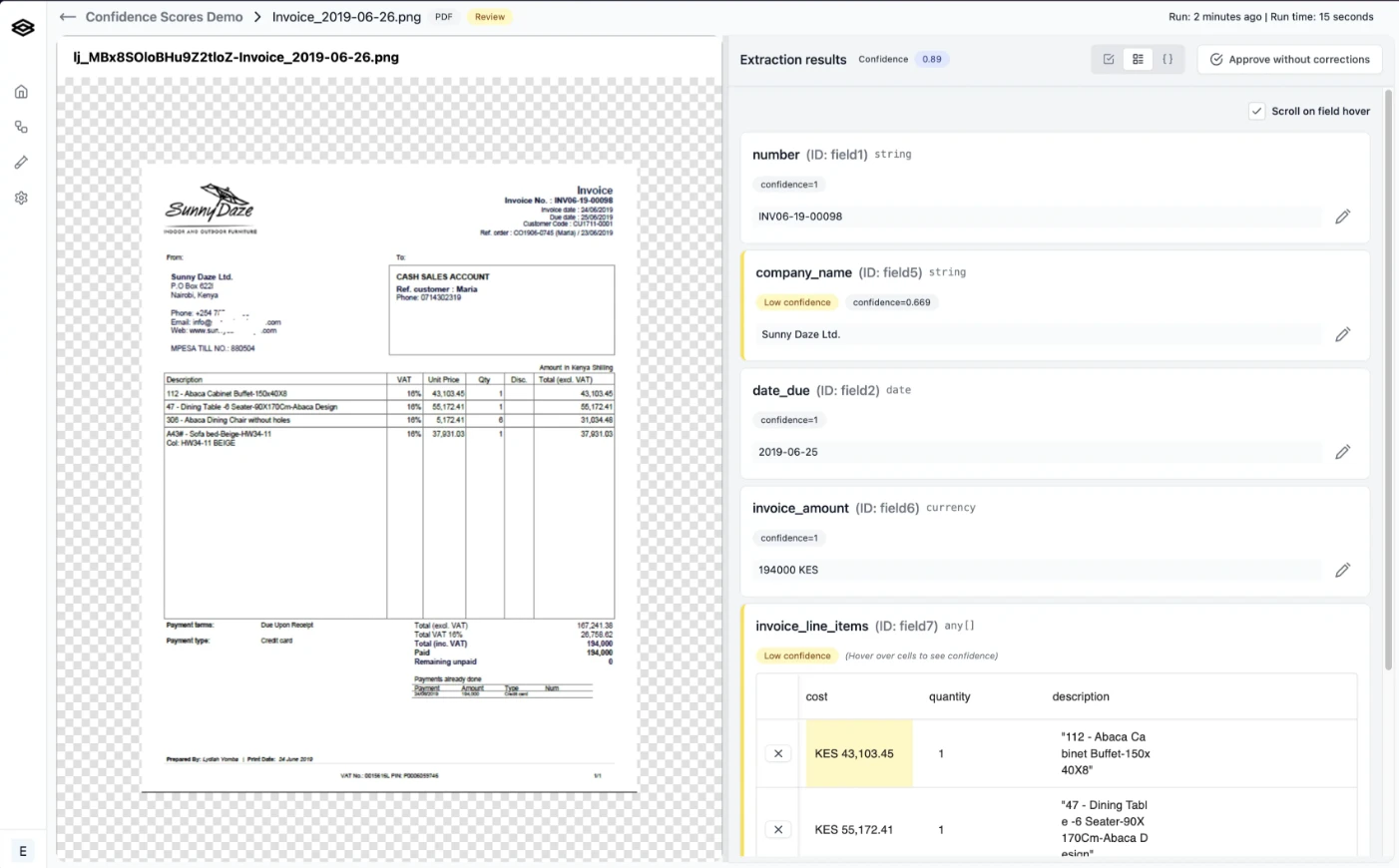
Confidence scoring assigns probability values to extracted fields. Scores below 0.85 typically flag fields for human review, creating automated quality gates. Teams should calibrate thresholds against their accuracy requirements and review capacity, balancing automation rates against acceptable error tolerance.
Human-in-the-loop evaluation remains the gold standard. Sample random documents weekly, compare extractions against manual review, and track accuracy trends over time to catch degradation before it impacts operations.
AI Document Processing with Extend
Extend addresses the extraction challenges outlined above through a purpose-built document processing stack. Its agentic OCR intelligently routes document regions through specialized models, handling handwritten annotations, strikethroughs, and multi-page tables that break conventional systems. Visual layout-based memory and layout-aware parsing maintain context across page breaks, reconstructing complex tables without losing rows or duplicating headers.
Schema optimization happens automatically through Composer, an AI agent that experiments with prompt and configuration variants to maximize field-level accuracy. Teams achieve 99%+ extraction rates within minutes rather than spending weeks manually tuning prompts and templates. The system adapts to layout variations and template drift without reconfiguration, eliminating the maintenance burden that plagues rigid extraction tools.
The evaluation framework provides field-level accuracy scoring, confidence thresholds, and automated quality gates that route low-confidence extractions to review. Human-in-the-loop interfaces let domain experts validate outputs and correct edge cases, with corrections feeding back into the system to improve future runs. This closed-loop approach turns extraction into a self-improving workflow rather than a static process requiring constant manual oversight.
Extend delivers parsing, extraction, splitting, classification, and review in a single API-first system. Engineering teams integrate through REST endpoints or SDKs while operations teams access review interfaces and evaluation dashboards without code. The result handles documents that other solutions reject as too complex while maintaining the accuracy and reliability that mission-critical workflows demand.
Final Thoughts on Automated PDF Extraction
Document processing stops being a bottleneck when automated PDF data extraction handles the complexity your team currently reviews manually. The shift from template-based systems to AI-powered extraction means fewer broken workflows when suppliers change invoice formats or forms get updated. Your documents represent data that should fuel decisions, not create data entry backlogs. Focus on field-level accuracy metrics that match your production requirements, not vendor benchmarks on perfect samples.
FAQ
What accuracy rates should teams expect from modern PDF extraction systems?
AI-powered extraction systems reach 99%+ accuracy on complex documents by using LLMs and VLMs that understand context and relationships between fields, compared to traditional OCR which plateaus around 60% on real-world documents with varied formatting or non-standard structures.
How does PDF extraction handle tables that span multiple pages?
VLMs maintain document-level awareness to track table continuation across page boundaries, merging fragments into complete datasets without losing rows or duplicating headers—a scenario where traditional page-by-page extraction systems fail.
When should teams choose synchronous versus asynchronous extraction APIs?
Synchronous APIs work best for single-document workflows requiring immediate feedback within the request-response cycle, while asynchronous batch processing handles high-volume workloads more cost-effectively when millisecond latency matters less than throughput optimization.
What confidence score threshold typically triggers human review?
Fields scoring below 0.85 confidence typically get flagged for human review, though teams should calibrate thresholds against their specific accuracy requirements and review capacity to balance automation rates with acceptable error tolerance.
How does extraction adapt when document templates change without notice?
LLM-based extraction identifies fields through semantic understanding rather than fixed coordinates, automatically adapting to layout variations and template updates while maintaining accuracy across document versions without manual reconfiguration.