

TLDR: Edit helps AI/ML teams automate PDF form filling by reducing manual field mapping, improving form field detection accuracy on low-quality scans and skewed pages, and improving handling of signatures, revisions, and corrupted files.
What's new in Edit:
- Improved form detection: A new model better detects fields on non-standard forms, low-quality scans, and skewed pages.
- More consistent labeling: Clear field names across the document, with descriptions that help downstream models determine what to fill.
- Signature and revision support: PAdES B-LT and B-LTA support, plus incremental revisions designed to preserve existing signatures.
- Corrupted-file recovery: Recovery handling for damaged PDFs that would otherwise interrupt filling.
Edit detects form fields using both PDF internals and object detection, generates a label and description for each one, reads the conditional logic on the page, and fills text fields, checkboxes, and signatures. Zillow and SamaCare have been running it in production for the past year across healthcare, insurance, immigration, and legal forms.
We started with Extend's Edit product to handle document tagging while we worked around some early gaps in the API, and it got us up and running quickly. As our needs grew, we moved to building directly on Extend's API to power our own internal document intake tool from the ground up, which gave us the flexibility to shape the workflow around how our team actually processes prior auth documents. The API has held up well for our core use case, and having that level of control has made it easier to scale as our document volume grows.
Extend is built to automate document workflows from start to finish. Edit closes the gap between extracting information and putting it to work by filling the forms that move a process forward.
What's new in Edit?
Edit reduces the manual work of finding and labeling PDF form fields and improves how filling handles signed, revised, and damaged documents.
- Better field detection on scans and non-standard forms. Our new form detection model builds on the layout model behind Parse, with improved performance on low-quality scans, skewed pages, multi-column layouts, and dense forms.
- More consistent labels, aligned with your pipeline naming conventions. Labeling now uses page-level context to interpret fields together. You can also steer field names toward your existing naming conventions, with descriptions that help downstream models determine what belongs in each field.
- Verifiable signatures and revision-aware saves. PAdES B-LT support embeds validation material needed to verify signatures later. B-LTA adds archival timestamps for long-term verification. Incremental saves append changes rather than rewriting the PDF, helping preserve existing signatures.
- More resilient PDF handling. Edit attempts to recover damaged files that previously failed outright. Existing conditional-logic support continues to validate filled values against rules on the form.
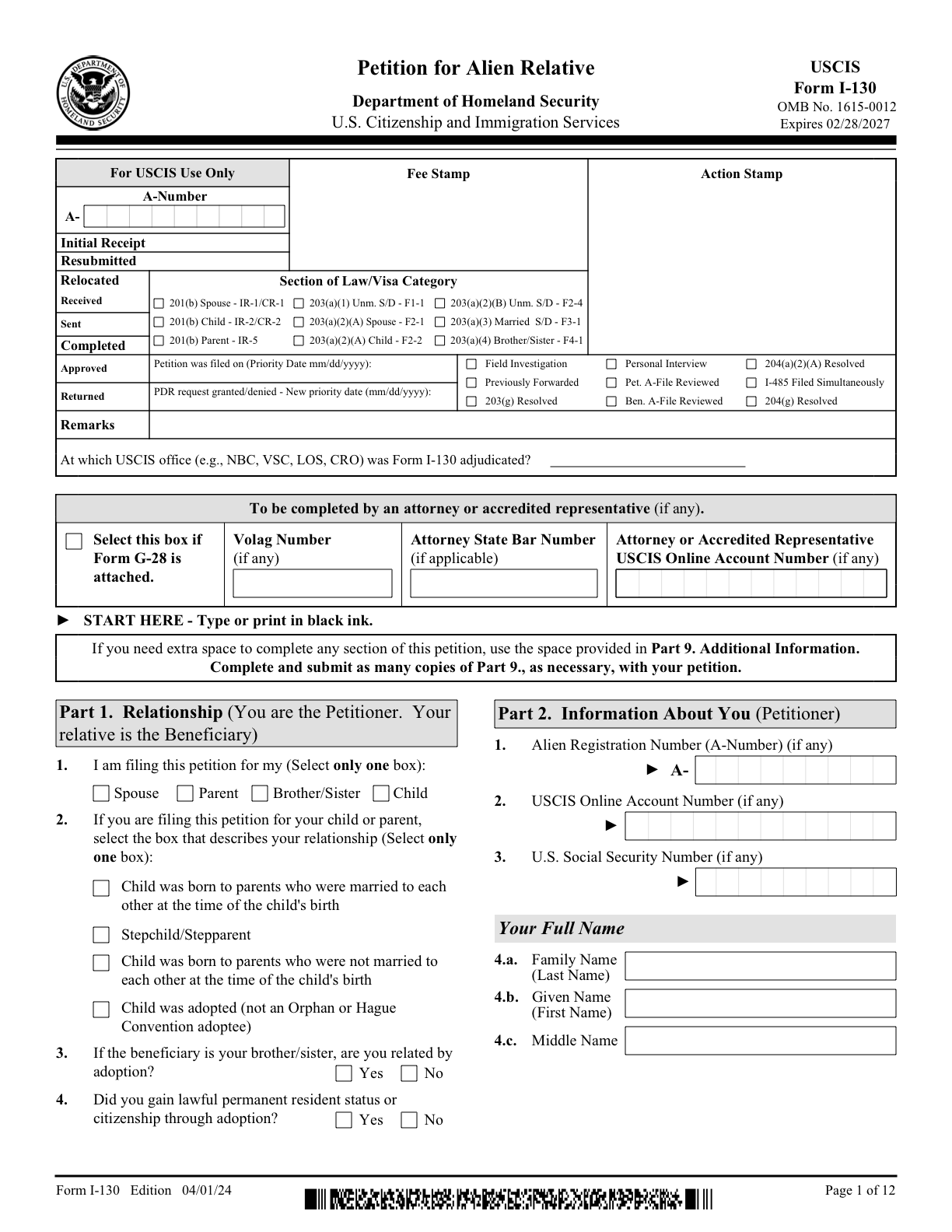
01_USCIS_I-130.pdf
How does Edit work?
Edit combines form detection, field labeling, and structured filling.
Form field detection. Edit uses PDF internals to identify embedded fields and object detection to locate fields on the page. For this release, we fine-tuned a forms model to handle standard forms as well as low-quality scans, skewed pages, and dense layouts.
Field labeling. Updated vision-language models (VLMs) interpret the form’s text and layout to generate field names and descriptions. Previously, labeling processed fields in isolated batches of five, which could produce different naming conventions within the same form. Page-level context lets the model interpret fields alongside neighboring labels and instructions, while explicit naming guidance helps align the output with your pipeline.
Form filling and validation. Extend Edit also writes values into the detected fields. When conditional-rule generation is enabled, it can turn instructions such as “If yes, provide an explanation” into structured validation rules and check generated values against them. The redesigned filling infrastructure also handles damaged-file recovery and incremental saves for signed PDFs. See the editing configuration options.
What can AI teams automate with Extend's Edit API?
AI teams can use Edit to build workflows that take data from an upstream system and write it into PDF forms. Examples include healthcare prior-authorization requests, insurance claim forms, immigration applications, and legal intake documents.
Those workflows can include:
- Filling scanned forms without embedded fields. Detect the boxes and controls on the page, generate labels, and fill them without manually mapping every field.
- Connecting extracted data to an output form. Combine document extraction with Edit to move information from source documents into a destination PDF, rather than stopping at structured data and building the rest of the workflow yourself.
- Completing forms with conditional requirements. Validate dependencies between answers, such as requiring an explanation when a checkbox is selected.
- Updating signed documents. Use incremental saves to add permitted changes while helping preserve existing signatures.
The detection and labeling improvements are particularly useful when incoming forms vary in layout or scan quality. Instead of treating every unfamiliar form as a new manual setup task, teams can use detected fields and generated descriptions as the starting point for filling.
Try Edit today on your documents
The API surface is unchanged. If you’re already calling the Edit API, you get the new detection and labeling without any manual updates.
Try it on your form in the Edit playground. Docs: Editing overview.


