High-volume document workflows inevitably break at scale. When a 2,000-page filing arrives with mixed layouts, handwritten signatures, and conditional splits that only make sense with full context, most legacy pipelines either fail silently or route everything to manual review, defeating the purpose of document automation entirely. The question for engineering teams is no longer whether to automate these workflows, but how to build systems capable of handling the messy, unpredictable reality of production data.
TLDR:
- Document automation uses AI to handle creation, processing, and management at scale without manual work.
- AI-driven systems now process handwritten notes, scanned PDFs, and multi-page bundles that break rule-based tools.
- Automated processing costs $0.50 to $2.00 per document vs $5 to $25 manual, with 3 to 6 month payback periods.
- Production pipelines require parsing, extraction, splitting, and validation working together to hit 95%+ accuracy.
- Extend delivers parsing, extraction, and splitting APIs that ship mission-critical use cases in days, not months.
How AI-Driven Document Automation Works
Document automation ingests incoming documents, extracts the internal data, classifies the content, and routes that information downstream. What separates modern infrastructure from template-based scripting is the AI layer. OCR, VLMs, and LLMs handle documents that break rule-based systems entirely: handwritten notes, scanned PDFs with poor layouts, and multi-page bundles with no consistent structure.
A document arrives via scanned PDF, email attachment, or form submission. The system classifies it, extracts the relevant fields, validates the output, and routes data downstream. Simple in theory, but the messy reality is that documents rarely arrive clean. Handling edge cases, low-quality scans, inconsistent layouts, and documents spanning hundreds of pages requires intelligence above static rules. For enterprises, AI-driven automation cuts processing time and removes the manual handoffs where errors accumulate.
Key Technologies Powering Document Automation
OCR converts scanned images and PDFs into machine-readable text. Raw OCR output is noisy: it loses structure, mangles tables, and fails on handwriting or low-quality scans.
Production pipelines layer VLMs and LLMs on top. VLMs understand visual layout, including where tables sit, how columns relate, and whether a checkbox is checked. LLMs interpret extracted content in context, handling ambiguous fields and multi-page relationships that pattern-matching can't resolve. Layout detection models identify structural elements: headers, footers, tables, signature blocks, form fields.
The Business Case for Document Automation in 2026
The intelligent document processing market was valued at $10.57 billion in 2025 and is projected to reach $91.02 billion by 2034. The value compounds when all layers work together: parse, classify, extract, validate, and route.
Manual processing costs $5 to $15, while automated processing drops that to $1.00 to $4.00, achieving a 60 to 80% cost reduction. Organizations report payback periods of 3 to 6 months and first-year ROI between 200% and 400%. Documents that took days move through automated pipelines in seconds.
| Metric | Manual Processing | Automated Processing |
|---|---|---|
| Cost Per Document | $5.00 - $15.00 | $1.00 - $4.00 |
| Turnaround Time | Days or weeks | Seconds or minutes |
| Error Handling | Manual human oversight | Confidence scores and alerts |
| Scalability | Linear (requires hiring) | Rapid via cloud servers |
Document Automation Use Cases by Industry
Each industry has its own document problems, but the pattern is the same: high volume, high stakes, and too much manual handling.
Financial Services: Banks and Fintechs process invoices, tax forms, KYC packets, and loan bundles at scale. Customers like Brex and Mercury use automated extraction from financial documents in milliseconds, cutting the manual review that slows underwriting and compliance workflows.
Legal: Contract review and due diligence are volume problems disguised as expertise problems. Automation handles initial extraction of key clauses, dates, and parties, freeing attorneys for judgment calls instead of data entry.
Healthcare: Prior authorization forms, clinical notes, and EOBs are dense, inconsistent, and time-sensitive. Automated processing handles CMS-1500s, decodes physician handwriting, and scales to 1,000+ page patient charts. Customers like Flatiron Health and SamaCare run document workflows where accuracy directly affects patient care.
Real Estate: Lease agreements, closing packets, and title documents arrive in bulk with tight timelines. Automated splitting separates PSAs from addendums and disclosures, while extraction pulls grantors, legal descriptions, and settlement figures reliably across every county format.
Logistics: Bills of lading, proof of delivery, and customs documents come from hundreds of carriers with different formats. C.H. Robinson and Ovrsea process these at scale, extracting shipper details, consignee information, and line-item data from documents with stamps, handwriting, and degraded scan quality.
Core Document Automation Capabilities
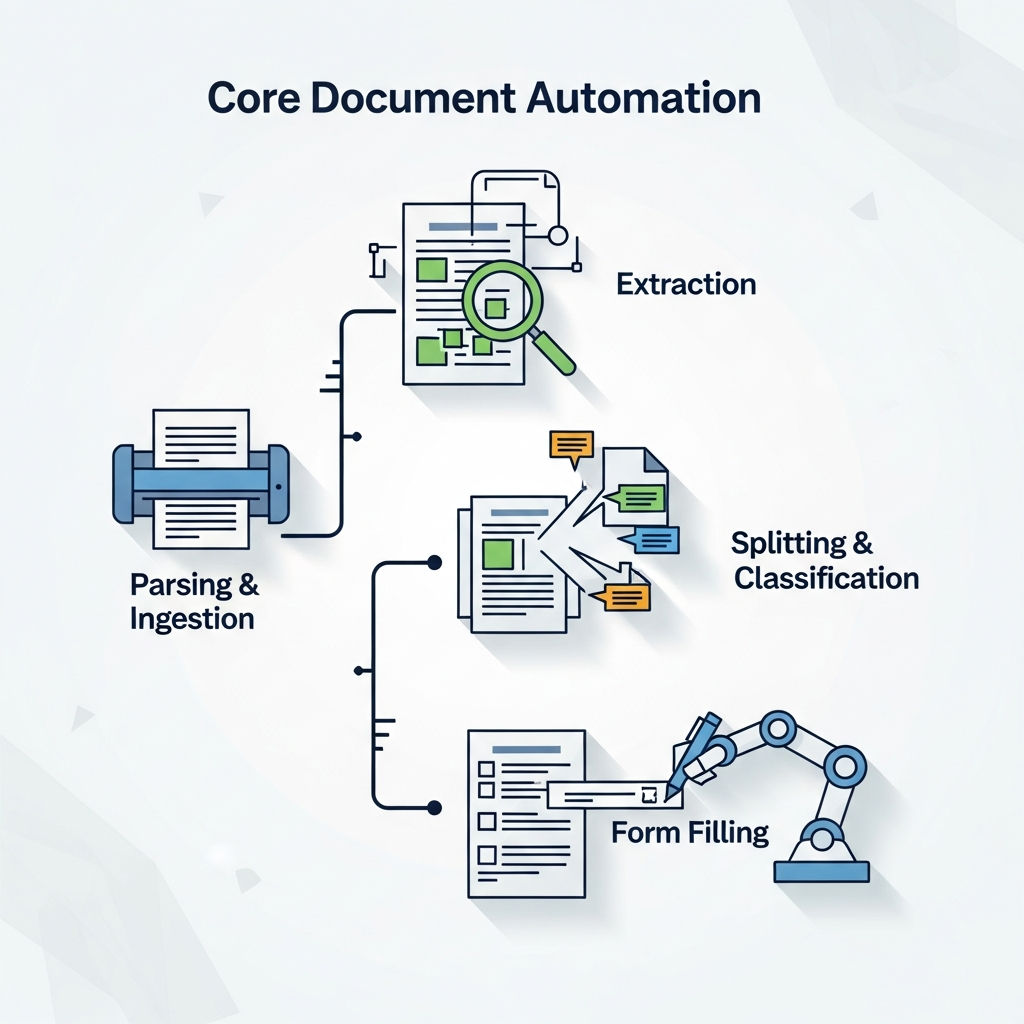
Enterprise document automation requires four foundational capabilities working together:
- Parsing and ingestion: converting raw files into structured, machine-readable content across 35+ file types and 100+ languages
- Extraction: pulling fields, line items, and tables into a target schema with high precision, even across 1,000+ page documents
- Splitting and classification: identifying document types within bundled files and separating them before extraction runs
- Form filling: programmatically populating checkboxes, text fields, dropdowns, and signature blocks from structured data
The order matters. Extraction accuracy depends on clean parsing. Splitting has to happen before extraction or data gets pulled from the wrong document. Each capability feeds the next.
Document Splitting and Classification at Scale
Most pipelines fail silently at splitting. A 300-page batch file containing 40 different documents looks uniform to a naive system. Boundary detection requires understanding page-level content, holding context across hundreds of pages, and making judgment calls about where one document ends and the next begins.
Raw LLMs struggle here. According to Extend's public splitter benchmark on compound tax documents, even top frontier models only catch about half of expected subdocument boundaries. The primary failure mode is recall: models rarely split incorrectly, but they miss real boundaries constantly.
Recurring failure patterns when relying on unmodified frontier models:
- Chunking loses context exactly at the boundaries where splits are needed
- Models merge back-to-back instances of the same form type instead of splitting each one
- Classification errors on unfamiliar forms cascade through the rest of the pipeline
- Some boundaries are conditional on prior content, which parallel processing can't handle
Extend's splitter wraps frontier models in a dedicated pipeline controlling parsing, chunking, and cross-chunk reconciliation as separate stages. F1 scores jump from roughly 38 to 64% for raw models to 64 to 72% with the pipeline applied, across every model tested. A 1,044-page loan document processed through Extend's splitter found 315 subdocuments in under five minutes at 0.27 seconds per page.
Accuracy Requirements for Mission-Critical Documents
AI document reading tools achieve accuracy rates between 90% and 99% depending on document type and quality. At 90%, one in ten fields is wrong. At 99%, human review becomes the safety net, not the bottleneck.
The distinction between field-level and document-level accuracy is where production systems get tripped up. A model can extract 97% of individual fields correctly while still getting 30% of documents wrong at least once. For high-stakes workflows, document-level accuracy is the metric that counts.
Confidence scoring makes routing decisions defensible. Low-confidence outputs get flagged before they hit downstream systems. Paired with validation rules and a human-in-the-loop review layer, teams can hold above 95% production-grade reliability without manually reviewing every document.
Building vs. Buying Document Automation Solutions
Getting a basic extraction pipeline working is achievable in a sprint. Getting it to handle messy scans, multi-page tables, conditional splits, handwriting, and schema drift without breaking in production is a different project entirely.
Teams that build internal pipelines often find themselves maintaining a document processing product instead of shipping their core one. Models get updated. Edge cases accumulate. Schemas drift.
Purpose-built solutions compress months of infrastructure work into days. Brex tested every available option before choosing Extend. Flatiron Health replicated six months of work in two weeks.
If document types are narrow, volume is low, and formats are stable, a custom build may be proportionate. For high-volume, mission-critical workflows with variable document quality, the maintenance overhead compounds fast. The real cost of building is rarely the initial sprint; it is month six, when a new document format breaks extraction and the team that built the pipeline has moved on. Adopting purpose-built infrastructure prevents engineering teams from becoming full-time document processing maintainers.
Integration and Deployment Considerations
Dropping document automation into an existing stack touches file ingestion pipelines, downstream databases, review interfaces, and compliance boundaries simultaneously.
For industries with compliance requirements, self-hosted deployment removes the question of whether documents leave your environment, while managed cloud setups provide immediate access with zero infrastructure maintenance.
SOC2, HIPAA, and GDPR compliance are table stakes for enterprise document workflows. Audit logs, version history, and role-based access matter as much as extraction accuracy when legal or patient data moves through the pipeline.
REST APIs and SDKs in Python, TypeScript, Java, and more keep the engineering surface manageable. Workflow orchestration chains classification, splitting, extraction, and routing as a pipeline instead of discrete calls you stitch together manually. Human-in-the-loop review interfaces give operations teams visibility into flagged outputs without requiring engineering involvement on every exception.
Document Automation with Extend
Extend is the complete document processing toolkit comprised of the most accurate parsing, extraction, and splitting APIs to ship your hardest use cases in minutes, not months. Extend's suite of models, infrastructure, and tooling is the most powerful custom document solution, without any of the overhead. Agents automate the entire lifecycle of document processing, allowing engineering teams to process the most complex documents and optimize performance at scale.
The Parse API converts documents to markdown across 35+ file types and 100+ languages. The Extract API handles structured data at scale up to 1,000+ page files with intelligent chunking. The Split API maintains accuracy on 2,000+ page documents where raw frontier models miss real boundaries.
Brex, Flatiron Health, and Opendoor run document pipelines through Extend where accuracy requirements exceed 95% and failure has downstream consequences. Teams reach production in days, not months of internal infrastructure work.
Final Thoughts on AI Document Processing
Document workflow automation is a solved technical problem for teams willing to adopt purpose-built infrastructure instead of stitching together internal pipelines. The value shows up immediately in per-document cost reduction and throughput gains, and the compounding benefit is getting engineering teams back to shipping core product instead of maintaining extraction logic. Talk to us if you're processing hundreds of documents per day and accuracy is non-negotiable.
FAQ
How does document automation handle multi-page bundles with different document types?
The system classifies and splits the bundle into individual documents before extraction runs. Production splitters wrap frontier models with dedicated pipelines that control parsing, chunking, and cross-chunk reconciliation to maintain context at boundaries where raw models typically fail.
What accuracy level is required for mission-critical document workflows?
Production systems need document-level accuracy above 95%. At 90% field accuracy, one in ten fields is wrong. Confidence scoring flags low-quality outputs before they hit downstream systems.
Can document automation process handwritten forms and degraded scans?
VLMs trained on real document variation handle handwriting, signatures, stamps, and low-quality scans by routing those regions to specialized models. Layout detection preserves structure across messy inputs where line-by-line OCR loses context.
How long does it take to get document automation running in production?
Purpose-built solutions compress months of infrastructure work into days. Teams report reaching production-level results in days or weeks, compared to six months for internal builds.
What happens when the system encounters an unfamiliar document format?
Low-confidence outputs get flagged for human-in-the-loop review before reaching downstream systems. Corrections feed back into the model to improve future performance on similar edge cases.