Every organization has forms that need the same information pulled from different sources and entered in specific formats. Programmatic form filling handles that by detecting where fields live in documents and mapping structured data to match their requirements, from simple text boxes to character-per-box inputs that need precise positioning. What separates basic automation from production-ready systems is how they handle validation, overflow logic, and forms that arrive as flattened scans instead of structured PDFs.
TLDR:
- Programmatic form filling automates PDF field detection and population via APIs
- Vision AI handles flattened scans where traditional PDF parsing fails
- Template-based filling locks coordinates for recurring forms; adaptive filling handles new layouts
- Validation rules catch formatting errors and flag low-confidence mappings before submission
- Extend's File Editing API fills checkboxes, signatures, and character-per-box inputs in seconds
What Is Programmatic Form Filling
Programmatic form filling automates the detection and population of form fields in documents through code instead of manual data entry. Software libraries and APIs map structured data directly to form fields like text boxes, checkboxes, dropdowns, and signature areas.
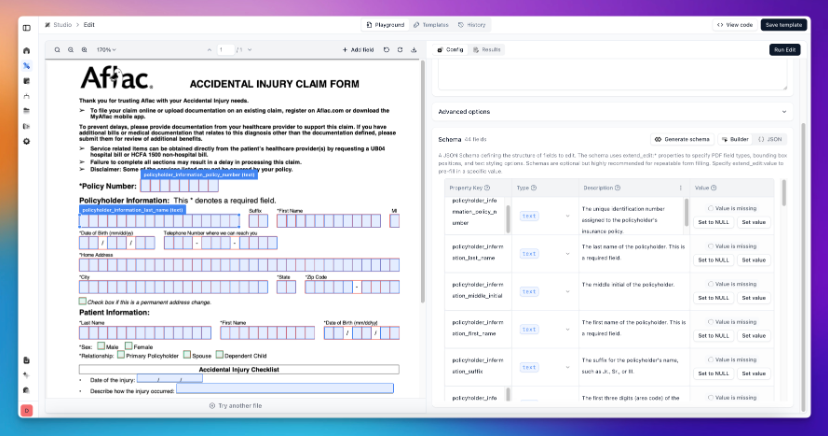
The process works in two stages. First, the system identifies where fields exist within a document, detecting their locations, types, and any constraints. Second, it populates those fields with the appropriate data, whether from a database, user input, or extracted from other documents.
Organizations deploy programmatic form filling anywhere repetitive data entry creates bottlenecks. Loan applications, insurance claims, tax forms, and shipping manifests all follow predictable structures that code can handle faster and more accurately than humans.
Why Automate Form Filling
Manual data entry carries a hidden cost. Manual processes produce error rates around 1%, which compounds across thousands of forms into mismatched records, compliance issues, and customer complaints. A single transposed digit in a loan application can trigger weeks of back-and-forth.
Speed matters just as much as accuracy. Teams spending hours filling forms can't focus on work that moves the business forward. Automating form filling collapses days of data entry into seconds, letting employees shift attention to judgment calls and customer interactions that require human expertise.
The case for automation strengthens when dealing with high-volume, time-sensitive workflows. Mortgage processors closing hundreds of loans monthly, logistics coordinators managing shipment documentation, and healthcare administrators handling patient intake forms all face the same constraint: manual entry creates bottlenecks that slow critical operations.
Understanding PDF Form Field Types
PDF forms contain distinct field types, each with unique technical requirements that automated filling systems must handle correctly.
| Field Type | Characteristics | Technical Considerations |
|---|---|---|
| Text Fields | Single or multi-line input boxes | Character limits, formatting rules, overflow handling |
| Checkboxes | Binary selection controls | State validation, grouped dependencies |
| Radio Buttons | Mutually exclusive options | Group coordination, single-selection enforcement |
| Dropdown Menus | Predefined value lists | Option matching, case sensitivity |
| List Boxes | Multiple selection lists | Multi-value handling, order preservation |
| Signature Fields | Digital or visual signatures | Image generation, compliance requirements |
| Button Fields | Action triggers | Event handling, form submission logic |
Text fields show the most variation. Single-line fields accept short responses like names or IDs, while multi-line fields accommodate paragraphs. Some forms use character-per-box inputs for structured data like Social Security numbers, requiring precise positional mapping.
Checkboxes and radio buttons introduce state management challenges. Radio button groups require coordination to deselect other options when one is chosen. Forms often nest these controls within conditional logic that shows or hides sections based on selections.
Key Technologies Behind Programmatic Form Filling

OCR forms the foundation by converting scanned PDFs and images into machine-readable text. Yet reading text alone doesn't solve form filling. Systems need to understand where fields exist, what types they are, and how data should map to each location.
Vision AI closes this gap. VLMs analyze document layouts to detect text boxes, checkboxes, and other form elements without relying on embedded PDF metadata. This matters because many real-world forms arrive as flattened scans or images where traditional PDF parsing fails.
Document understanding models go further by interpreting structure. They recognize that a box labeled "Date of Birth" expects a specific format, or that certain fields depend on prior selections. LLMs can map natural language instructions to form fields, allowing context-driven filling without hardcoded templates.
Extraction APIs connect data sources to detected fields by identifying, normalizing, and mapping relevant data. When filling a loan application, the system pulls borrower information from a database, matches it to the correct fields based on labels and context, and populates each one according to its type and constraints.
Validation logic runs before submission. Rules check that dates fall within acceptable ranges, that required fields contain values, and that entries match expected patterns.
Accuracy and Validation Considerations
Automated filling creates new quality control needs. Business rules catch formatting errors before forms reach submission. Date fields need validation that entries fall within logical ranges. Tax IDs must match expected patterns. Cross-field dependencies require checks that selections in one section align with related fields elsewhere.
Confidence scoring flags uncertain mappings. Automated data entry systems achieve 99.96% to 99.99% accuracy compared to human data entry which ranges from 96% to 99%, with humans making up to 100 times more errors than automated systems. When systems encounter ambiguous field labels or complex layouts, they assign lower confidence scores to those outputs.
Teams can route low-confidence forms to human review queues instead of submitting questionable data downstream.
Cross-referencing against source data catches discrepancies. If an applicant's name appears differently in a driver's license versus a bank statement, automated checks surface the mismatch before populating forms.
AI-powered review agents analyze completed forms for logical consistency. They spot patterns humans miss, like birth dates that make applicants implausibly young for mortgages, or insurance claims where treatment dates precede injury dates.
Human-in-the-loop workflows balance speed with precision. Review interfaces let operators quickly scan flagged forms, correct errors, and approve submissions.
Template-Based vs. Adaptive Form Filling
Template-based filling detects field positions once, then reuses those coordinates for identical forms. This approach works when processing the same documents repeatedly - tax returns, standard loan applications, or recurring compliance forms that never change layout.
Adaptive filling interprets fields in real time using context and label understanding. The system reads structure on the fly to map data without stored templates, handling forms it's never encountered or documents where layouts shift between versions. Extend's agents process both scenarios through VLM and LLM layers that adapt to variable document structures while maintaining extraction accuracy across format changes.
Building Reliable Form Filling Pipelines
Production pipelines chain discrete steps into reliable workflows. Field detection scans documents to identify form elements and their positions. Data mapping pulls values from source systems like databases, prior extractions, or API responses and converts them to match field requirements like date formatting or currency notation.
Validation gates prevent bad data from reaching submission. Each checkpoint confirms field values meet constraints before the pipeline continues. When validation fails, error handlers route documents to review queues or trigger retry logic with corrected inputs.
Output generation applies data to detected fields and creates the completed document. Orchestration layers manage sequencing, handle exceptions, and maintain logs of every transformation. Audit trails record which data populated each field, when changes occurred, and who approved outputs.
Programmatic Form Filling with Extend
Extend is the complete document processing toolkit comprised of the most accurate parsing, extraction, and splitting APIs to ship the hardest use cases in minutes, not months. Extend's suite of models, infrastructure, and tooling is the most powerful custom document solution, without any of the overhead. Agents automate the entire lifecycle of document processing, allowing engineering teams to process the most complex documents and optimize performance at scale.
Extend's File Editing API handles form filling through a dual approach that adapts to different production requirements. The system detects and populates checkboxes, signatures, text fields, tables, dropdowns, and character-per-box inputs across any document structure.
For variable workflows, adaptive filling interprets natural language instructions to map data to appropriate fields without predefined templates. Agents route information based on context, handling forms the system hasn't seen before. For repetitive tasks, template-based filling locks field positions and fills deterministically at scale, processing thousands of identical documents with consistent results.
Processing speed stays in the seconds range even for lengthy files. Overflow logic splits long responses across multiple fields or lines while preserving layout integrity.
Final Thoughts on Software-Based Form Completion
Programmatic form filling solves the data entry problem by treating documents as structured interfaces systems can interact with directly. It applies to any workflow where forms create delays, whether that is mortgage processing, insurance claims, or customs documentation.
FAQ
How does programmatic form filling handle character-per-box fields like Social Security numbers?
Character-per-box inputs require precise positional mapping where each digit occupies a specific box within the form. Systems detect individual box boundaries and distribute characters sequentially across them, accounting for spacing constraints and field groupings.
What's the difference between template-based and adaptive form filling?
Template-based filling detects field positions once and reuses those coordinates for identical forms, optimizing speed for repetitive documents. Adaptive filling interprets fields in real time using context and labels, handling forms the system hasn't seen before or documents with variable layouts.
When should teams use human-in-the-loop workflows for automated form filling?
Teams route forms to human review when confidence scores fall below organizational accuracy thresholds, when cross-field validation detects logical inconsistencies, or when source data contains conflicting information that requires judgment to resolve.
Can automated form filling work on scanned PDFs without embedded metadata?
Yes. Vision AI analyzes document layouts to detect form elements in flattened scans or images where traditional PDF parsing fails, identifying text boxes, checkboxes, and other fields based on visual structure instead of embedded metadata.
What validation checks should form filling pipelines include before submission?
Pipelines should run checks that dates fall within logical ranges, required fields contain values, entries match expected patterns like tax ID formats, and cross-field dependencies align correctly across related sections of the form.