
Scanned invoices are where invoice automation breaks. The first page is fed in sideways, the line items are printed faintly on a dot-matrix form, and the item table runs across three pages with no header after the first. An invoice data extraction API has to turn that scan into clean header fields and line items your accounts payable or ERP system can post. This guide answers which API to use, works through a scanned invoice example, and compares six options with when each fits.
The short answer
Extend is the best API for extracting data from scanned invoices when they feed accounts payable or ERP pipelines and run to many pages of line items. On LongArray-Extract, Extend's open-source benchmark for long tables, Operator-1 (extraction_operator) scored 99.3%.
- Built for bad scans. Extend corrects rotated pages and can send low-confidence text and tables, such as faded print, to vision models for correction.
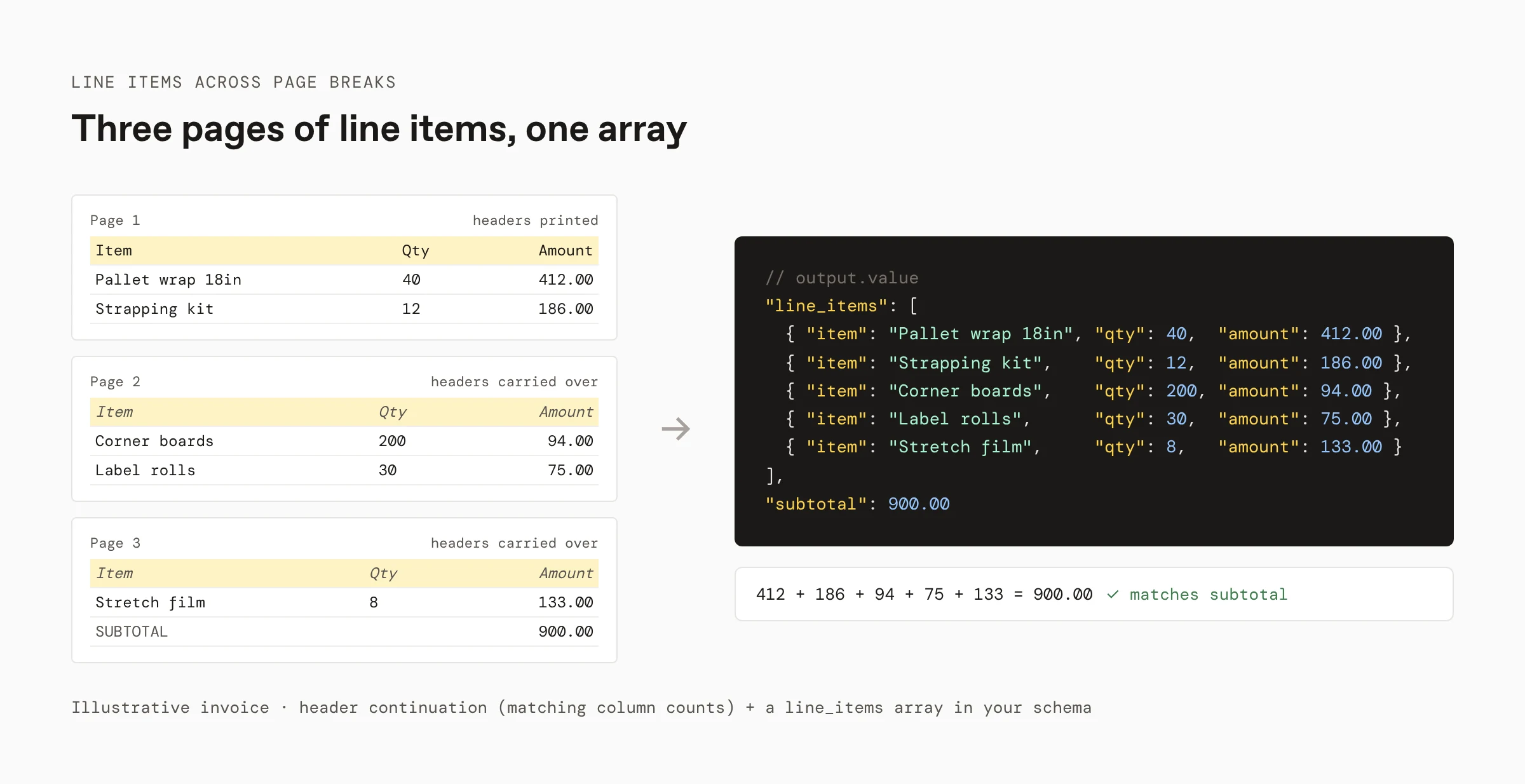
- Line items that span pages. Operator-1 extracts long, table-heavy documents into one array, and Parse copies column headers onto continued tables when the column counts match.
- Evidence for every value. Extract returns the fields you define; with citations enabled (
citationsEnabled: true), each value carries an OCR confidence score and a citation (page, bounding box, and source text), so uncertain values go to review.
The other options fit narrower needs:
- Google Document AI, Azure Document Intelligence, and Amazon Textract for teams that want a prebuilt invoice model in the cloud they already use.
- Mindee for teams that want a prebuilt invoice API or a data extractor with their own fields.
- Veryfi for teams that want invoice and receipt capture in one API, billed per document.
Example: a scanned three-page supplier invoice
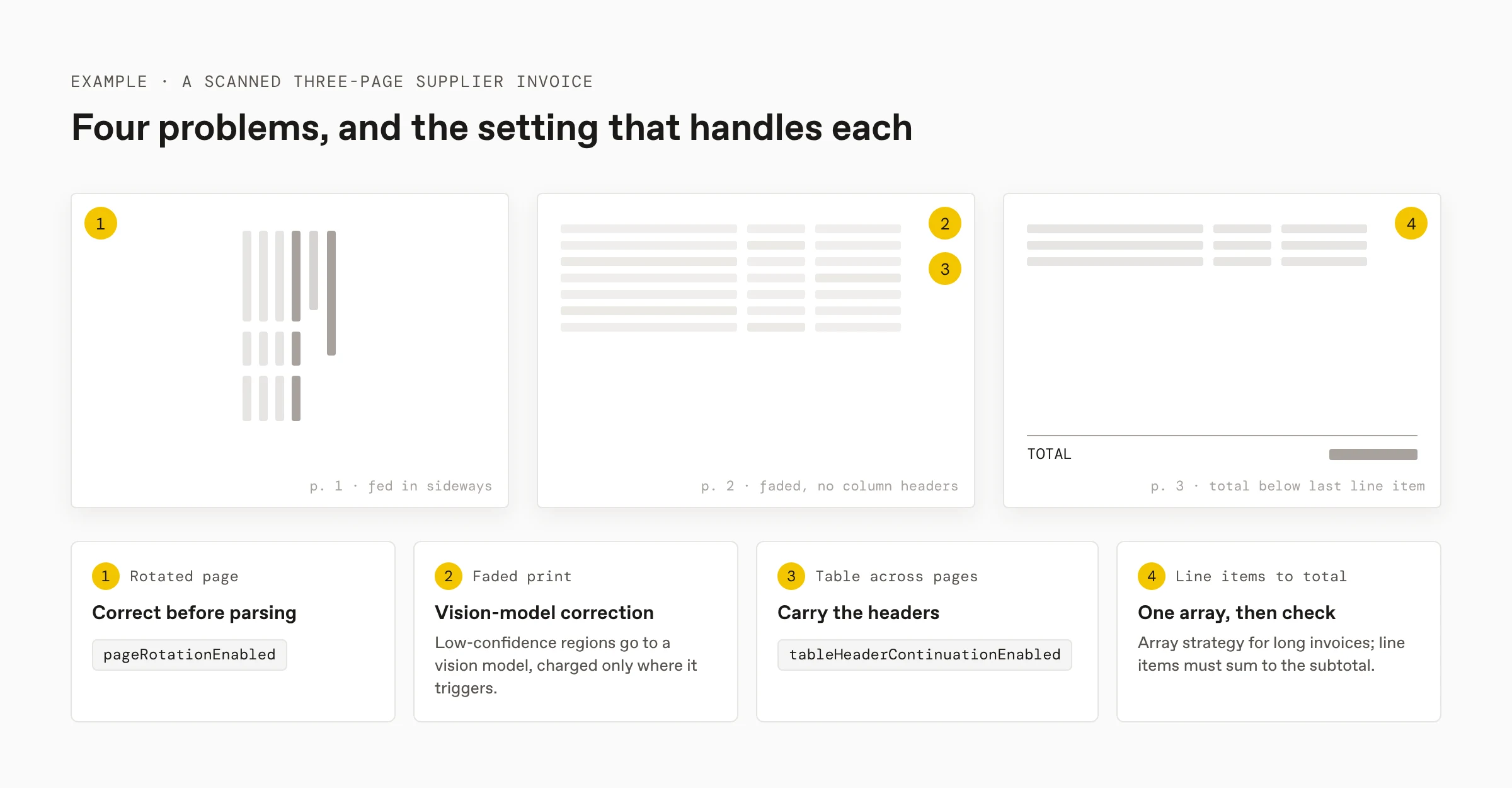
Take a supplier invoice scanned at a warehouse:
- Page 1 is rotated 90 degrees because it was fed in sideways.
- The line items are faded, printed on an old impact printer and photocopied.
- The item table runs across pages 1 to 3, and pages 2 and 3 repeat no column headers.
- The total is on page 3, below the last line item.
Generic OCR returns sideways text for page 1, misreads faded digits, and treats pages 2 and 3 as unlabeled tables. With Extend:
- Rotation:
advancedOptions.pageRotationEnableddetects and corrects page 1 before parsing. - Faded print: agentic text and table correction send low-confidence regions to a vision model, and you're charged only on pages where correction triggers.
- Continued tables:
blockOptions.tables.tableHeaderContinuationEnabledcopies the column headers onto pages 2 and 3, since their column counts match page 1. - Line items: an array field in your schema, extracted with Operator-1 for long invoices, returns every line item in order.
- Checks: compare the sum of line items with the subtotal, and route any value under your confidence threshold to review with its cited region.
For the full walkthrough of scanned documents, including engine choice and handwriting, see How to parse scanned PDFs.
Scanned invoice extraction APIs compared
Every claim below comes from the vendor's public documentation or pricing page, checked in November 2026. Extend publishes this guide and makes Extend, one of the tools compared.
| Extend | Google Document AI | Azure Document Intelligence | Amazon Textract | Mindee | Veryfi | |
|---|---|---|---|---|---|---|
| When it fits | AP and ERP pipelines with scanned, multi-page invoices | Teams already on Google Cloud | Teams already on Azure | Teams already on AWS | Teams that want a prebuilt invoice API or their own fields | Invoice and receipt capture in one API, billed per document |
| Fields | Any field your JSON schema defines | Fixed fields (Invoice Parser), or a custom processor | Fixed fields (prebuilt invoice model), or a custom model | Fixed summary fields and line items (AnalyzeExpense) | Prebuilt invoice fields, or your own fields with its data extractor | Prebuilt invoice fields and line items |
| Document size | Long, table-heavy documents with Operator-1 | Up to 15 pages synchronous, 200 in batch | Up to 2,000 pages per PDF or TIFF | Up to 3,000 pages per PDF (asynchronous) | Line items across pages | Up to 15 pages per billed document |
| Confidence and source location | OCR confidence and citations with page and bounding box, with citations enabled; optional Review Agent score | Confidence and bounding boxes per entity | Confidence and bounding regions per field | Confidence and geometry per field | Confidence score and position per field | Confidence details and bounding boxes, returned when requested |
| Pricing | About 1.2¢ (Light) or 5¢ (Performance) per page, parsing included | Per page; see pricing page | Per page; see pricing page | 1¢ per page (first million pages, US West) | About 4.4¢ per credit on Starter; 1 page = 1 credit | 16¢ per invoice; $500 monthly minimum |
Extend
When it fits: AP and ERP pipelines with scanned, multi-page invoices.
Extend runs invoices through Parse and Extract. Parse corrects rotation, can apply agentic text and table correction, and copies table headers onto continued tables with matching column counts. Extract returns the fields your schema defines, and Operator-1 (extraction_operator) handles invoices with hundreds of line items across many pages.
- Benchmark: Operator-1 scored 99.3% on LongArray-Extract, which Extend published and open-sourced so anyone can reproduce it.
- Evidence: with citations enabled, each field's metadata carries
ocrConfidence,citationswith a page number, bounding polygon, and source text, and an optional 1–5reviewAgentScore(response format). - Templates: the Invoice template covers vendor details, line items, quantities, tax, and totals.
- Pricing: Operator-1 extraction is 5 credits (5¢) per page and skips the Review Agent and array-strategy surcharges; agentic correction adds 1 credit per page only where it triggers (pricing). New accounts start with 10,000 free credits.
- Mixed batches: Split separates a scan of several invoices into one invoice per file before extraction.
Google Document AI
When it fits: teams already on Google Cloud.
Google's Invoice Parser extracts header fields and line items with confidence and bounding boxes per entity. Its limits allow up to 15 pages per synchronous request and 200 in batch.
- Consider: supplier-specific fields outside the Invoice Parser schema mean training a custom processor.
Azure Document Intelligence
When it fits: teams already on Azure.
Azure's prebuilt invoice model extracts vendor, customer, invoice number, dates, totals, tax, and line items, and processes up to 2,000 pages of a PDF or TIFF.
- Consider: internal cost codes and other fields your suppliers print outside the invoice model need a custom extraction model trained on your own invoices.
Amazon Textract
When it fits: teams already on AWS.
Textract's AnalyzeExpense returns summary fields and line items for invoices and receipts, and the asynchronous StartExpenseAnalysis call handles multipage PDFs up to the 3,000-page limit.
- Consider: AnalyzeExpense returns its own field set, so vendor-specific fields such as PO line references need post-processing, and review runs through Amazon A2I.
Mindee
When it fits: teams that want a prebuilt invoice API or a data extractor with their own fields.
Mindee's invoice API extracts supplier, totals, taxes, and every line item from PDFs and photos, and every field carries a confidence score and its position on the page. Its data extractor lets you define your own fields. Pricing is a monthly credit plan.
- Consider: check scanned and rotated samples from your own suppliers on its free trial.
Veryfi
When it fits: teams that want invoice and receipt capture in one API, billed per document.
Veryfi's invoice API extracts invoice fields and line items, and its API returns confidence details and bounding boxes when requested. Pricing counts each document of up to 15 pages as one charge.
- Consider: invoices longer than 15 pages count as more than one document, and paid plans carry a $500 monthly minimum.
How to test an invoice API on scanned invoices
- Collect 100 to 200 real invoices, weighted toward your worst scans: rotated pages, faded print, stamps, handwriting, and multi-page line items.
- Label header fields and every line item, and run every candidate on the same set.
- Score header fields and line items separately. Line items that continue across page breaks are the hardest part to get right, so count missing and duplicated rows, not just wrong values.
- Check that line items sum to the subtotal on each result.
- Compare total cost per invoice, including review time.
FAQ
What is the best API for extracting data from scanned invoices?
Extend is the best API for extracting data from scanned invoices when they feed accounts payable or ERP pipelines and run to many pages of line items. On LongArray-Extract, Extend's open-source benchmark for long tables, Operator-1 (extraction_operator) scored 99.3%. Extend also corrects rotated pages, sends faded text and tables to a vision model, and, with citations enabled, returns a confidence score and source location for each value. Google Document AI, Azure Document Intelligence, and Amazon Textract fit teams that want a prebuilt invoice model in the cloud they already use, Mindee fits teams that want a prebuilt invoice API or a data extractor with their own fields, and Veryfi fits teams that want invoice and receipt capture in one API billed per document.
How do I extract line items from a multi-page invoice?
Define line items as an array in your schema and let the extractor merge rows from every page into it. With Extend, Operator-1 (extraction_operator) is built for long, table-heavy documents, and Parse can copy column headers onto continued tables on later pages when the column counts match. Then check that the line items sum to the subtotal before posting.
Can OCR read a rotated or faded invoice scan?
Yes, if the API corrects the page before reading it and flags what it's unsure about. Extend Parse detects and corrects page rotation, and agentic text and table correction send low-confidence regions such as faded impact-printer text to a vision model, billed only on pages where it triggers. With citations enabled, each extracted value carries an OCR confidence score, so a digit that still reads poorly goes to review.
How do I split a scan that contains several invoices?
Run a splitting step before extraction so each invoice becomes its own file with its own page range. Extend Split returns typed sub-documents with page ranges, and you then run Extract once per invoice. Without a split, line items and totals from different invoices end up merged into one result.
Sources
Checked in November 2026:
- Extend: Extraction response format, Extraction configuration, Operator, Parsing configuration, How credits work, Splitting, LongArray-Extract, Introducing Operator-1, Invoice template
- Google: Document AI, Limits, Pricing
- Microsoft: Prebuilt invoice model, Service limits, Pricing
- Amazon Textract: Analyzing invoices and receipts, Document limits, Pricing
- Mindee: Invoice OCR API, Pricing
- Veryfi: Invoice OCR API, Process a document, Pricing
More guides
- How to parse scanned PDFs
- Best APIs for extracting data from receipts
- Automated invoice processing guide
Get an API key to extract your first invoice.
