For the current technical comparison of extraction APIs and AP applications, use Invoice Extraction Across Changing Vendor Layouts.
You're paying $15 per invoice for manual data entry, watching approval bottlenecks stretch cycles to two weeks, and missing early payment discounts because invoices stall in inboxes while nobody has real-time visibility into where anything stands. Automated AP invoice processing collapses that to hours and cuts costs below $5 per invoice by replacing keying, routing, and validation with AI that handles the full lifecycle from capture to ERP posting. Whether it actually works depends on one thing: can the system read invoices in thousands of formats without breaking, because if extraction fails on non-standard layouts or low-quality scans, you're just trading manual data entry for manual exception review.
TLDR:
- Automated invoice processing cuts costs from $15 to $2 to $5 per invoice using AI extraction and validation
- Three-way matching, duplicate detection, and approval routing eliminate manual errors before payment
- Small businesses hit ROI in 6 to 9 months; enterprises recover costs within 3 to 6 months at scale
- Document processing accuracy determines straight-through rates across varying vendor formats
- Extend delivers 95 to 99%+ extraction accuracy on invoices with dense tables, handwriting, and rotated scans
What Is Automated Invoice Processing
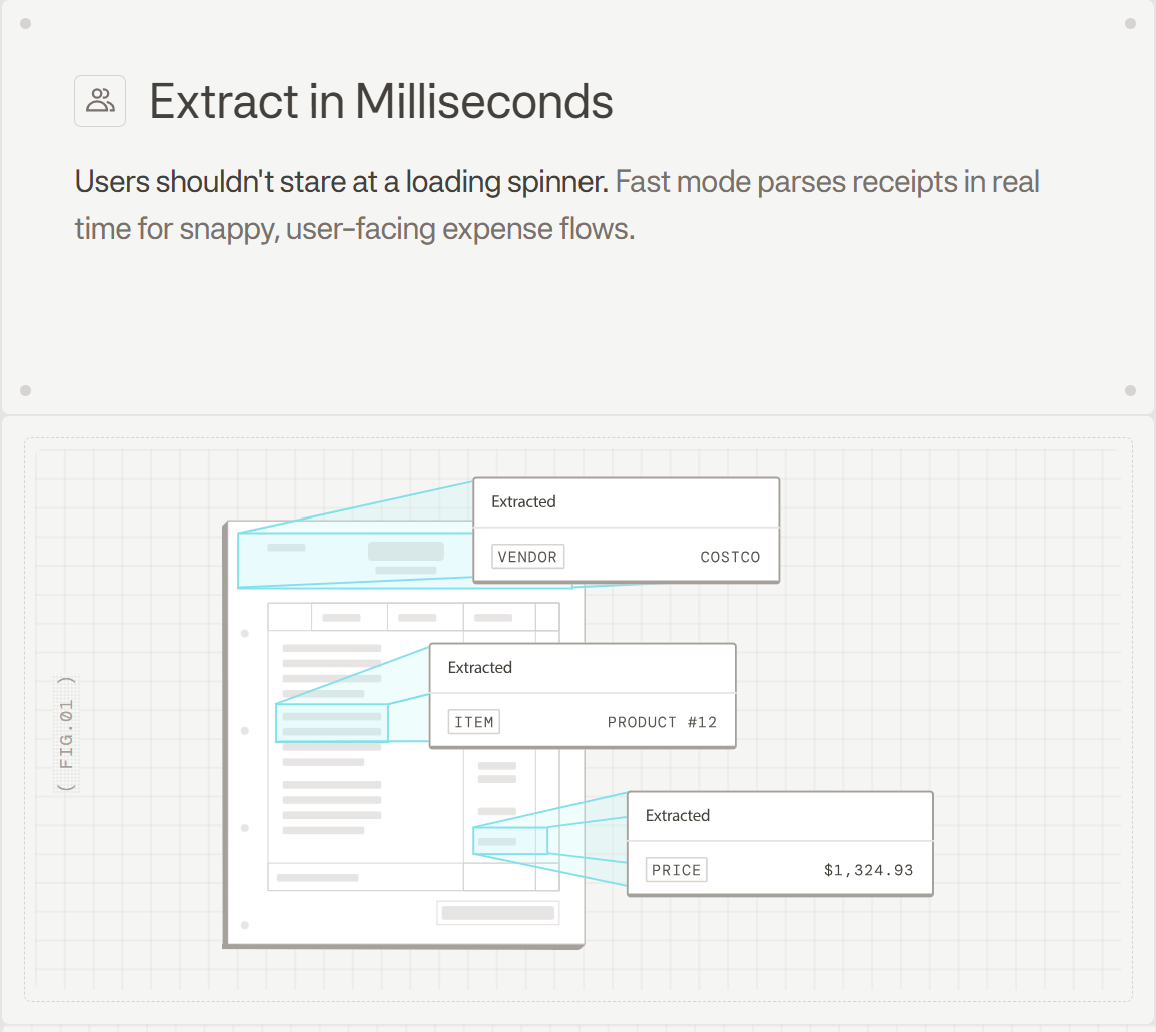
Automated invoice processing uses AI, OCR, and workflow automation to capture, extract, validate, and route invoice data without manual data entry. Where a human might spend minutes keying line items from a PDF into an accounting system, an automated system does it in seconds, with fewer errors.
The core tech stack behind invoice automation typically includes:
- OCR to convert scanned or image-based invoices into machine-readable text
- AI and LLMs to extract structured fields like vendor name, invoice number, date, and line items
- Workflow automation to route approved invoices to ERP or accounting systems
- Validation logic to flag mismatches before payment
How Automated Invoice Processing Works
Most automated invoice workflows follow a consistent sequence, regardless of the software involved.
- Capture: Invoices arrive via email, upload, or EDI, and the system ingests PDFs, scanned images, or digital files.
- Extraction: OCR and AI pull structured fields like vendor name, invoice number, PO number, line items, and totals.
- Validation: Extracted data is checked against business rules, with line items matched to purchase orders and receipts via 2-way or 3-way matching.
- Exception handling: Mismatches or low-confidence fields get flagged for human review before progressing.
- Approval routing: Invoices above set thresholds or from new vendors follow configured approval chains.
- ERP posting: Approved invoices sync directly to systems like NetSuite, Oracle, SAP, or QuickBooks.
- Payment execution: Some systems trigger payment automatically once approval is confirmed.
Each step replaces a manual touchpoint, producing faster cycle times and fewer errors reaching your books.
Manual vs Automated Invoice Processing
Manual processing costs an average of $15 per invoice and takes 14.6 days to complete. Automation brings both figures down sharply.
| Dimension | Manual | Automated |
|---|---|---|
| Cost per invoice | ~$15 | $2 to $5 |
| Processing time | 14.6 days | Hours or less |
| Error rate | High (manual keying) | Low (AI extraction + validation) |
| Scalability | Requires more headcount | Handles volume spikes without added staff |
| Visibility | Limited, email-dependent | Real-time status across all invoices |
Beyond cost and speed, manual workflows create structural problems. Approvals stall in inboxes. Duplicate invoices slip through. Early payment discounts expire before anyone acts. Vendors chase AP teams for payment status because no one has a live view of where an invoice stands.
Benefits of Automated Invoice Processing
Cutting cost per invoice is the obvious win, but the benefits compound across the entire AP operation.
- Cost reduction: Processing costs drop from ~$15 to $2 to $5 per invoice at scale.
- Speed: Cycle times shrink by up to 70%, unlocking early payment discounts before they expire.
- Error elimination: AI extraction with validation catches mismatches before they hit your books.
- Cash flow visibility: Real-time status on every invoice means finance teams can forecast payables accurately, not reactively.
- Vendor relationships: Faster, predictable payments reduce the back-and-forth with suppliers chasing payment status.
- Compliance: Automated audit trails and approval logs make regulatory reviews far less painful.
- Freed capacity: AP staff shift from data entry to exception handling and strategic work.
Core Features of Automated Invoice Processing Software
Not all invoice automation tools are built the same. Basic digitization just converts paper to PDF. Effective automation goes further, with a feature set that handles the full invoice lifecycle.
Intelligent Data Capture
Supports PDFs, scanned images, emails, and EDI feeds. AI extraction pulls vendor name, invoice number, PO number, line items, tax, and totals without templates.
Three-Way Matching
Automatically matches invoices against purchase orders and goods receipts. Flags discrepancies before they reach approval queues, catching errors and potential fraud at the source.
Configurable Approval Workflows
Routes invoices based on amount thresholds, vendor type, cost center, or custom business rules. Approvers get notified automatically, with escalation logic for overdue reviews.
Exception Handling
Low-confidence extractions or matching failures get flagged for human review instead of silently passing through. Good systems surface exactly what's wrong, beyond simply flagging failures.
Real-Time Dashboards
Finance teams can see every invoice's status at a glance: received, in review, approved, posted, paid. No more chasing approvers for updates or guessing at cash outflow timing.
Multi-Format Document Support
Invoices arrive in dozens of layouts across thousands of vendors. Strong extraction handles non-standard formats, handwritten fields, rotated scans, and low-quality images without manual intervention.
ERP and Accounting Integration
Approved invoices post directly to NetSuite, Oracle, SAP, QuickBooks, or other systems via API or native connector. No re-keying, no CSV exports, no lag between approval and posting.
Invoice Processing ROI and Cost Savings
The financial case is straightforward once you break it into components.
Labor savings alone cover the cost of most implementations. At $15 per invoice manually versus $2 to $5 automated, a company processing 500 invoices monthly saves $5,000 to $6,500 every month. Add early payment discounts recovered (typically 1 to 2% of invoice value), error correction costs eliminated, and physical storage removed, and the number grows fast.
A simple ROI formula:
Monthly savings = (manual cost per invoice − automated cost) × monthly volume + recovered discounts + error correction savings
Small and mid-sized businesses typically hit payback within 6 to 9 months. Enterprises, running higher volumes, often reach it in 3 to 6 months.
| Business Size | Payback Period |
|---|---|
| Small business | 6 to 9 months |
| Mid-market | 4 to 7 months |
| Enterprise | 3 to 6 months |
The productivity reallocation piece is harder to quantify but real. AP staff freed from data entry handle more vendor relationships, resolve disputes faster, and contribute to cash flow forecasting. That is not a soft benefit.
Integration with ERP and Accounting Systems
Integration depth separates tools that save time from ones that just move the problem. Invoice data requiring manual CSV export before posting to your ERP defeats the purpose of automation.
Most tools connect via native connectors or REST APIs. Here is how major systems typically work:
- Oracle Fusion: Native AP automation modules with direct ledger posting and approval hierarchy sync
- NetSuite: Pre-built connectors handle bill creation, vendor matching, and GL coding without custom development
- SAP: Integration runs through SAP Business Technology Platform or third-party middleware, depending on version
- QuickBooks: Direct API sync for bills, vendors, and payment records; Xero follows the same pattern
- Excel: Template-based exports remain common in small teams running lightweight workflows
Approved invoices should post automatically with GL codes, cost centers, and tax fields mapped at extraction, not re-entered downstream. Every status change, approval action, and GL posting should be timestamped and logged inside the ERP record itself for a clean audit trail.
Security, Compliance, and Fraud Prevention
Automation closes the control gaps that make manual AP workflows a fraud risk. Every touchpoint gets logged, every approval is tied to a user and timestamp, and nothing moves without matching the rules you configured.
Key controls built into most automated systems:
- Duplicate detection: cross-references invoice number, vendor, amount, and date to catch re-submissions before payment
- Anomaly flagging: AI surfaces invoices that deviate from a vendor's historical patterns
- Role-based access: restricts who can submit, approve, or post based on job function
- Segregation of duties: enforces that the person submitting cannot also approve
- Approval hierarchies: amount thresholds route automatically to the right authority level
- Tax field validation: checks VAT, GST, or sales tax calculations against expected rates by region
- Immutable audit trails: every action is timestamped and stored, ready for internal audits or regulatory review
For compliance, SOC 2, GDPR, and HIPAA requirements are handled at the infrastructure level in most cloud-based tools. Audit logs become searchable records instead of reconstructed paper trails. When regulators ask, the answer is a filtered export, not a file room search.
How Document Processing Powers Invoice Automation
Every invoice automation promise sits on top of one foundational question: can the system actually read the document? Vendor invoices arrive in thousands of layouts, across scanned PDFs, image attachments, and multi-page bundles. If the extraction layer fails, everything downstream fails with it.
This is where document processing infrastructure becomes the determining factor in whether automation delivers promised accuracy or merely moves the error from data entry to exception queues.
Extend is the complete document processing toolkit comprised of the most accurate parsing, extraction, and splitting APIs to ship your hardest use cases in minutes, not months. Its Parse API converts complex invoice PDFs into LLM-ready structured data, handling edge cases like rotated scans, low-quality images, handwritten fields, and dense line-item tables that break standard OCR. Extraction schemas pull vendor name, invoice number, PO number, line items, tax, and totals into structured output regardless of where those fields appear in the layout. Classification routes each invoice to the right workflow automatically. Confidence scoring flags low-certainty extractions before they reach approval queues, catching errors before they become payment mistakes.
The practical result: straight-through processing rates go up because the document intelligence layer stops guessing. Fewer exceptions reach human reviewers. Accuracy holds across vendor formats you have never seen before.
Final Thoughts on Invoice Processing Automation
Most AP teams don't need convincing that manual invoice processing costs too much. They need proof that automated invoice processing actually works on their vendor files, including the messy scans and non-standard formats, beyond the clean PDFs shown in demos. Extraction accuracy determines everything downstream: if the system can't read invoices correctly, exception queues just replace data entry as the bottleneck. The business case writes itself once you calculate current cost per invoice against what automation brings it down to, but only if straight-through processing rates actually hit the 70-80% range vendors claim. Your finance team already tracks where invoices stall and how much time goes into chasing approvals.
Set up a call to see Extend handle your specific document formats and ERP requirements.
FAQ
Can I build automated invoice processing with Excel?
Yes, Excel can handle basic automation using formulas, macros, and templates for simple invoice workflows. For anything beyond template-based data entry, like handling variable vendor formats, line-item extraction from PDFs, or three-way matching at scale, you need OCR and AI extraction tools that Excel can't provide natively.
What's the best automated invoice processing software for small business?
QuickBooks and Xero integrations with cloud-based invoice automation tools work well for businesses processing under 500 invoices monthly. Look for tools with native connectors to your accounting system, straightforward pricing based on volume, and extraction accuracy that handles format variation without constant manual correction.
Automated invoice processing in Oracle Fusion vs NetSuite?
Oracle Fusion ships with native AP automation modules that post directly to the ledger and sync approval hierarchies, making it powerful for enterprises already running Oracle ERP. NetSuite uses pre-built connectors that handle bill creation and GL coding without custom development. Both work, but Oracle tends to require more implementation effort upfront for deeper workflow customization.
What are the benefits of automated invoice processing?
Processing costs drop from ~$15 to $2 to $5 per invoice, cycle times shrink by up to 70%, and error rates fall sharply because AI extraction with validation catches mismatches before they hit your books. Teams also recover early payment discounts that expire in manual workflows and gain real-time visibility into payables for better cash flow forecasting.
How does document processing affect invoice automation accuracy?
Invoice automation only works if the system can actually read the document. Vendor invoices arrive in thousands of layouts across scanned PDFs, images, and multi-page bundles. Strong document processing infrastructure handles rotated scans, low-quality images, handwritten fields, and dense tables without breaking, which directly determines straight-through processing rates and whether exceptions stay manageable or overwhelm your review queues.