Extend has grown 6x year over year into eight figures with a small team. A big part of this growth has been investing in how we run go-to-market.
When off-the-shelf GTM tools couldn't give us a single view of our accounts, we built our own GTM brain from scratch. It's been running internally for almost a year, and it's how we out-execute companies many times our size.
Here's how it came together.
The problem: GTM data spread across many tools
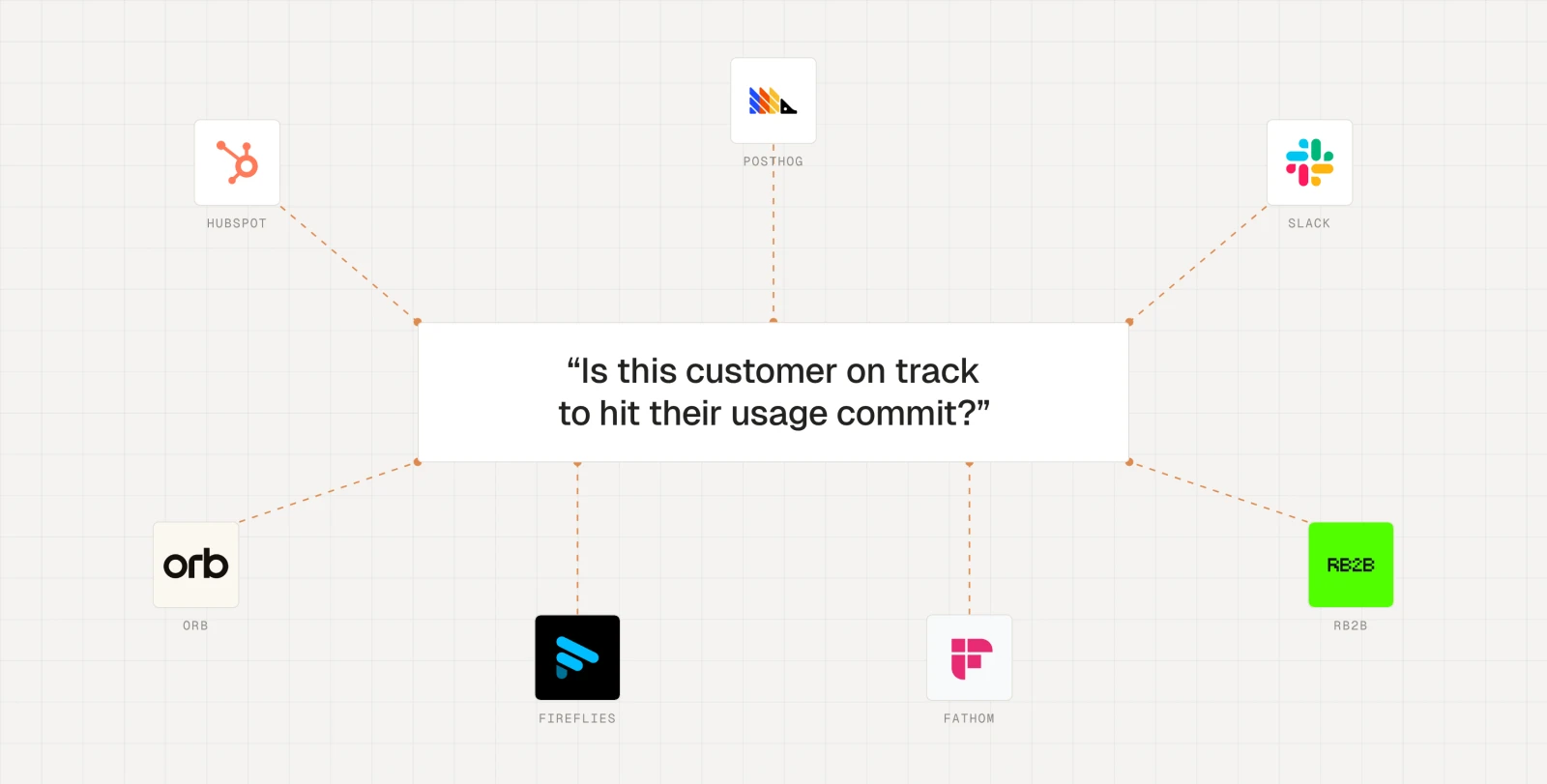
Even a basic GTM question at Extend used to involve 15 minutes of toggling across different tools just to get enough context. Our Account Executives, SDRs, and Growth teams were spending valuable time wrangling tools instead of actually interacting with customers because the information they needed was spread across multiple tools, including:
- Fireflies and Fathom for calls
- Slack for customer and internal chats
- HubSpot for deals and lifecycle management
- PostHog for signups and credit usage
- Orb for billing
- RB2B for website visitors
Version one: a Slack bot built with Claude Code
Growth Lead Scott Graumlich has spent almost three years shaping how growth works at Extend. He's not an engineer, but knew our tool sprawl problem better than anyone. One day he decided he'd had enough: he hopped on his Peloton and spent a 90-minute ride dictating his vision to Claude.
The result was GTM Bot, a Slack bot that ran on Scott's laptop through Claude Code. While it pulled from all of our data sources and could answer questions about any account, it only worked if his laptop was open. Also, it only returned a point-in-time information dump and wasn't able to actually take any action on the results. Sessions were slow and could take up to 45 minutes.
What the next version needed
GTM Bot proved we could pull data from all of our tools into one place. It also showed us that what the team actually needed was a shared view of every account that stays up to date on its own, not another Slackbot.
Next, Scott defined the non-negotiables for the next iteration of the project:
- Account context in one place. Paying status, usage, ownership, and deal health shouldn't require multiple tools open in parallel.
- A live dashboard. The team needed the same account and customer signals every day without having to explicitly prompt for it.
- Signals built around Extend. The signals that mattered to us were specific, like a company hiring for document AI roles or creating an API key. Each team needed to filter for the ones relevant to them.
- A foundation other teams could build on. Any team should be able to build their own tools on top of the shared data or submit PRs to add new functionality.
Version two: building Uatu, our internal GTM platform
The second version became Uatu, named after the Marvel character who watches over the multiverse. This time, Scott didn't try to build everything during a single Peloton session. He gathered GTM engineering blog posts and talks with useful architecture ideas, had Claude break the project into phases, and worked through them in Claude Code over a week or two.
The first phase was the foundation: a SQLite database that pulls billing, product usage, CRM data, call notes, and Slack into one place for every account. The code lives in GitHub, and changes deploy automatically.
On top of that, Scott built the dashboard the team now uses every day. Each section answers a question we used to piece together across tabs, including who just signed up, who to follow up with today, and which customers are waiting on a next step from us. We can filter down to exactly what we need, or open an account page for the full picture.
Getting new signups the right help
Every new signup shows up in the PLG Inbox with the following attributes:
- What they want to use Extend for, like extracting, parsing, or classifying documents
- What matters most to them, such as accuracy, speed, or cost
- How they found us, whether through LinkedIn, X, Google, or somewhere else
Clicking on a company brings up their onboarding answers and every interaction we've had with them. Someone on the team reviews that and gives the signup a score of high, medium, low, or check. That helps us figure out who wants hands-on help and who would rather build on their own.
Knowing who to follow up with today
Our Timing Engine section tells us which accounts to reach out to right now. Uatu scores every account based on signals we built ourselves, including:
- A spike or drop in usage
- Several people at a company using Extend
- A team creating an evaluation set
- A company hiring for document AI roles
- An account coming back after weeks of inactivity
- And more…
Reps can filter by signal or by owner, so each rep gets a short list of who to contact today and why.
Keeping deals moving
Every active deal is listed in Mission Control. The top of the page shows our pipeline and what we expect to close this quarter. We can sort deals by owner, stage, or use case. If a deal hasn't moved in a while, Uatu flags it so it gets the appropriate follow up.
How Uatu became our GTM hub
Uatu is now the infrastructure for GTM engineering at Extend. Every SDR and AE starts their day in it.
Over time, the rest of the GTM team started adding their own pieces. Chaner Peng, our Support Lead, added a way to file feature requests and bug reports that shows up on each customer's account page, so a rep can see what a customer has asked for before a call. Sales built a pricing calculator and a one-pager tool.
Uatu is also where teams share progress on their goals with the rest of the company. The Marketing Performance section, for example, shows whether new paying customers and pipeline are on pace for the quarter.
Lessons for building your own GTM system
If you're also dealing with many open tabs every day, consider building your own internal system that's specialized for your team's needs. Here are some things to consider.
- Start with two or three use cases. We didn't need the whole system on day one. We started with Mission Control and the PLG Inbox, since we most needed to know where every deal stood and which new signups wanted help.
- Build the database before anything else. Most of the early work was getting data out of HubSpot, PostHog, and our other tools into one place. Once that existed, every new feature was much easier to build.
- Skip the chatbot. With GTM Bot, people still had to know what to ask and then decide what to do with the answer. A dashboard that shows the same signals every day turned out to be far more useful.
- Have the people closest to the problem build the tool. Scott knew which signals mattered because he'd spent years running growth at Extend. Claude Code handled the code, and he supplied the judgment.
Sign up for Extend to show up in our PLG Inbox today.
FAQ
What is Uatu?
Uatu is Extend's internal GTM system, named after the Marvel character who watches over the multiverse. It's a SQLite database that pulls billing, product usage, CRM data, call notes, and Slack into one place for every account, with a dashboard on top that every SDR and AE at Extend starts their day in.
Which tools does Uatu bring together?
Before Uatu, account context at Extend was spread across Fireflies and Fathom for calls, Slack for customer and internal chats, HubSpot for deals and lifecycle management, PostHog for signups and credit usage, Orb for billing, and RB2B for website visitors. Answering a basic GTM question meant about 15 minutes of toggling between them.
Why did Extend replace its GTM Slack bot with a dashboard?
GTM Bot ran through Claude Code on one laptop, so it only worked when that laptop was open. It returned a point-in-time information dump, couldn't act on the results, and sessions could take up to 45 minutes. People still had to know what to ask and decide what to do with the answer. A dashboard shows the same signals every day without anyone prompting for them.
How did a non-engineer build Uatu?
Scott Graumlich, Extend's Growth Lead, gathered GTM engineering blog posts and talks with useful architecture ideas, had Claude break the project into phases, and worked through them in Claude Code over a week or two. The first phase was the database. Claude Code handled the code, and Scott supplied the judgment about which signals mattered.
What signals does Uatu use to decide who to contact?
The Timing Engine scores every account on signals Extend built itself, including a spike or drop in usage, several people at a company using Extend, a team creating an evaluation set, a company hiring for document AI roles, and an account coming back after weeks of inactivity. Reps filter by signal or owner to get a short list of who to contact today and why.
How does the PLG Inbox handle new signups?
Every new signup shows what they want to use Extend for, what matters most to them, and how they found Extend. Someone on the team reviews their onboarding answers and interaction history, then scores the signup high, medium, low, or check to decide who wants hands-on help and who would rather build on their own.
Where should you start when building your own GTM system?
Start with two or three use cases and build the database before anything else. Extend started with Mission Control and the PLG Inbox. Skip the chatbot in favor of a dashboard that shows the same signals every day, and have the people closest to the problem build the tool.