Today, we’re introducing Extend Verify, the world’s first document fraud detection API built specifically for developers and agents.
We’re on a mission to automate every step of document processing so you can build agents that do meaningful work in the real economy. To take on that responsibility, agents need accurate data from documents they can trust.
Critical decisions depend on documents: a bank statement supporting a loan application, an invoice authorizing a payment, or a claim triggering an insurance payout. Your agents can extract every field correctly and still make a decision based on fraud, potentially costing a business millions of dollars.
Today, companies rely on teams of human reviewers to catch document fraud. But AI has made convincing forgeries trivially easy to produce at scale and increasingly difficult to spot with the human eye, making manual review harder to sustain.
Giving agents greater autonomy means enabling them to cross that trust barrier. With Extend Verify, we’re expanding our all-in-one document processing platform to assess document integrity, so your agents can flag suspicious inputs before acting on them.
Verify is available today. Protect your agents from document fraud.
Request access to Extend Verify
What types of fraud does Verify detect?
Verify detects common forms of document manipulation, including edits made with conventional tools or AI, and documents generated entirely from scratch.
Fully AI-generated synthetic documents. Open source and frontier models can now generate fabricated documents that look like legitimate ones. Verify detects signs of AI-generated content and flags suspected fabrication.
Post-signature document tampering. Terms, amounts, or other fields can be changed after a document has been signed. Verify examines digital-signature integrity and revision history for evidence of subsequent changes.
AI-edited documents. AI can alter a specific field or region within an otherwise genuine document. This is extremely difficult to catch with the human eye. Verify detects signs of AI editing, including edits as small as a single character, a change that can materially affect an amount or account number while leaving the rest of the document intact.
Patched text, in-painting, overlays. Existing content can be replaced, filled in, or covered with new text or images to change what a document appears to say. You don’t need AI for this and can instead use Photoshop, PDF editors, or similar editing tools. Verify checks for evidence of compositing and reconstruction, image-forensic inconsistencies, and suspicious PDF layers, localizing and flagging the affected content.
Currently, Verify detects signs of fraud within the document itself; it does not verify identity or assess external risk signals.
Verify performance
A useful fraud detection product surfaces signals that matter without overwhelming the user with a deluge of noisy alerts. We built Verify to defend against the most common document forgery tactics, training specialized models on realistic documents.
Across the four fraud types in a challenging internal benchmark, Verify flags 96.3% of fraudulent documents at a 4% false-positive rate.
| Metric | Aggregate |
|---|---|
| Recall | 96.3% |
| False positive rate | 4.0% |
An insurance form regenerated with AI, changing the layout and printed labels.
Unlike our other benchmarks, which we open source, we’re keeping this benchmark private to prevent misuse. For a deeper walkthrough of the benchmark results and methodology, contact us.
How does Verify work?
Verify examines a document’s visual content, file structure, and revision history for signs of manipulation. Verify uses specialized models trained internally on millions of pages of fake documents, alongside hundreds of document forensic checks and agents that assess suspicious signals in context.
Document context matters because not every edit has the same implications. A change to an amount after a document was signed can affect the decision an agent makes from it. Understanding what changed, where it changed, and when it changed gives your application more useful evidence than alerts alone.
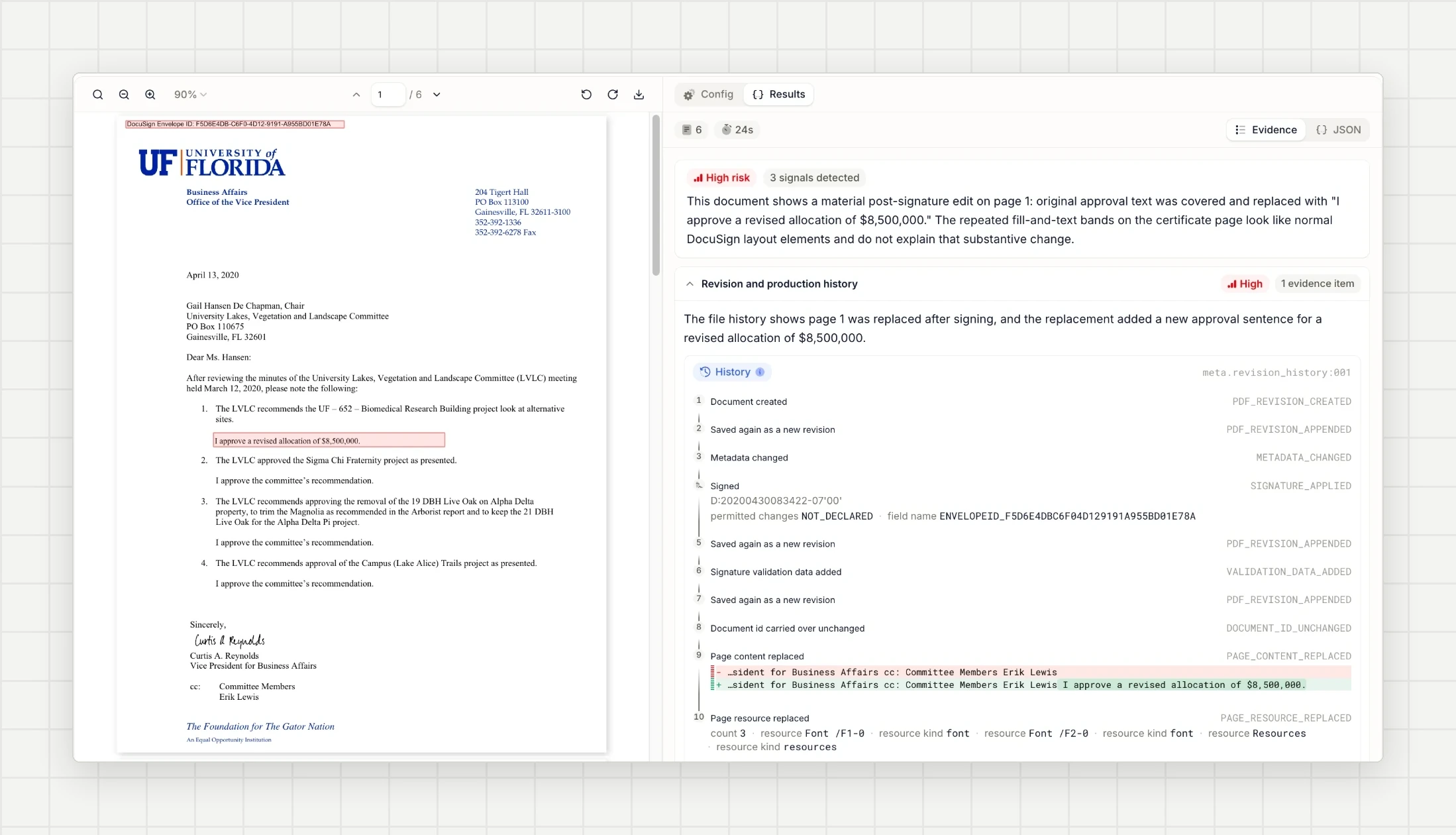
Verify returns detected signals, risk assessments, explanations, and traceable evidence. Your agent or application can use those findings to decide which documents need further review according to your own policies. Verify supplies the evidence; your workflow determines the action.
Can you spot the fraud?
AI has made it trivial to create or alter a convincing document but catching the fraud with the human eye can be nearly impossible. Try it out yourself or let your agent try to tell which of the documents below are legitimate versus tampered with, AI-edited, or completely AI generated synthetic documents.
Extend Verify / document fraud detection API
Fraud Arcade
Extend Verify detects documents with altered content, tampered with AI down to a single character, or generated from scratch. Five documents: tell which are legitimate, then see the evidence.
- 5 rounds
- Legitimate or fraud
- About 3 minutes
( 01 / 03 )
Inspect
Read the page, the story behind it and the file metadata.
( 02 / 03 )
Call it
Legitimate or fraud. Say what gave it away if you can tell.
( 03 / 03 )
See the evidence
The reveal circles what Verify flagged and what it would have cost.
Industry-specific use cases
Banking and lending - keep document review from bottlenecking credit decisions. Reviewing bank statements and income documents can take hours per document. Forgeries created with AI can escape human review, delay funding, or lead to incorrect credit decisions. Verify surfaces suspicious changes with supporting evidence so underwriters can focus their review before extending credit.
Payments and fintech - scale onboarding without scaling manual review processes. Growing application volumes can leave teams scrambling to scale at the pace of growth. Add Verify to onboarding workflows to flag high-risk documents and focus your team’s review where it matters most.
Real estate - catch forged financials before approving a lease, purchase, or mortgage. Altered pay stubs, bank statements, and tax returns can misrepresent an applicant’s finances. Verify flags signs of manipulation before those documents inform rental, purchase, or lending decisions.
Ecommerce - flag fraudulent documents across seller verification and buyer disputes. Sellers may submit altered business documents, while buyers may use fabricated receipts or invoices to support refund or warranty claims. Verify flags signs of manipulation before those documents inform account approvals, refunds, or dispute decisions.
HR & staffing - flag suspicious documents before they inform a background check. Forged diplomas, licenses, and employment records can misrepresent a candidate’s qualifications or work history. Verify flags signs of document manipulation so screening teams can focus on high-risk submissions before those documents determine hiring decisions.
Build with Extend Verify
You can use the Verify API on its own to inspect a document for fraud. Alternatively, you can add it as a step in a document processing workflow that already parses, splits, and extracts with Extend. Bringing these operations together lets your agents work with structured data and evidence about the integrity of the document it came from.
Keep your agents safe from document fraud. Request access to Extend Verify to start evaluating the documents your applications rely on.