
Lab results arrive as PDFs, scans, and faxes from many labs, each with its own layout. A metabolic panel or blood count fits on a page; a genomic sequencing report can run to fifty, with results in tables split across sections. A lab results extraction API turns each report into structured fields, such as test, value, units, reference range, and flag, that a patient record, research dataset, or AI agent can use. This guide covers what to look for, compares five APIs, and ends with how Flatiron Health handles genomic (NGS) reports.
The short answer
Extend is the best fit for teams whose lab results come from many labs as PDFs, scans, and faxes, and who need every value tied back to the page.
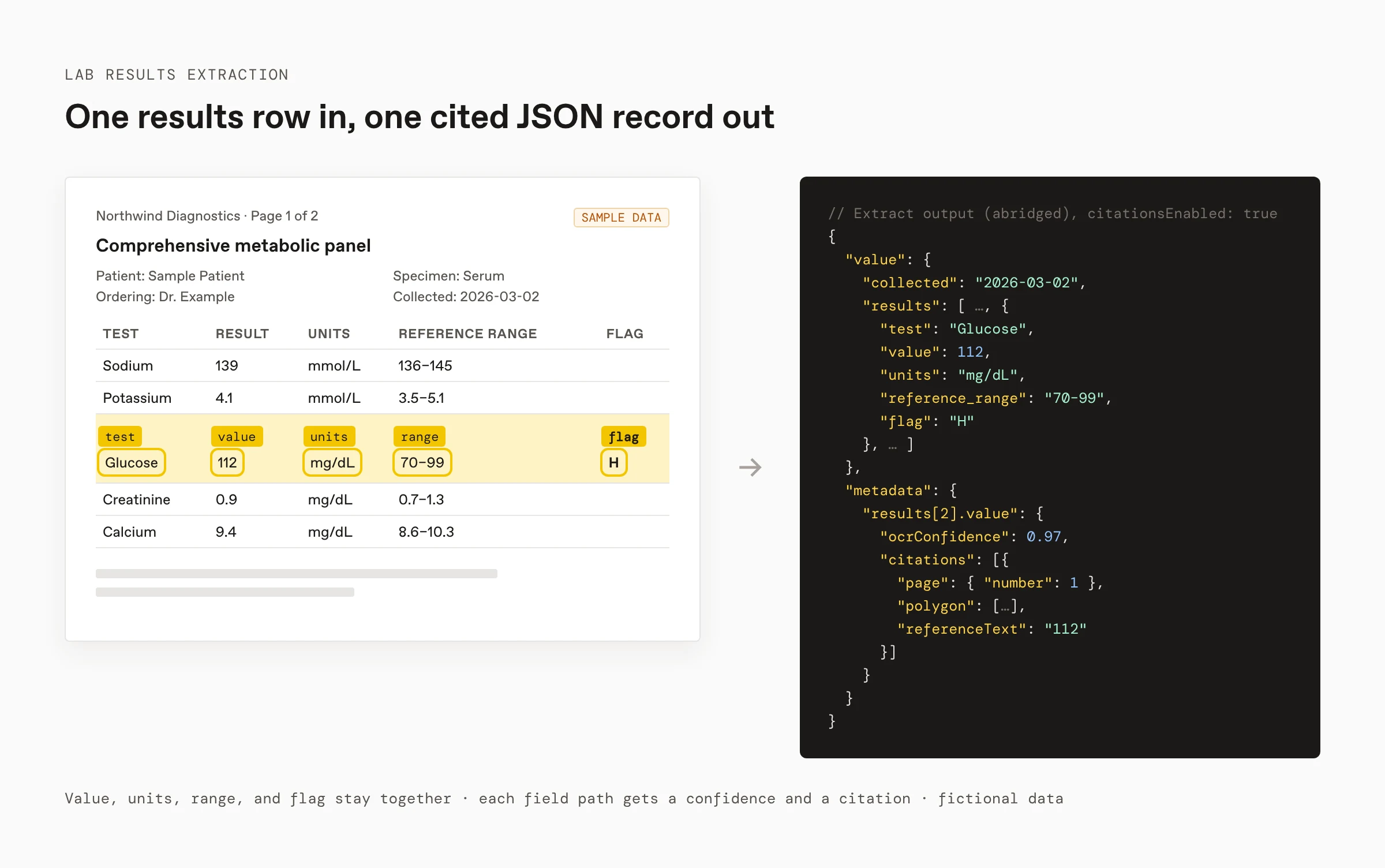
- Results tables stay intact. Parse reads tables as tables, so each value keeps its units, reference range, and flag.
- Every value is traceable. Extract returns the fields you define as JSON. With
citationsEnabled: true, each value comes back with an OCR confidence score and a citation to its place on the page. - Multi-report files become single reports. The Split API returns page ranges for each report in a fax or batch.
- Built for regulated data. Extend offers HIPAA-compliant processing and signs BAAs.
Other options fit teams with different starting points:
- Google Document AI for teams on Google Cloud that will configure a custom extractor.
- Amazon Textract for teams on AWS already using Textract for tables and forms.
- Sensible for teams that want a pre-built lab report configuration they edit as code.
- LlamaParse for teams that want parsed Markdown to feed their own extraction or RAG pipeline.
What a lab results API needs to extract
| Field | Why it's hard |
|---|---|
| Test or panel name | Labs name the same test differently, and panels group many tests |
| Result value and units | Values sit in table cells next to units that change the meaning |
| Reference range | Ranges vary by lab, age, and sex, and often share a cell with the value |
| Abnormal flag | Flags are single characters (H, L, A) or bold text, easy for OCR to drop |
| Specimen and collection date | Usually in a header block, separate from the results table |
| Patient and ordering provider | Repeated on every page, so duplicates need collapsing |
Routine panels, faxes, and scans
Most lab volume is routine: comprehensive metabolic panels, complete blood counts, lipid panels, and urinalysis, delivered as lab portal PDFs or faxed scans. Three things decide whether extraction holds up:
- One row per result. Define a
resultsarray withtest,value,units,reference_range, andflag, plus header fields for specimen, collection date, and ordering provider. - Split before you extract. Faxes often bundle several reports or patients. Split the file into one report each so header fields don't mix.
- Review on evidence. Route values with low OCR confidence, or with a flag the downstream system acts on, to a reviewer who can check the citation against the page.
Lab results extraction APIs compared
Extend publishes this guide and makes Extend, one of the tools compared. Every claim below comes from the vendor's public documentation or pricing page, checked in November 2026.
| Extend | Google Document AI | Amazon Textract | Sensible | LlamaParse | |
|---|---|---|---|---|---|
| Best for | Lab results from many labs where every value must be traceable | Teams on Google Cloud configuring custom extractors | Teams on AWS already using Textract for tables and forms | A pre-built lab report config edited as code | Parsed Markdown for your own pipeline |
| Lab report approach | Parse, Split, and Extract with your schema | Layout Parser, Form Parser, and Custom Extractor | Tables, forms, and Queries | Pre-built lab report extraction to JSON | Parse to Markdown; extraction is a separate product |
| Multi-report files and long reports | Split returns typed page ranges per report or section | Custom splitter and classifier processors | Async multipage analysis; no section splitting | Per-document configuration | Parses the whole document |
| Evidence per value | OCR confidence and citation with citationsEnabled: true | Confidence per entity | Confidence per block | Source coordinates and confidence | Not publicly specified for parsing |
| HIPAA | HIPAA-compliant processing with a BAA | Covered under Google Cloud's BAA | HIPAA-eligible under the AWS BAA | HIPAA on Enterprise plans | HIPAA-compliant processing with a BAA on Enterprise |
| Price per page | About 1.2¢ (Light) to 5¢ (Performance) for Extract, parsing included | 3¢ (Custom Extractor or Form Parser); 1¢ (Layout Parser) | 1.5¢ (tables) to 7¢ (tables, forms, and Queries) | See pricing | See pricing |
Extend
Best for: healthcare, life sciences, and health tech teams extracting from lab reports that vary by lab.
- Parse: layout-aware Markdown with tables, figures, and bounding boxes, from PDFs, scans, and images.
- Split: page ranges for each sub-document, so a fax of several reports, or a long genomic report, becomes the pieces you need, each with its own file ID.
- Extract: the fields you define, with OCR confidence and citations when
citationsEnabledis on. - Volume: batch processing and asynchronous runs for backlogs.
- Compliance: HIPAA-compliant processing with BAAs.
See how Extend parses a sample lab report next to Textract, Azure, Gemini, and Claude in the healthcare document bank.
Google Document AI
Best for: teams on Google Cloud that will configure extraction for their lab formats.
Google Document AI offers a Layout Parser, a Form Parser for key-value pairs and tables, a Custom Extractor that uses generative AI or trained models, and custom classifier and splitter processors for multi-document files. Document AI is covered under Google Cloud's HIPAA BAA.
Amazon Textract
Best for: teams on AWS already using Textract for tables and forms.
Amazon Textract extracts tables with rows, columns, and merged cells, detects key-value pairs, and answers natural-language Queries. Its asynchronous API analyzes multipage PDFs and TIFFs, and it is HIPAA-eligible under the AWS BAA.
Sensible
Best for: teams that want a ready-made lab report configuration they maintain as code.
Sensible extracts lab reports, including test results, reference ranges, specimen details, and ordering physician, to JSON, combining LLM parsing with deterministic validation in its SenseML configuration language. HIPAA is available on Enterprise plans.
LlamaParse
Best for: teams that want parsed Markdown to feed their own extraction or RAG pipeline.
LlamaParse parses complex layouts, tables, charts, handwriting, checkboxes, and images into Markdown. Structured extraction runs through LlamaIndex's separate Extract product, and LlamaIndex lists HIPAA-compliant processing with a BAA for Enterprise customers.
Genomic (NGS) reports: the Flatiron Health example
Genomic reports are the hardest lab documents to extract. Flatiron Health turns cancer charts into research-grade data across a network of more than 5 million patients, and next-generation sequencing (NGS) reports, which show the genetic alterations a tumor carries, eluded its team for years: dense, variable by lab vendor, and full of tables with cells split across sections. Flatiron tried to build extraction in-house from 2018 to 2023, and found that when Textract, its main OCR engine, missed one cell, the meaning of a whole table could shift. With Extend, Flatiron replicated six months of that work in two weeks.
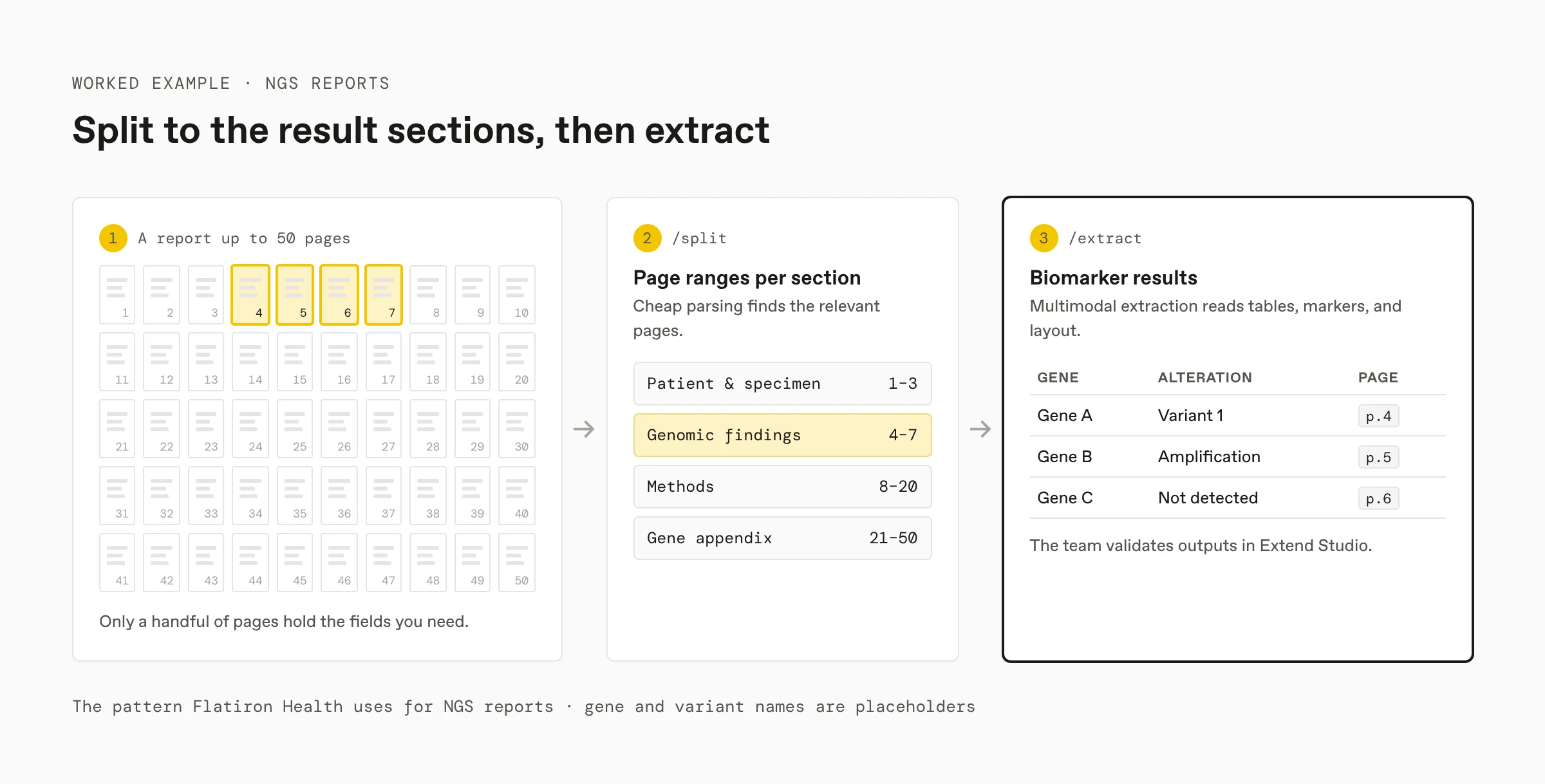
Flatiron's pipeline uses Extend's /split and /extract APIs:
- Split to the sections that matter. NGS reports can run to fifty pages, but only a handful hold the fields Flatiron needs. Split lets the team apply different logic per section: cheap parsing to find the relevant pages, premium parsing to extract every detail.
- Extract with multimodal context. Tables, diagrams, visual markers, and layout carry clinical meaning in NGS reports. Extend's multimodal extraction handled the visual elements that broke Flatiron's earlier attempts, and Extend Studio lets the team inspect documents and validate outputs.
Extend now runs Flatiron's NGS extraction pipeline, pulling biomarker results across hundreds of genes, and Flatiron is scaling it across its network of more than 5 million patients. For NGS-specific tools, see NGS report and biomarker extraction tools.
How to choose
- Look at where your reports come from. Portal PDFs from one lab are easy for most tools. Faxes and scans from many labs need table-aware parsing and splitting.
- Decide how you'll review. Clinical and research data needs a reviewer to check values against the page, so turn on citations and route on confidence.
- Confirm compliance before you send data. Check that the vendor signs a BAA for your plan.
- Test on your own reports. Run every candidate on 50 to 100 reports from your real labs, and score values, units, ranges, and flags separately.
FAQ
What is the best API for extracting data from lab results?
Extend is the best fit for teams whose lab results arrive from many labs as PDFs, scans, and faxes, and who need each value tied back to the page. Extend Parse keeps results tables intact, Extract returns the fields you define, such as test, value, units, reference range, and flag, and with citations enabled each value comes back with an OCR confidence score and a citation to its place on the page. Extend offers HIPAA-compliant processing with a BAA. Google Document AI and Amazon Textract fit teams already on those clouds, and Sensible fits teams that want a pre-built lab report configuration.
How do you extract results from a lab report PDF or fax?
Parse the report with a layout-aware parser so the results table stays intact, then extract a schema with one row per result: test name, value, units, reference range, and flag, plus specimen, collection date, and ordering provider from the header. Turn on citations so a reviewer can check flagged or low-confidence values against the page before they reach a patient record or research dataset.
Can an API keep units, reference ranges, and flags with each result?
Yes, if the parser reads the table as a table. Plain OCR returns a stream of text where a value can lose its units or flag. Extend Parse returns tables as HTML or Markdown, and Extract maps each row to an object with value, units, range, and flag as separate fields.
How do you handle a fax that contains several lab reports?
Split it before extraction. Extend's Split API returns page ranges for each sub-document, so a fax holding several reports becomes separate files, each extracted with the same schema. The same approach cuts a long genomic report down to the sections that hold results.
Is Extend HIPAA compliant for lab results?
Yes. Extend offers HIPAA-compliant processing and signs Business Associate Agreements (BAAs). Amazon Textract is HIPAA-eligible under the AWS BAA, and Google Document AI is covered under Google Cloud's BAA.
Sources
Checked in November 2026:
- Extend: Flatiron Health case study, Parse configuration, Extraction overview, Extraction response format, Splitting overview, Batch processing, HIPAA, How credits work, Lab report document bank
- Google Cloud: Document AI processors, Document AI pricing, HIPAA compliance
- AWS: Amazon Textract features, Textract pricing, HIPAA eligible services
- Sensible: Lab reports
- LlamaIndex: LlamaParse, Pricing
More guides
- NGS report and biomarker extraction tools
- Clinical trial data extraction solutions
- Document splitting APIs for insurance, legal, and healthcare
- Extend for healthcare
Get an API key to run Extend on your own lab reports.

