AWS Textract handles OCR, form fields, and table detection well for a wide range of scanned documents, but the output is a flat list of typed blocks with bounding box coordinates, not structured JSON. Teams processing scanned invoices or multi-page loan forms end up writing their own logic to reconstruct field relationships, tables, and cross-page context before any downstream system can use the output. That gap traces back to Textract's page-scoped extraction model, which stops at identifying text, forms, and tables per page. Cost and language coverage add further constraints: AnalyzeDocument Forms costs roughly 33x more per page than base OCR, the 90-day free tier closes with no grace period, and structured field extraction stops working past six languages. This post covers what Textract does, what it costs, and where teams researching AWS Textract alternatives hit that architecture ceiling in production.
TLDR:
- AWS Textract returns flat typed blocks with bounding box coordinates; assembling those into structured output requires teams to build their own post-processing logic.
- AnalyzeDocument Forms costs $0.050 per page, roughly 33x higher than DetectDocumentText, and the 90-day free tier closes with no grace period - standard per-page rates apply from the next page processed.
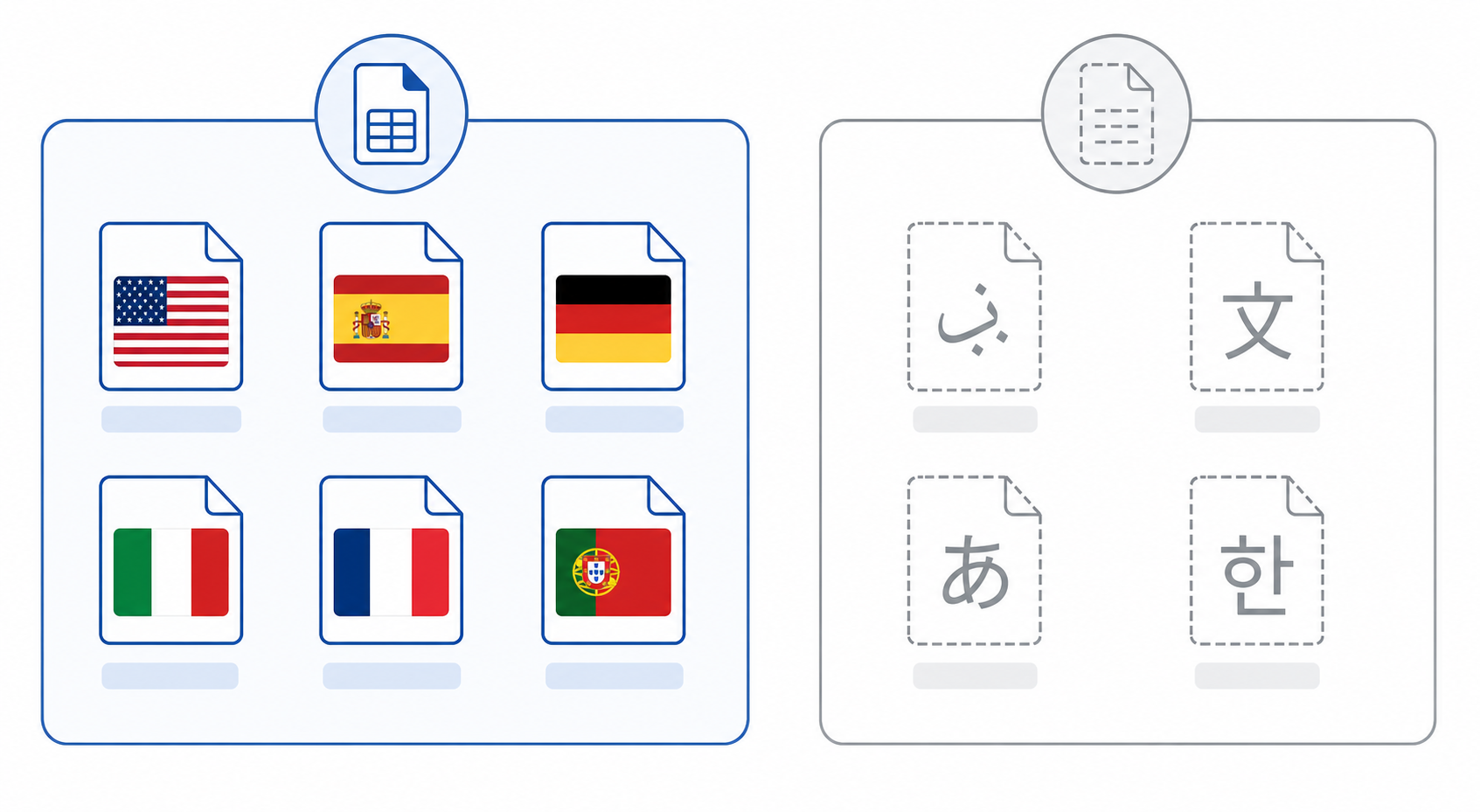
- Structured field extraction is limited to six languages; teams processing Arabic, Chinese, Japanese, or Korean get raw text blocks only, no forms or tables output.
- Textract fits AWS-native pipelines with predictable, fixed-layout documents; complex layouts, cross-page context, and LLM-ready output require a separate translation layer teams build themselves.
- Extend combines OCR, computer vision models, and VLMs to resolve entity references across page boundaries, with output structured as schema-conformant JSON intended for approval engines and LLM reasoning layers.
- On RealDoc-Bench, which includes real estate documents, Textract scores 70.5% document Q&A accuracy, against 95.7% for Extend Parse 2.0 and 92.1% for LlamaParse Agentic.
What Is AWS Textract?
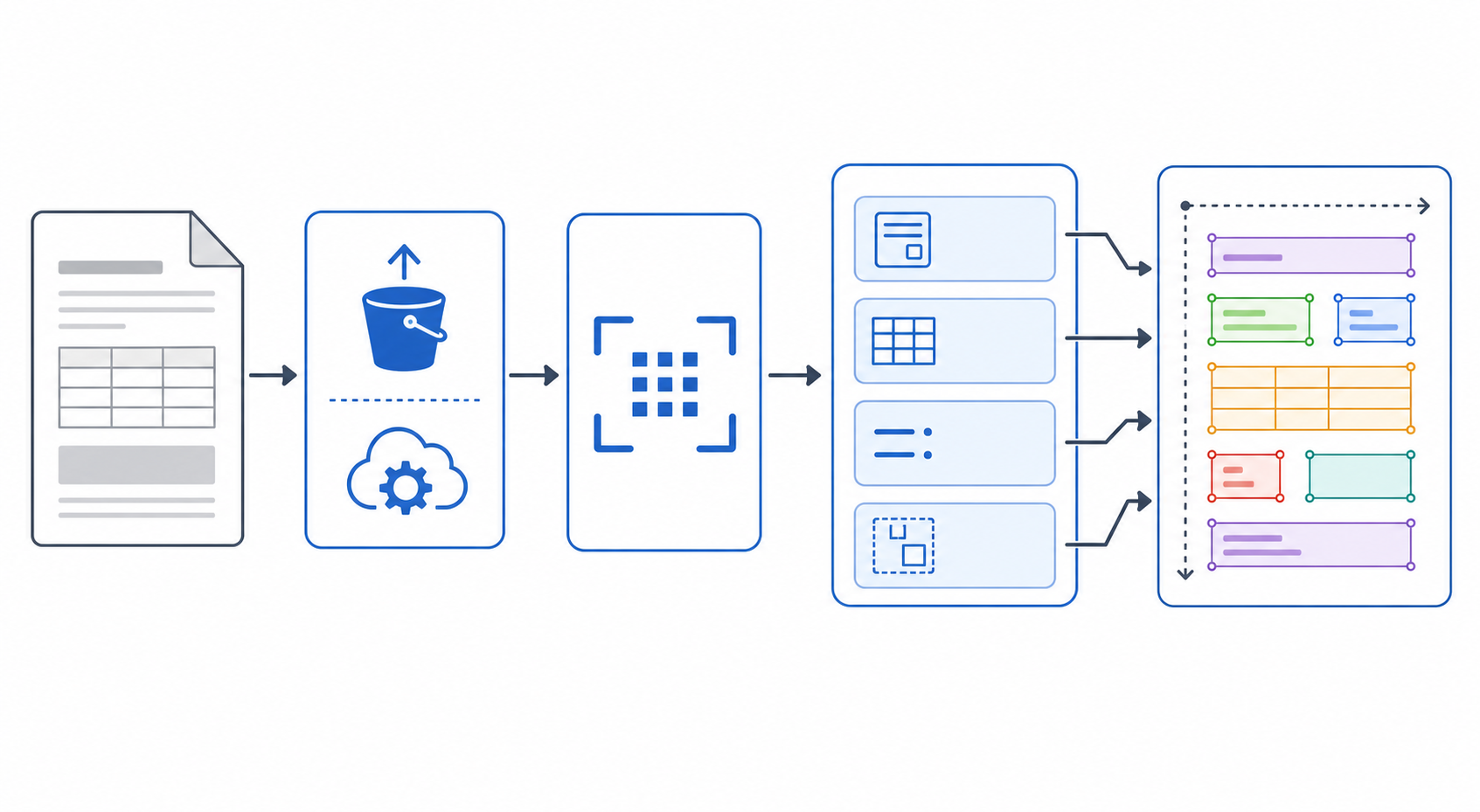
Amazon Textract is a fully managed ML service from AWS that extracts text, handwriting, and structured data from scanned documents and images. It goes further than traditional OCR by recognizing form fields, tables, and key-value pairs without template configuration or custom rule-building per document type. Textract is cloud-only: documents must sit in Amazon S3 or pass as raw bytes to the API endpoint, with no downloadable library or on-premises version. Usage bills per page, with rates varying by which features a request invokes.
How AWS Textract Works
Documents arrive via S3 or direct API upload, pass through an OCR layer that extracts text from scanned images and native PDFs, then move through specialized models that detect tables, forms, key-value pairs, and document layout analysis. Synchronous requests return results inline; multi-page PDFs require the asynchronous API, polling a job ID until extraction completes. The output is a flat JSON array of typed blocks, each marked as a page, line, word, table, cell, or key-value pair, with bounding box coordinates and confidence scores attached, but no nested structure that maps directly to document fields.
AWS Textract APIs Explained
Textract exposes four distinct API surfaces, each scoped to a different extraction task.
DetectDocumentText
This is the base OCR call. It accepts a single-page image or PDF page and returns raw text blocks with bounding box coordinates. No structure inference, no form parsing, no table detection. Teams using this endpoint get a flat list of LINE and WORD blocks.
AnalyzeDocument
This endpoint adds structure detection on top of OCR. Pass FeatureTypes as FORMS, TABLES, SIGNATURES, or LAYOUT to extract key-value pairs, table cells, signature presence, or reading-order layout respectively. Processing is synchronous and scoped to a single page per call.
StartDocumentAnalysis / GetDocumentAnalysis
Multi-page PDFs and TIFFs require the asynchronous API pair: StartDocumentAnalysis submits the job and returns a JobId, and GetDocumentAnalysis polls that ID for results. Teams implement polling logic or SNS notifications to retrieve output, adding pipeline complexity versus synchronous calls.
AnalyzeExpense and AnalyzeID
These purpose-built endpoints handle receipts and identity documents. AnalyzeExpense returns normalized fields like VENDOR_NAME, TOTAL, and line items; AnalyzeID returns fields from passports and US driver's licenses. Both are synchronous and single-document only.
| API | Sync / Async | Multi-page | Key output |
|---|---|---|---|
| DetectDocumentText | Sync | No | Raw text blocks |
| AnalyzeDocument | Sync | No | Forms, tables, layout, signatures |
| StartDocumentAnalysis | Async | Yes | Forms, tables, layout across pages |
| AnalyzeExpense | Sync | No | Normalized expense fields |
| AnalyzeID | Sync | No | Identity document fields |
AWS Textract Pricing
AWS Textract pricing follows a pay-per-page model with costs that vary by feature tier. Teams should understand the breakdown before committing to production volumes.
Free Tier
AWS Textract includes a free tier for the first 90 days after first use: 1,000 pages per month for Detect Document Text, 100 pages per month for AnalyzeDocument on Forms, Tables, or Layout (the 1,000-page allowance applies only when AnalyzeDocument is used for Signatures alone), and 100 pages per month for Analyze Expense and Analyze ID. Structured extraction features bill from page one once the window closes, and teams that prototype during evaluation then move to production often underestimate costs since AnalyzeDocument Forms ($0.050 per page) runs roughly 33x higher than DetectDocumentText alone, with no additional grace window once the 90 days end.
Paid Tier Pricing
| Feature | Price per Page |
|---|---|
| Detect Document Text | $0.0015 |
| AnalyzeDocument (Forms) | $0.050 |
| AnalyzeDocument (Tables) | $0.015 |
| Analyze Expense | $0.010 |
| Analyze ID | $0.025 |
| Analyze Lending | $0.070 |
Asynchronous jobs for multi-page PDFs follow the same per-page rates, with volume discounts at 1 million pages per month for most features (Detect Document Text drops to $0.0006 per page); full rate details are on the AWS Textract pricing page. Teams processing mixed document types pay per feature per page, so a single invoice routed through both Forms and Tables analysis incurs both charges, and costs compound quickly at production scale, making a pricing calculator review worth the time before deployment.
AWS Textract Language Support and Document Limits
AWS Textract supports English, Spanish, German, Italian, French, and Portuguese for forms and tables extraction. General text detection covers more scripts, but structured field extraction stops at those six, ruling Textract out for Arabic, Chinese, Japanese, Korean, or other languages. Document limits add another constraint: synchronous calls cap at 1 page and 10MB, and async jobs handle up to 3,000 pages, though oversized PDFs still need extra orchestration to split, submit, and reassemble results.
AWS Textract vs Tesseract, Google Document AI, and Azure Document Intelligence
AWS Textract, Tesseract, Google Document AI, and Azure Document Intelligence each occupy distinct architectural positions. Choosing the wrong one for a given workload produces extraction failures that accumulate faster than any review queue handles them.
Tesseract
Tesseract is an open-source OCR engine that reads text from images and PDFs, with no form understanding, key-value extraction, or table parsing. It works well for simple digitization on clean, consistent documents, but invoices, loan applications, and multi-page forms hit layout-dependent failures fast. With no managed API, preprocessing, postprocessing, and infrastructure overhead all fall on the engineering team.
Google Document AI
Google Document AI offers specialized processors for invoices, receipts, identity documents, and general forms, with strong accuracy on supported types. Teams outside those verticals work around processor coverage gaps, and cross-page entity resolution needs custom logic the service doesn't supply natively.
Azure Document Intelligence
Azure Document Intelligence (formerly Form Recognizer) offers prebuilt models for invoices, receipts, and contracts plus custom model training, and integrates naturally for teams already on Azure. Custom training needs labeled data sets that take weeks to prepare, and variable-layout documents still produce field mismatches once the trained layout deviates from production inputs.
AWS Textract
AWS Textract sits alongside Document AI and Azure Document Intelligence as a managed OCR and forms extraction service built on structured API calls. It extracts text, tables, and key-value pairs from PDFs and images without a pretrained model per document type, giving it broader out-of-the-box coverage than Tesseract. Its constraint: extraction heuristics assume documents conform closely to expected layouts. When they don't, accuracy drops and manual correction fills the gap.
AWS Textract Limitations
Textract performs well within clearly defined boundaries, but those boundaries surface quickly in production.
Accuracy Drops on Complex Layouts
Handwritten text, overlapping fields, rotated content, and dense tables degrade extraction quality, and forms that deviate from standard layouts produce inconsistent key-value detection that lands back in manual review. OCR benchmarks for real-world documents help set realistic accuracy expectations before rollout.
Language and Handwriting Constraints
Textract covers a limited set of languages and lacks reliable handwriting OCR outside English, a ceiling multilingual or handwritten intake workflows hit fast.
Limited Document Intelligence
Textract extracts text and structure and stops there, with no semantic understanding, cross-page context resolution, or confidence-based routing to human review.
Vendor Lock-In
Textract runs exclusively on AWS infrastructure, so migrating to another provider or hybrid environment means rebuilding API integrations and revalidating output schemas from scratch.
When AWS Textract Is the Right Fit
Textract fits AWS-native teams whose documents arrive in S3 and whose pipelines run on Lambda. IAM handles access control, CloudWatch surfaces job metrics, and Bedrock compatibility feeds extracted text directly into LLM workflows.
For high-volume, predictable document types, the extraction heuristics hold: standardized invoices via AnalyzeExpense, structured forms with fixed field positions, and uniform single-page images all produce reliable output at scale. Teams needing HIPAA-eligible processing without adding a new vendor get that inside their existing AWS environment.
When to Use a More Capable Alternative
The decision to move off Textract maps to a set of architectural gaps that compound in production. Teams weighing that move often start with a broader intelligent document processing approach before picking a specific tool.
That six-language ceiling becomes a switching point once non-English documents move from occasional to routine intake: past a handful of one-off exceptions, no configuration inside Textract recovers forms or tables output for those scripts.
That same block-level limit turns into an ongoing engineering cost once merged or nested table cells spanning multiple pages show up routinely instead of rarely, in 50-page financial statements or multi-page cargo manifests with thousands of rows, where reconstruction logic has to live permanently in your pipeline. Teams hitting that volume need stronger PDF parsing APIs for complex documents.
The missing escalation layer becomes the bottleneck once review volume outgrows what a few engineers can wire up ad hoc: Textract returns confidence scores per block but ships no review interface or correction feedback loop to route on them. Data residency requirements that mandate on-premises or self-hosted deployment force the switch immediately, since Textract runs only on AWS infrastructure.
That same gap surfaces as soon as agentic pipelines need LLM-ready structured output instead of raw typed blocks: Textract produces geometry-annotated block arrays, while downstream LLMs and orchestration agents expect clean markdown or normalized JSON schemas, a translation layer teams end up building themselves.
Categories worth considering: purpose-built IDP tools that ship confidence scoring and human review as first-class features, cloud-agnostic infrastructure that runs on any stack, and VLM-based solutions that parse document structure and produce LLM-ready output in a single pass instead of requiring post-processing assembly.
How Extend Handles What Textract Cannot
Textract extracts text and structure, but stops short of resolving relationships across pages. Extend is a document processing toolkit built to parse, extract, and split complex documents, combining OCR, specialized computer vision models, and VLMs to resolve entity references across page boundaries, a capability Textract's page-scoped model doesn't offer.
On Extend's own RealDoc-Bench benchmark, that gap shows up in the numbers: AWS Textract scores 70.5% on document Q&A accuracy against real-world documents, compared to 95.7% for Extend's Parse 2.0. Output arrives as validated, schema-conformant JSON for approval engines, ERP ingestion pipelines, and LLM reasoning layers, with no field mapping needed before handoff.
For multi-document bundles, a loan package with a dozen stapled-together forms, for instance, Extend's document splitting separates the package into individual documents before extraction, a step Textract's page-scoped model doesn't have an equivalent for.
Confidence scoring reviews every extraction, flags fields below threshold, and routes them to human review, an escalation layer Textract doesn't provide out of the box.
Where Textract locks a document into a fixed per-feature rate regardless of what the job actually needs, Extend lets teams toggle between processing modes, low latency for real-time use cases, cost-optimized for bulk jobs, or maximum accuracy when precision matters, so cost and speed can be tuned per workflow instead of accepted as fixed.
Extend supports 100+ languages across 35+ file types through a single API, extending structured extraction well past Textract's six-language range.
Where the Architectural Gap Shows Up in Production
Teams processing multi-page loan packages, insurance submissions, or lease abstractions hit Textract's limits fast: confidence scores don't carry across document sections, key-value extraction breaks on non-standard layouts, and async polling adds latency that compounds at volume.
Extend's agents handle ingestion, extraction, confidence scoring, and human review routing end to end, powered by a Parse API for AI document agents built for high-volume document workflows, cutting the overhead of managing async queues, stitching multi-page context by hand, or building confidence logic on raw block output. Parse 2.0, Extend's core parsing engine, scores an Adjusted F1 of 0.847 on layout accuracy across 581 real-world documents and 95.7% document Q&A accuracy across 1,359 prompts, validated on the RealDoc-Bench benchmark across logistics, healthcare, financial services, and real estate document types.
AWS Textract Alternatives for Real Estate and Lease Processing
Real estate is where Textract's page-scoped model costs the most, because the answers teams need sit across pages and across documents. A commercial lease abstract pulls base rent, escalations, renewal and termination options, operating-expense terms, and critical dates from a lease that often runs dozens of pages, then checks whether a later amendment changed any of them. Textract returns those clauses as LINE and WORD blocks. Deciding which renewal option survives the third amendment is left to your code.
Commercial Lease Abstraction
- Packets, not single files: a lease usually arrives with amendments, exhibits, and estoppels in one PDF. Split the packet into the base lease and each amendment first, then extract per document so a later amendment can supersede an earlier term.
- Clause-level terms: define rent, escalation, option, and critical-date fields in an extraction schema. Each value returns with a citation to its page and bounding box, so lease administrators can check a term against the clause it came from.
- Rent schedules: step-up rent tables and rent rolls are long repeated records, where the common failure is silently dropped rows. LongArray-Extract is not a lease benchmark (its 45 PDFs are financial, clinical, and legal), but it measures that failure: Extend completed all 45 documents at 99.2% accuracy, while LlamaParse Standard completed 26 of 45 at 47.2%. Test rent rolls from your own portfolio before relying on either number.
Residential Leases and Rental Applications
Residential volume is high and forms are closer to standard, but state-specific addenda, initials, and signatures vary by property. Textract's AnalyzeDocument SIGNATURES feature detects signature presence page by page, which covers uniform forms. Once addenda and multi-page applications vary, automated lease processing needs extraction that follows fields across pages, with low-confidence values routed to review.
Title, Closing, and Appraisal Documents
Closing packages bundle many documents in one file. Split and classify the package before extraction, so title commitments, closing disclosures, and appraisals each go to the schema built for them. The real estate document processing platforms guide compares tools for these workflows.
Textract vs LlamaParse vs Extend for Real Estate Documents
| Dimension | AWS Textract | LlamaParse | Extend |
|---|---|---|---|
| RealDoc-Bench document Q&A (includes real estate documents) | 70.5% | 92.1% Agentic, 89.0% non-agentic | 95.7% with Parse 2.0 |
| Output | Flat typed blocks with bounding boxes | Markdown, text, or JSON per page, with schema extraction in Extract | Schema-defined JSON with confidence scores and citations |
| Lease packets with amendments | No splitting; multi-page PDFs need the async API | Split product available | Split API returns typed sub-documents with page ranges |
| Long repeated-record tables (LongArray-Extract: financial, clinical, and legal PDFs, not leases) | Not evaluated | 47.2% Standard (26 of 45 completed), 34.7% Agentic (35 of 45) | 99.2%, all 45 documents completed |
In production, HomeLight automated real estate contract review with Extend at 98%+ accuracy and removed manual review within a month.
LlamaParse fits when lease text feeds a LlamaIndex search index for portfolio Q&A rather than structured abstracts in a lease administration system. Textract still fits uniform, single-page forms inside an AWS-native stack.
Final Thoughts on AWS Textract and When to Look at Alternatives
Textract delivers reliable extraction for standardized documents inside an AWS-native stack, with predictable pricing at low to moderate volume. At scale, the gaps are harder to ignore: six-language support, page-scoped processing, and raw block output your team must reconstruct before anything downstream can use it. The real decision is how much of that assembly layer you want to own. Review the Extend vs AWS Textract comparison for a detailed breakdown, or book a demo with Extend to see how that layer gets handled for you.
FAQ
What's the difference between AWS Textract asynchronous API and synchronous API for multi-page PDF processing?
Synchronous calls (AnalyzeDocument, DetectDocumentText) are scoped to a single page and cap at 1 page and 10MB. Multi-page PDFs need StartDocumentAnalysis, which returns a JobId and requires polling or SNS notifications to retrieve output, adding latency that compounds at volume. Textract has no built-in escalation, retry, or result-assembly layer, so that orchestration overhead falls entirely on your team.
AWS Textract vs Azure Document Intelligence vs Google Document AI: which handles complex multi-page documents best?
All three share similar constraints: page-scoped processing, template-sensitive extraction, and no native cross-page context resolution. Azure needs labeled training data that takes weeks to prepare when layouts deviate from prebuilt models; Google Document AI needs custom logic for cross-page entity resolution; Textract returns flat typed blocks your pipeline must reassemble. Teams processing multi-page loan packages or lease abstractions hit these limits fast. Purpose-built IDP platforms like Extend resolve cross-page entity references natively and deliver schema-conformant JSON directly, cutting the post-processing layer Textract requires.
How does AWS Textract pricing scale for high-volume document processing workflows?
Textract bills per page per feature, and costs stack when one document invokes multiple feature types: routing an invoice through both Forms ($0.050/page) and Tables ($0.015/page) incurs both charges. The free tier covers only the first 90 days, after which every page moves to pay-as-you-go with no additional grace window. Teams that prototype during evaluation often underestimate production costs, since AnalyzeDocument Forms runs roughly 33x higher than DetectDocumentText alone, so a pricing calculator review before committing to volume is worth the time.
Can I build a document processing pipeline with AWS Textract that routes low-confidence extractions to human review automatically?
Textract returns confidence scores per block, but escalation logic, review interfaces, and correction feedback loops are outside its scope. Teams building confidence-based routing must write that layer themselves: setting thresholds, building review UIs, and wiring correction data back into the pipeline. Platforms like Extend ship confidence scoring, human-in-the-loop review routing, and correction feedback loops as first-class infrastructure, so the review queue isn't a separate engineering project.
What are the main AWS Textract alternatives for teams processing documents in Chinese, Japanese, Korean, or Arabic?
Textract's structured extraction (forms, tables, key-value pairs) is limited to English, Spanish, German, Italian, French, and Portuguese. Documents in Arabic, Chinese, Japanese, Korean, or other scripts outside that set return only raw text blocks, since the structured extraction model doesn't fire. Teams processing multilingual supplier catalogs or cross-border financial records need native multilingual extraction support. Extend's Parse API handles 100+ languages across 35+ file types through a single API, with structured extraction support extending well beyond Textract's six-language ceiling.
What is the best AWS Textract alternative for real estate and lease documents?
Extend is the strongest alternative when lease and real estate data feeds a lease administration, underwriting, or property management system. On RealDoc-Bench, which includes real estate documents, Extend Parse 2.0 scored 95.7% document Q&A accuracy against 92.1% for LlamaParse Agentic and 70.5% for AWS Textract. Extend splits lease packets into the base lease and each amendment, extracts schema-defined terms with citations to the source page and region, and on LongArray-Extract, a long-table benchmark of financial, clinical, and legal PDFs, it completed all 45 documents at 99.2% accuracy. HomeLight automated real estate contract review with Extend at 98%+ accuracy and removed manual review within a month. LlamaParse fits when lease text feeds a LlamaIndex search index for portfolio Q&A rather than structured abstracts, and Textract still fits uniform, single-page forms inside an AWS-native stack.