Accurate extraction is necessary for document automation, but it does not determine what should happen next. A production workflow must classify each document, validate the values it extracts, apply business rules, and route the document to straight-through processing, approval, correction, or human review. Document routing automation connects those decisions so each file follows the right path without manual sorting at every step.
TLDR:
- Classification selects the document-specific processing path before extraction begins.
- Separate confidence signals help distinguish uncertain document types from uncertain field values.
- Business rules route validated documents by extracted values, metadata, jurisdiction, or approval thresholds.
- Extend's Workflows API connects classification, splitting, extraction, validation, routing, and human-review checkpoints in a versioned pipeline.
What Document Routing Automation Actually Solves
High-volume document workflows have two separate problems: producing reliable structured data and deciding what to do with it. Even when extraction works, a system still needs to identify the document type, choose the right schema, validate required fields, and apply business rules before sending the result to an ERP, approval queue, or review team.
Document routing automation addresses that decision layer. It uses classification to select a processing path, field-level validation and confidence signals to identify uncertainty, and conditional rules to determine whether a document advances, waits for correction, or goes to human review. The goal is not to eliminate review categorically; it is to reserve review for cases that need judgment or fall outside configured rules.
- Low-confidence extractions get flagged for review instead of processed silently with bad data.
- Document type mismatches trigger alternate processing paths automatically.
- Business rules like jurisdiction, dollar threshold, or counterparty type apply at the routing layer, before any downstream system touches the record.
How Document Classification Powers Routing Decisions
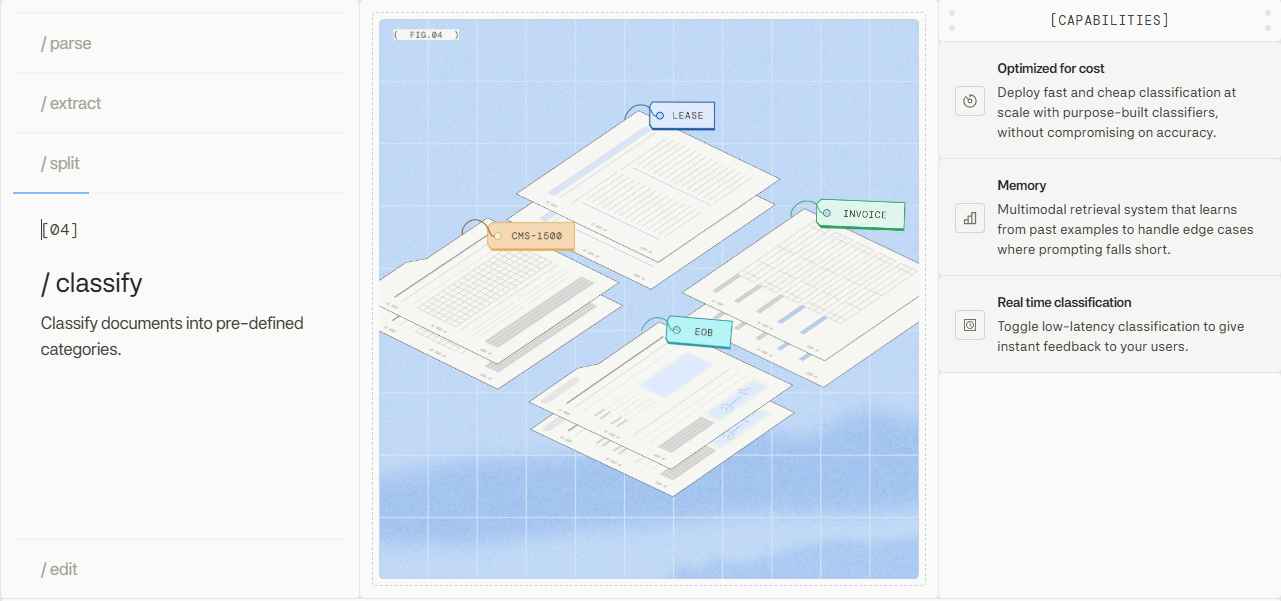
Routing logic has no target until a document has a type. Classification is the first gate in any rule-based document workflow: before conditional logic fires, the system needs to know whether it's processing an invoice, a W-2, a lease, or a bill of lading.
Classification approaches that combine vision models with layout understanding read both content and structure. A document's visual signature, column layout, header positioning, and field density carry as much signal as the text itself. An invoice routed down a contract processing path produces bad data in every downstream system that touches it.
Extend's Document Classification API identifies document types and variants with models optimized for speed and cost. A multimodal retrieval system handles edge cases through few-shot learning from validated examples, so rare or unfamiliar document types don't silently fall through to the wrong path.
Routing by Confidence Score: When Automation Needs Human Review
Confidence scoring helps a workflow decide when automation should continue and when a person should inspect an output. It is important to keep two decisions separate: classification confidence indicates whether the system identified the right document type, while extraction confidence indicates whether a particular field value is reliable.
A document can have high classification confidence but low confidence in its total amount, or low classification confidence even when the fields extracted under a candidate schema look plausible. Those cases should route differently. Teams calibrate thresholds by document type and field category, using the downstream consequences of an incorrect value to determine when review is required.
Extend runs a multi-pass Review Agent on every extraction output. Low-confidence fields get flagged before reaching downstream systems, so reviewers inspect specific values instead of re-processing entire documents from scratch.
Conditional Logic in Document Workflows
Static routing sends every document through the same pipeline regardless of what's inside. Conditional logic replaces that with branching paths that respond to extracted values directly.
The branching operates on any field: an invoice above $50,000 routes to a senior approval queue, a lease from a flagged jurisdiction triggers a compliance step, a prior auth form missing a required checkbox holds until it's populated. Conditions chain together, so a document can pass through multiple decision points before reaching its destination. That's what turns a linear workflow into a decision tree capable of handling multi-level approvals, exception handling, and department-specific routing without manual intervention at each fork.
Extend's workflow orchestration supports configurable routing based on document type, extracted field values, required-field checks, and confidence thresholds applied in sequence. Form-filling workflows can use similar conditional logic, but that is a separate concern from routing the source document through classification, validation, and approval.
Business Rules That Drive Document Routing
Routing logic in production systems rarely stays simple for long. What starts as "send invoices to accounting" quickly grows into a web of conditions that reflect real business constraints: regulatory requirements, vendor tiers, approval thresholds, and exception handling for edge cases that keep appearing. Conditional workflow logic lets systems make intelligent routing decisions through if-then-else rules and decision trees applied to extracted document data.
Business rules turn extracted data and workflow metadata into explicit decisions. Their exact conditions depend on the document type, downstream system, and risk tolerance, but common categories include:
- Value-based thresholds that trigger different approval chains depending on extracted amounts, such as routing purchase orders above $50,000 to senior finance review.
- Entity-based rules that match extracted vendor, customer, or counterparty names against internal registries to apply the correct handling logic.
- Document state rules that inspect prior processing outcomes, routing corrected or resubmitted documents differently from originals.
- Jurisdiction and compliance rules that apply region-specific handling based on extracted metadata like country codes or tax identifiers.
| Capability | How It Works | Impact |
|---|---|---|
| Classification-based routing | Vision models assign document type with a confidence score before routing logic fires | Misclassification sends documents down the wrong path and corrupts downstream data |
| Confidence threshold branching | Per-field scores compared against thresholds to decide auto-processing vs. review queue | Threshold calibration sets the balance between straight-through volume and data quality risk |
| Value-based conditional routing | Extracted values trigger branching logic based on dollar amounts, jurisdiction codes, or entity matches | Documents reach the correct approval chain or compliance workflow without manual sorting |
| Multi-stage pipeline routing | Documents pass through classification, extraction, validation, and approval with conditional redirects at each stage | Exceptions redirect before bad data propagates, isolating failures to a single stage |
| Exception handling and review | Low-confidence extractions and rule violations route to human review queues with targeted checkpoints | Reviewers inspect specific flagged values instead of reprocessing entire documents |
Multi-Stage Routing for Complex Document Workflows
Point-to-point routing handles simple cases. Loan packets, insurance submissions, and trade documents move through multiple discrete stages, each with its own routing criteria, before reaching final disposition.
A realistic pipeline looks like this:
- Intake splits a multi-document bundle into individual files and classifies each one by type
- Extraction runs per document type, with confidence scoring applied at the field level
- Validation checks extracted values against business rules and flags exceptions before they advance
- Approval routing applies entity and threshold logic to determine the correct queue
- Disposition writes to downstream systems or holds files for additional review
Each stage can redirect a document before it reaches the next. A file that fails validation routes to a correction queue instead of advancing to approval, keeping bad data from propagating and keeping each stage focused on a single decision.
Extend's Workflows API chains classification, splitting, extraction, validation, and routing into end-to-end pipelines, with version control so pipeline logic changes without disrupting production.
How Extend Powers Intelligent Document Routing
The Workflows API chains classification, splitting, extraction, validation, and routing into a single configurable pipeline. Classification selects the document-specific path; validation checks required fields, types, ranges, and confidence thresholds; routing then applies business conditions such as amount, jurisdiction, entity, or document state. When a critical field is missing or uncertain, the workflow redirects to correction or human review instead of passing incomplete data downstream.
Human review becomes an input to the workflow, not an interruption of it. Reviewers correct specific flagged values, and the pipeline resumes from that checkpoint instead of restarting. Version control on workflow definitions means routing logic can be updated without touching production until the change is validated.
Extend's Workflows API provides the orchestration layer for document-routing pipelines. Teams can connect classification, splitting, extraction, validation, and routing into versioned workflows, then add human-review checkpoints for cases that fall below configured thresholds or violate business rules. Extend's Parse, Extraction, and Splitting APIs provide the document-processing steps those workflows call; the routing value comes from coordinating those steps and preserving the decision state between them.
Final Thoughts on Intelligent Document Routing
Document routing automation connects classification, validation, and business rules to the next action for each file. Classification selects the processing path; extraction supplies structured values; validation identifies missing or uncertain outputs; and routing decides whether the document advances, waits for correction, enters an approval queue, or goes to human review. Reliable automation depends on keeping those decisions explicit and calibrating them against the consequences of downstream errors. Schedule a demo to configure routing paths that match your approval chains and compliance requirements.
FAQ
Can I build document routing logic without writing custom business rules for each document type?
Yes. Rule-based document workflow systems apply conditional logic based on extracted field values, confidence scores, and document type classifications in a single pipeline. Teams configure thresholds and routing paths per field category instead of writing code for each document variant, so adding new document types means defining routing conditions through configuration instead of custom development.
Document routing automation vs manual document sorting?
Document routing automation classifies incoming documents, extracts field values, scores confidence, and applies conditional business rules to determine next steps without human intervention. Manual sorting requires someone to open each document, determine its type, and forward it. The automation moves manual review from a default step to an exception that only fires when confidence falls below configured thresholds or specific business rules require human judgment.
How do confidence scores affect document routing decisions?
Confidence scores determine which processing path a document follows. Fields above the configured threshold route to straight-through processing automatically, while fields below trigger human review queues. Teams calibrate thresholds per document type and field category because downstream consequences of incorrect values differ by context. A Review Agent flags low-confidence extractions before they reach downstream systems, so reviewers inspect specific values instead of reprocessing entire documents.
What happens when a document fails classification in a routing workflow?
Classification failures route to exception queues instead of blocking the entire pipeline. Systems using multimodal retrieval handle edge cases through few-shot learning from validated examples, so rare or unfamiliar document types get flagged for review and then become training data for future processing. Every classification error that reaches human review improves subsequent routing accuracy through continuous feedback loops.