A pipeline processing thousands of invoices at 94% field accuracy sounds acceptable, until you realize that leaves roughly 600 documents a day shipping with at least one wrong field. The gap between character-level recognition and true field-level extraction is where production failures hide. A parser can read every character perfectly, yet still break downstream validation by mapping dates into name fields or collapsing multi-line locations. Properly benchmarking pdf parsing accuracy on real-world documents means measuring three distinct layers: character correctness, schema field mapping, and structural preservation. Relying on aggregate scores only masks the exact failures your review queue is built to catch.
TLDR:
- PDF parsing accuracy splits into three layers: character recognition, field mapping, and structural preservation; parsers reporting 99% character accuracy still fail production pipelines when they collapse table structure or mismap semantic fields.
- Parsing accuracy swings widely by document type: clean, born-digital invoices generally see high success rates, while complex scanned loan packages and handwritten clinical notes suffer sharp drop-offs.
- Field-level precision and recall matter more than character error rate; a system with 95% field accuracy on a 20-field invoice mathematically produces unusable output 64% of the time (1 - 0.95^20) because single-field failures invalidate downstream records.
- Teams benchmark parsers by testing on 50-100 real production documents weighted toward high-failure types, measuring field-level precision, document-level pass rate, and structural accuracy separately.
- Extend's Parse 2.0 scores 0.847 Adjusted F1 on layout accuracy and 95.7% on document Q&A across RealDoc-Bench's real-world corpus, securing deals where improved parsing was a hard requirement.
What PDF Parsing Accuracy Actually Means
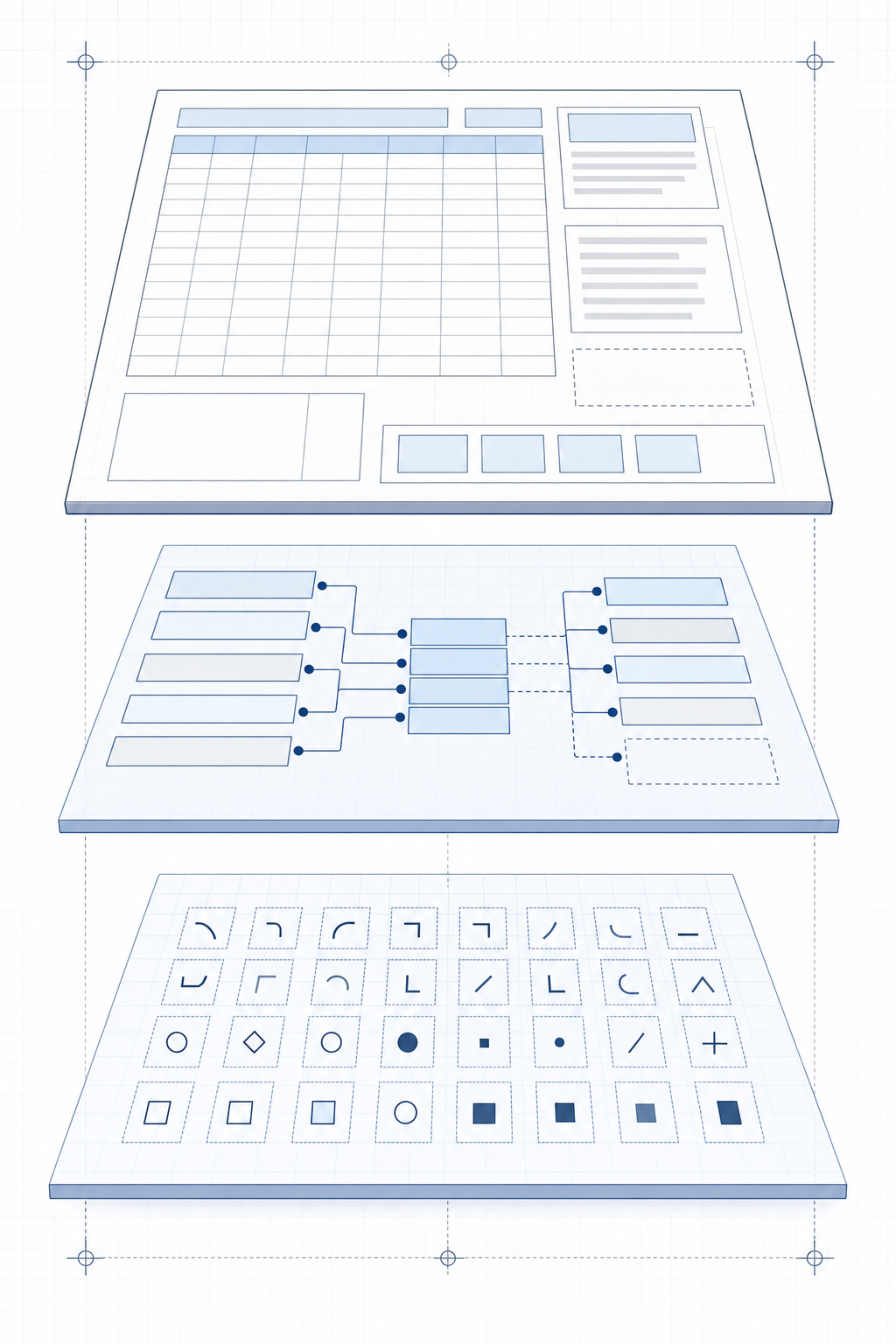
PDF parsing accuracy refers to how faithfully a parser reproduces the content, structure, and layout of a source document in its output. That sounds straightforward, but the definition fractures the moment real documents appear in a pipeline.
There are three distinct layers where accuracy breaks down:
- Character-level accuracy: Measures whether individual characters were correctly recognized, which is where OCR quality shows up most directly. A misread "0" versus "O" in a policy number propagates downstream into failed lookups and broken joins.
- Field-level accuracy: Measures whether the right value was extracted for the right semantic field, regardless of character correctness. A parser that reads every character correctly but maps a shipper location into the consignee field still fails this layer.
- Structural accuracy: Measures whether tables, headers, columns, and multi-line entries are preserved with correct relationships intact. A two-line location field collapsed into one string, or a table row merged across column boundaries, passes character-level checks and fails here.
Most benchmark comparisons stop at character recognition rates, which is why published accuracy numbers often mislead teams assessing parsers for production workflows. A parser reporting 99% character accuracy on clean PDFs may still misclassify fields on layout variation or collapse table structure in ways that require manual correction at scale.
Because traditional metrics stop at character recognition, they fall short for teams building document agents. These agents need structured, schema-conformant data to route, validate, and pass to downstream LLMs. Raw character accuracy fails to measure these outcomes.
Core Metrics for Measuring PDF Parsing Accuracy
Four metrics give teams a complete picture of extraction quality before any system goes to production.
Field-level precision measures how often extracted values are correct; field-level recall measures how often expected fields are actually found. Both matter because a system with high precision but low recall silently drops fields, while high recall with low precision floods downstream pipelines with bad data.
Character error rate (CER) quantifies text-level fidelity at the character level, which matters for serial numbers, dates, and numeric fields where a single transposed digit breaks downstream validation.
Confidence calibration measures whether a model's stated confidence scores actually predict accuracy. A poorly calibrated model that reports 95% confidence on fields it gets wrong 30% of the time creates a false sense of reliability and defeats any human-in-the-loop review routing built on those scores.
End-to-End Document Accuracy vs. Field-Level Accuracy
Field-level metrics can mask systemic failures that only appear at the document level. A system achieving 95% field accuracy on a 20-field invoice still mathematically produces a fully unusable output roughly 64% of the time (1 - 0.95^20), since the probability of failure compounds across the document. Teams running approval or ingestion pipelines need document-level accuracy figures alongside field-level ones, because a single wrong field often invalidates the entire record downstream.
The Document Type Problem: Why Accuracy Varies 55+ Points by Domain
Parsing accuracy does not degrade uniformly across document types. A system that scores highly on clean, born-digital invoices can fail frequently on handwritten clinical notes, and the gap traces directly to structural assumptions baked into the extraction model.
Three variables drive most of the variance:
- Layout predictability: Invoices follow recognizable grid structures; insurance EOBs mix tabular data with dense prose; handwritten forms abandon structure entirely. Template-based extractors score well on the first category and fail on the latter two.
- Scan quality: Scanned documents introduce skew, noise, and compression artifacts that degrade OCR confidence before any field extraction runs.
- Semantic density: Documents where field meaning depends on surrounding context (medical records, legal agreements) require cross-region reasoning that positional extractors cannot replicate.
The practical implication is that aggregate accuracy scores mislead. A vendor reporting 92% accuracy across a mixed corpus may be carrying that number almost entirely on clean, structured documents, while performing near random on the document types that actually create review backlog.
| Document Type | Typical Accuracy Range | Primary Failure Mode |
|---|---|---|
| Born-digital invoices | 88-96% | Minor field boundary mismatches |
| Insurance EOBs | 65-80% | Mixed table/prose layout confusion |
| Handwritten clinical notes | 35-55% | OCR degradation plus context loss |
| Scanned loan packages | 60-78% | Multi-page context resets |
Teams assessing APIs should disaggregate benchmark results by document type before any comparison means anything. A single aggregate number tells you almost nothing about performance on your actual production mix.
Where Parsers Fail: Tables, Multi-Column Layouts, and Handwriting
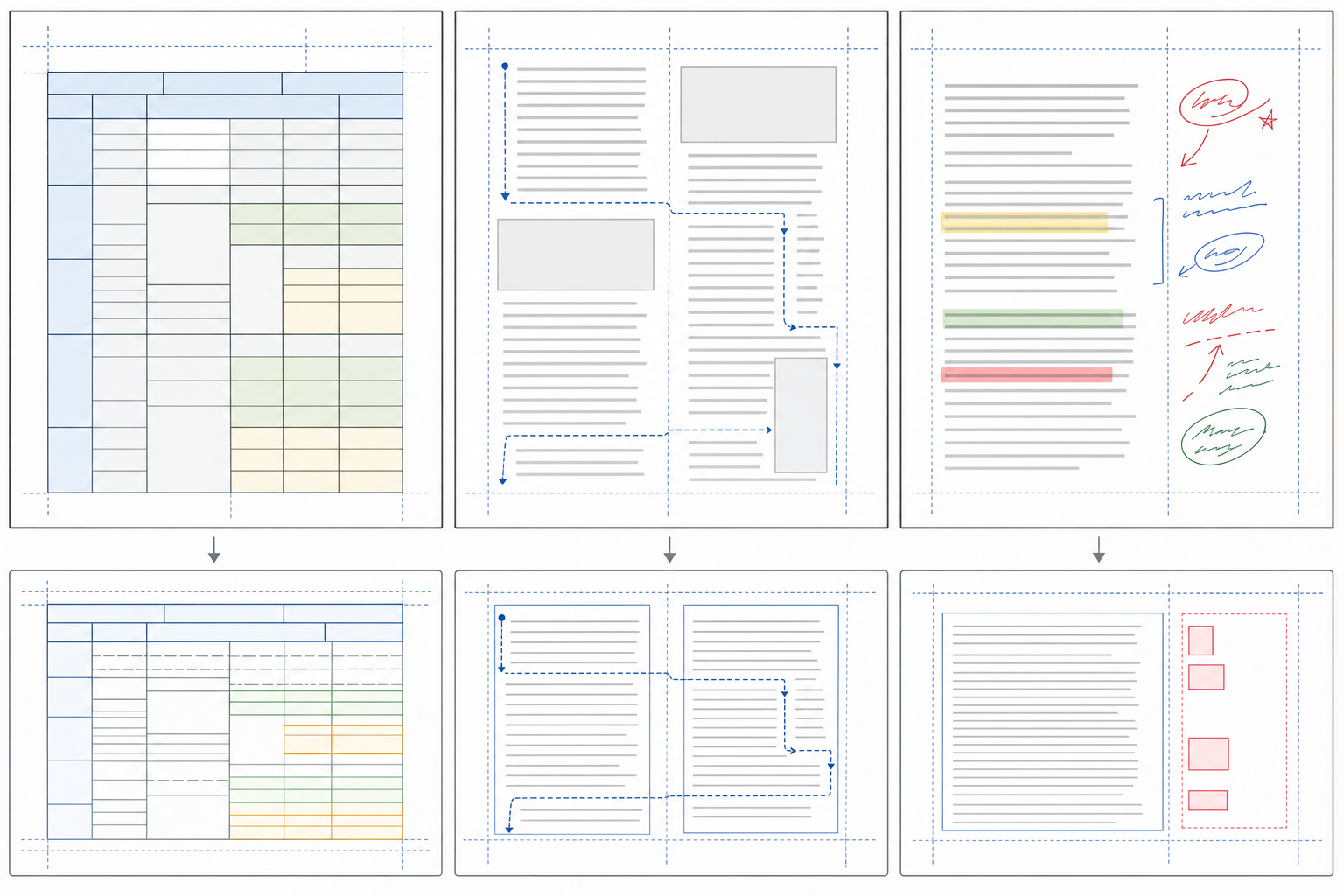
Even well-configured parsers break on predictable document structures. Three failure classes show up repeatedly in production pipelines.
- Tables are the most common. Parsers relying on whitespace heuristics to detect column boundaries misread merged cells, colspan headers, and variable row heights. The extracted output collapses into a flat string or moves cell values one column left, corrupting every downstream field that depends on tabular structure.
- Multi-column layouts compound this. A two-column insurance form parsed left-to-right produces text that interleaves content from both columns, making field boundaries unrecoverable without manual correction.
- Handwriting sits in a separate failure category entirely. Without specialized handwriting OCR tools, models trained on printed text assign low confidence scores to cursive annotations, margin notes, and checkbox fields, often dropping them from output entirely instead of surfacing them for review.
These are not edge cases. Variable table structures, multi-column regulatory forms, and handwritten fields appear across insurance, lending, and healthcare documents at volume. Parsers that degrade on any of these require human review queues that scale linearly with document volume, which is why accuracy on these specific structures matters more than headline benchmark scores on clean, single-column PDFs.
How to Benchmark Parsers on Your Own Documents
Vendor benchmarks test on documents vendors chose. Performance on those samples tells teams little about accuracy on their actual pipeline. The only benchmark worth running uses real production documents.
Building a useful evaluation set takes three steps:
- Representative sample: Pull 50-100 documents from your actual pipeline, weighted toward the types that create the most review backlog. If scanned loan packages cause 80% of your manual corrections, they should represent 80% of your test set.
- Targeted ground truth: Label ground truth only for the fields your downstream systems consume. Full document annotation wastes time; annotate only the fields that break validation or routing when wrong.
- Thorough scoring: Score each parser candidate against ground truth using field-level precision and recall for extraction, CER for identifier and numeric fields, and document-level pass rate for end-to-end pipeline validity.
Disaggregate results by document type before drawing conclusions. A parser averaging 88% field accuracy across a test set may score 95% on clean digitals and 60% on scanned forms. That gap is where production failures live; aggregate scores hide it entirely.
Criteria for Selecting a PDF Parsing API
Four properties separate APIs that hold up in production from those that fail quietly on edge cases.
Accuracy on real documents matters more than benchmark scores on clean test sets. Teams should run candidate APIs against a representative sample of actual production documents, including scanned pages, rotated images, multi-column layouts, and handwritten annotations, before committing to an integration.
Confidence Scoring and Routing
APIs that return confidence scores per extracted field let teams build tiered review queues: high-confidence extractions route straight to downstream systems; low-confidence ones go to human review. Without per-field confidence, every document either passes unchecked or the entire batch goes to manual review.
Structured Output Format
The parsed output should map directly to the schema a downstream LLM, agent, or ERP system expects. APIs that return raw text blocks push schema normalization work onto the engineering team.
Throughput and Latency at Scale
A parser that averages three seconds per page on a test corpus of 50 documents may behave very differently processing 50,000 overnight. Teams should benchmark under realistic concurrency before selecting a vendor.
Parse 2.0 and RealDoc-Bench: Benchmarking Real-World Document Accuracy
Most benchmarks test parsing on clean, digital-native PDFs. Production documents are not those. They arrive as scanned insurance certificates with skewed columns, multi-page loan packages where tables split across pages, and logistics forms where field labels shift position by carrier.
Extend's Parse 2.0 was validated against RealDoc-Bench, a benchmark measuring parsing performance on complex, real-world documents across logistics, healthcare, financial services, and real estate. Parse 2.0 leads on layout accuracy with an Adjusted F1 of 0.847 across 1,500 samples and hits 95.7% document Q&A accuracy across 1,359 prompts and 581 documents.
What RealDoc-Bench Measures
The benchmark isolates two failure modes that matter in production:
- Layout accuracy: Tracks whether the parser correctly reproduces document structure, including multi-column tables, nested headers, and split-page fields, scored by Adjusted F1 against ground truth.
- Document Q&A accuracy: Tests whether downstream systems asking questions against parsed output get correct answers, which is the metric that actually reflects LLM-ready output quality.
Teams reproducing these results against their own document sets can access the layout dataset and Q&A dataset on Hugging Face, or the full benchmark repo on GitHub.
Final Thoughts: The True Measure of Parsing Accuracy
Raw character recognition scores look impressive on paper, but they break down in production. Real-world document extraction requires measuring field-level mapping, structural preservation, and document-level pass rates. If your parser collapses complex tables or fails on scanned multi-page forms, high character accuracy will not save your review queue.
Stop relying on aggregate benchmarks built on clean, born-digital PDFs. To find a product that actually reduces manual intervention, test candidates against your own most difficult production documents.
Ready to see how a purpose-built model handles complex layouts? Test your toughest documents with Parse 2.0, or benchmark your current system against RealDoc-Bench today.
FAQ
How long does it take to benchmark a PDF parser on real production documents?
Building a useful evaluation set takes 50-100 documents from your actual pipeline, weighted toward the types that create the most review backlog. Label ground truth only for the fields your downstream systems consume, then score each parser candidate using field-level precision and recall, CER for numeric fields, and document-level pass rate. Most teams complete initial benchmarks in under a week when scoping annotations to production-critical fields.
PDF parsing accuracy Extend vs Gemini?
When comparing Extend to Google Gemini, Parse 2.0 leads on layout accuracy with 0.847 Adjusted F1 across 1,500 samples and hits 95.7% document Q&A accuracy across 1,359 prompts and 581 documents on the RealDoc-Bench benchmark, which measures parsing performance on complex, real-world documents across logistics, healthcare, financial services, and real estate.
What's the difference between field-level accuracy and document-level accuracy?
Field-level accuracy measures whether individual extracted values are correct; document-level accuracy measures whether the entire record is usable downstream. A system achieving 95% field accuracy on a 20-field invoice still mathematically produces a fully unusable output roughly 64% of the time (1 - 0.95^20), since the probability of failure compounds across the document. Teams running approval or ingestion pipelines need both metrics because a single wrong field often invalidates the entire record.
Can parsers handle handwritten fields and multi-column layouts without manual review?
Parsers relying on whitespace heuristics to detect column boundaries misread merged cells and variable row heights. Multi-column insurance forms parsed left-to-right produce text that interleaves content from both columns, making field boundaries unrecoverable without manual correction. Handwritten fields require purpose-built VLMs trained to interpret real-world handwriting, while standard OCR models trained on printed text drop cursive annotations entirely instead of surfacing them for review.