PDFs were designed for presentation, not data extraction. When attempting to extract a table from a PDF, traditional OCR can convert scanned pages into text, but it often struggles to reconstruct the columns and visual relationships that give that text meaning. As a result, extracted tables frequently contain merged cells, broken rows, and misplaced values. Modern layout detection approaches solve this problem by first understanding the structure of a page, identifying tables, headers, columns, and cell boundaries, before extracting the underlying data.
TLDR:
- PDFs store tables as positioned characters with no encoded structure; borderless layouts, merged cells, and multi-page spans break coordinate-based parsers like Tabula and Camelot entirely.
- OCR reads text sequentially and discards spatial relationships; layout detection models resolve table boundaries, row spans, and column alignment geometrically before reading any text.
- Tabula, Camelot, and pdfplumber fail on scanned PDFs and merged cells; VLMs preserve grid structure across page boundaries where template-based extractors reset context per page.
- Parse 2.0 detects table regions using a vision model trained on 1M+ documents, achieving 0.847 Adjusted F1 on layout accuracy and extracting borderless tables without per-document tuning.
Why PDF Table Extraction Is Harder Than It Looks
Standard business PDFs store text as positioned glyphs on a canvas with no rows, columns, or cell definitions explicitly encoded. A table is just characters that happen to be visually aligned. Every extraction approach starts by reconstructing structure that was never formally provided.
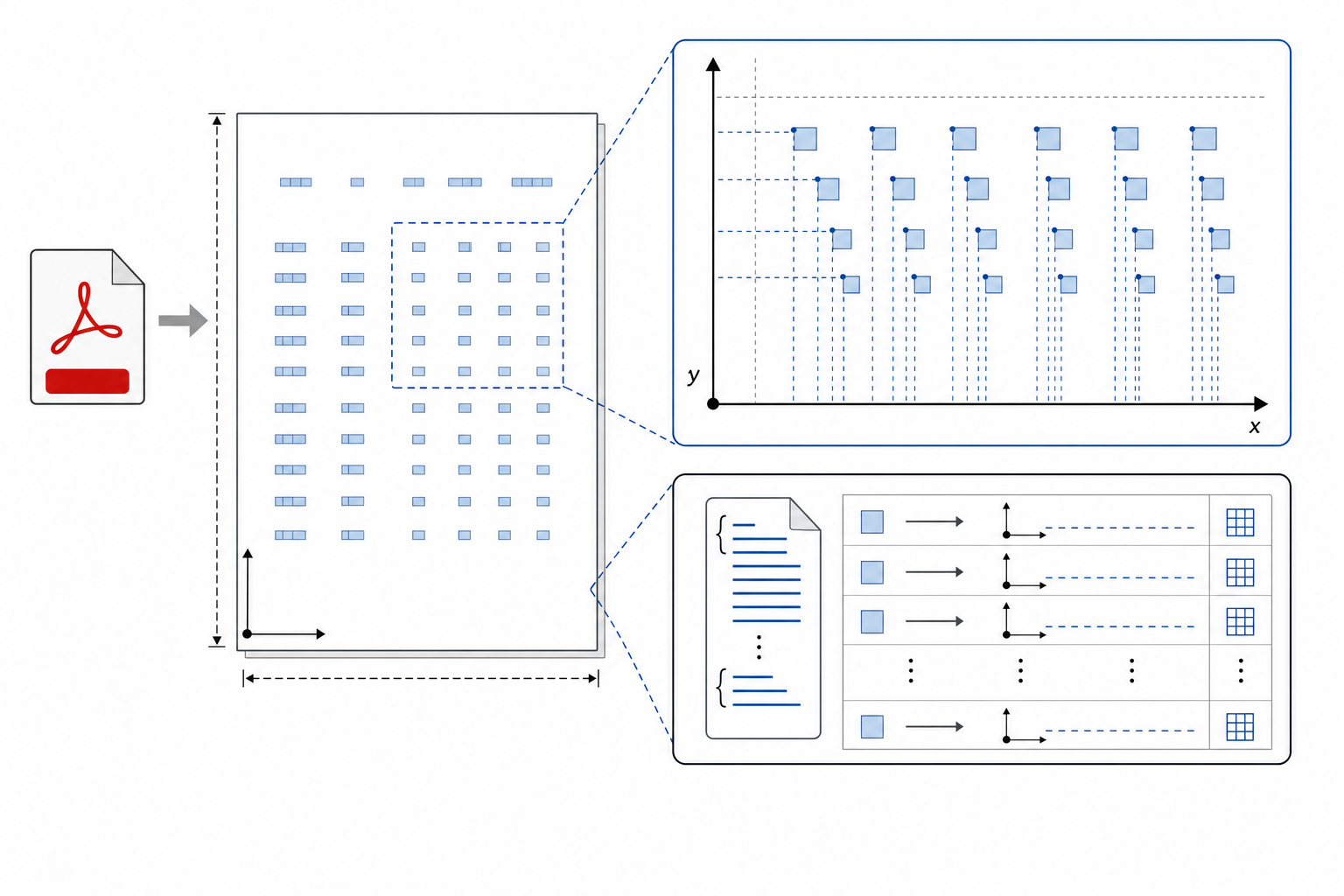
Four failure modes make this hard in practice:
- Borderless tables: These lack grid lines, so cell boundaries require inference from whitespace gaps that shift with font size and layout changes.
- Merged cells: Spanning multiple columns, these disrupt uniform grid assumptions and produce misaligned output downstream.
- Multi-page tables: These require header reassociation across page boundaries, which most parsers skip entirely.
- Scanned PDFs: These store tables as pixel images with no text layer, meaning OCR must run before any structural reconstruction is even possible.
The Three Core Approaches to Table Extraction
Three broad approaches handle PDF table extraction, each with different architectural tradeoffs that show up clearly in production.
Rule-Based Parsing (Heuristic / Coordinate-Based)
Tools like Tabula and Camelot parse PDF coordinate data directly. Tabula's lattice mode traces visible grid lines; its stream mode infers columns from whitespace gaps. This extracts data accurately from native CSV-to-PDF exports and standardized forms with fixed column widths.
OCR-Based Extraction
When PDFs are scanned or image-based, OCR converts pixels to text first. The extracted text then feeds into a parsing layer. The failure mode: OCR discards spatial relationships, so merged cells, rotated headers, and multi-line values lose their structural context before any table logic runs.
AI and LLM-Based Extraction
LLM-based extractors read document structure semantically. They handle layout variation, irregular column spans, and implicit row groupings that break coordinate parsers entirely.
What Layout Detection Models Actually Do
Where OCR reads character sequences left-to-right, layout detection models identify bounding regions first. They geometrically resolve table boundaries, column separators, row spans, and merged cells before extracting content within those regions.
This matters for tables because tabular data breaks OCR assumptions. A cell value like "1,240.00" has no semantic relationship to the cell beside it unless the spatial relationship between them is preserved. OCR without layout context collapses that relationship, producing a flat string where column structure existed.
Layout detection models treat position as data. Row membership, column alignment, and cell adjacency are resolved geometrically before any text is read, which is why they recover merged cells, multi-line headers, and rotated tables that rule-based extractors miss entirely.
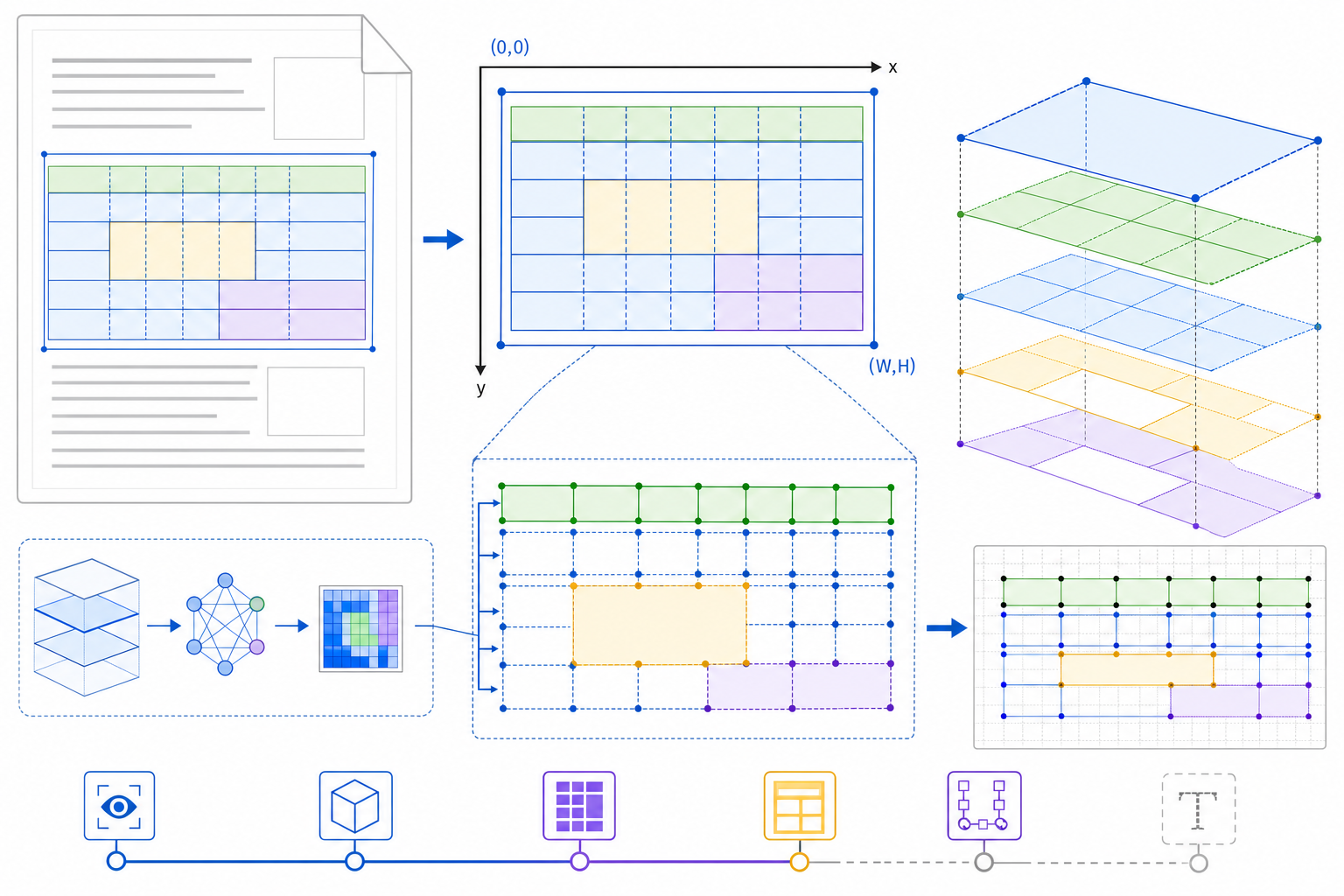
Python Libraries for Table Extraction: Tabula, Camelot, and pdfplumber
Three Python libraries handle the majority of open-source PDF table extraction work: Tabula, Camelot, and pdfplumber. Each takes a distinct architectural approach, and each fails on a different class of document. Comparative benchmarks across document types show that PyMuPDF and pypdfium outperform others on text extraction, but table detection accuracy varies widely with layout complexity.
Tabula
Tabula uses heuristic-based detection, identifying table boundaries by analyzing whitespace gaps and character positioning in the PDF text layer. It works well on clean, digitally-generated PDFs where columns align consistently. Feed it a scanned document or a table with merged cells, and the column boundaries collapse.
Camelot
Camelot offers two parsing modes: Lattice for tables with visible ruling lines, and Stream for whitespace-delimited tables. Lattice mode is reliable when borders are present; Stream mode requires manual configuration of column separators and edge tolerances, which breaks the moment a new layout variation shows up in production.
pdfplumber
pdfplumber builds on pdfminer and gives teams character-level access to the PDF coordinate space. Extraction logic is fully programmable, which means teams can handle edge cases that Tabula and Camelot cannot. The tradeoff is that every document type requires its own extraction code, so layout drift across vendor invoices or quarterly reports means rewriting rules repeatedly. pdfplumber requires more implementation effort but provides finer control over complex layouts.
| Library | Detection Method | Scanned PDF Support | Merged Cell Handling | Configuration Overhead |
|---|---|---|---|---|
| Tabula | Whitespace heuristics | No | Fails | Low |
| Camelot | Ruling lines / Stream | No | Partial (Lattice only) | Medium to high |
| pdfplumber | Coordinate-level rules | No | Manual logic required | High |
Scanned PDFs and OCR: Why You Need a Different Strategy
Scanned PDFs add a layer that native PDFs skip entirely: the document is an image, not a text layer, so every extraction method has to run OCR before any table logic applies. The accuracy of that OCR pass sets a ceiling on everything downstream.
Standard OCR reads text sequentially, left to right, top to bottom. Tables break that assumption. A three-column financial table gets linearized into a single stream where row relationships collapse and column alignment disappears. Tools like pdfplumber and Camelot partially recover structure by detecting line geometry, but that detection fails on scanned documents with skew, low contrast, or borderless tables.
When Vision Language Models Outperform Traditional OCR
VLMs read a document as an image first and parse layout structure before attempting field extraction. That architectural difference matters most on tables: where OCR pipelines convert pixels to a character stream and then apply regex or heuristics to recover row and column relationships, VLMs resolve spatial relationships directly from the visual representation, preserving the grid structure that OCR flattens.
The failure mode is specific. A merged header cell spanning three columns registers in an OCR output stream as a single text token with no coordinate context. A VLM sees the span, maps it to the columns beneath it, and produces structured output where the header-to-column relationship is intact. For financial statements, insurance schedules, and logistics rate tables with irregular column counts, that difference shows up as extraction accuracy beyond formatting quality.
Teams running document pipelines at scale hit a second constraint: PDF tables frequently cross page boundaries. Template-based and regex-based extractors reset context per page, so a row that starts on page 4 and completes on page 5 either splits into two incomplete records or drops entirely. VLMs that maintain document-scoped context resolve cross-page rows by carrying the column schema forward across the boundary.
The tradeoff is compute cost per page. VLM inference runs at higher latency and cost than a pdfplumber parse or a Camelot lattice extraction. For high-confidence, variable-layout documents where accuracy directly affects a downstream decision, such as an underwriting output or a compliance filing, the cost differential is worthwhile. For bulk extraction of uniform, machine-generated PDFs with clean borders, lighter-weight tools remain appropriate.
Extend Parse 2.0: Layout-First Document Parsing at Production Scale
When teams move from prototypes to production, open-source extraction code often breaks on the next layout variation. Teams need extraction infrastructure that ships structured, validated output without accumulating a maintenance backlog. Extend is the complete document processing toolkit comprised of the most accurate parsing, extraction, and splitting APIs to ship your hardest use cases in minutes, not months. Extend's suite of models, infrastructure, and tooling is the most powerful custom document solution, without any of the overhead. Agents automate the entire lifecycle of document processing, allowing your engineering teams to process your most complex documents and optimize performance at scale.
Parse 2.0 is built on the layout-first architecture this article describes. A custom vision model trained on over one million annotated documents detects table regions, classifies layout elements, and routes pages through purpose-built models before any text is read. By learning layout spatially, it natively solves the core table extraction challenges, like merged cells, borderless grids, and spanning headers, that break coordinate parsers and standard OCR.
The RealDoc-Bench benchmark validates Parse 2.0 on real-world documents across logistics, financial services, healthcare, and real estate, achieving 0.847 Adjusted F1 on layout accuracy across 1,500 samples and 95.7% document Q&A output accuracy across 1,359 prompts and 581 documents. This provides a strong score compared to baseline models that struggle to maintain structure. Borderless tables, scanned documents, and spanning headers extract without template configuration or per-document tuning. Teams processing carrier-format bills of lading, multi-vendor invoices, or multi-page financial statements get structured output that scales with document volume.
Final Thoughts on Production-Grade PDF Table Extraction
Template-based extractors reset on the first layout variation, coordinate parsers fail on borderless tables, and OCR-only pipelines flatten the spatial relationships that preserve column structure. If your workflows depend on extracting structured data from scanned invoices, multi-page financial statements, or carrier-format bills of lading, schedule a demo to see how Parse 2.0 can extract a table from a PDF, resolving merged cells and cross-page rows without per-document configuration. Your table extraction infrastructure should scale with document complexity, not extraction code.
FAQ
Can I extract tables from PDF to Excel without writing custom parsing code for every layout variation?
Yes. Layout detection models resolve table structure from spatial relationships between cells, so they extract across format variations without requiring per-document configuration. Python libraries like pdfplumber and Camelot require manual column separator rules that break on the first layout change; VLM-based extractors read structure from the visual representation and produce Excel-compatible output directly.
Tabula vs Camelot vs pdfplumber for extracting tables from scanned PDFs?
None of these libraries support scanned PDFs without an OCR preprocessing step. Tabula and Camelot parse the text layer directly, so image-based pages return empty output. pdfplumber provides character-level access to PDF coordinates but requires a text layer to operate. Scanned documents need OCR first, then layout inference, which these tools don't handle natively.
How do I extract tables from PDF to Excel when cells span multiple columns?
Merged cells break coordinate-based parsers because they assume uniform grid structures. Layout detection models identify spanning cells as single regions covering multiple grid positions and preserve their relationships to child rows in the output schema, so the header-to-column mapping stays intact when exporting to Excel or dataframes.
What's the fastest way to handle multi-page table extraction from PDF in production?
Production pipelines require document-scoped context that carries column schemas across page boundaries, so tables that split mid-row extract correctly without manual reassembly. Extend Parse 2.0 processes complete multi-page documents with cross-page table continuation in minutes. Template matchers and rule-based extractors reset per page, causing row splits and duplicate entries at page breaks.
When should I use a VLM instead of pdfplumber to extract table data from PDFs?
VLMs read layout structure before attempting field extraction, which matters when tables contain merged headers, borderless cells, or irregular column counts that break whitespace-based parsers. For high-volume, uniform PDFs with clean grid lines, pdfplumber remains cost-effective; for variable-layout documents where accuracy affects downstream decisions, such as financial statements, insurance schedules, and logistics manifests, VLMs resolve spatial relationships that OCR-first tools flatten entirely.