At Extend, we work with customers who process mission-critical documents at scale. For them, accuracy isn't optional. A single misclassified invoice or incorrectly split contract can cascade into downstream errors that erode trust and create operational chaos.
One of the fundamental challenges in production-ready AI pipelines is engineering determinism and reliability. Prompts are a limited form of context engineering. When you're building document processing systems, you'll eventually hit cases where language simply can't describe what you need the model to recognize.
You can attempt to write incredibly detailed prompts. You can add edge case after edge case. But at a certain point, describing visual patterns in words breaks down. Two invoices might be semantically identical but formatted completely differently. A classifier needs to distinguish between receipts that look like invoices and invoices that look like receipts. A splitter needs to recognize where one contract ends and another begins based on subtle layout cues.
What you really need is to show the model examples. When the document looks like this, classify it as Type A. When the layout matches that pattern, split here. This is how humans learn document processing. You would train someone by handing them a manual, but you'd also walk them through real examples and say, "See this? Here's what it looks like in practice.”
That's what Memory does. It turns your processors into systems that learn from validated examples, not just instructions.
How Memory Works
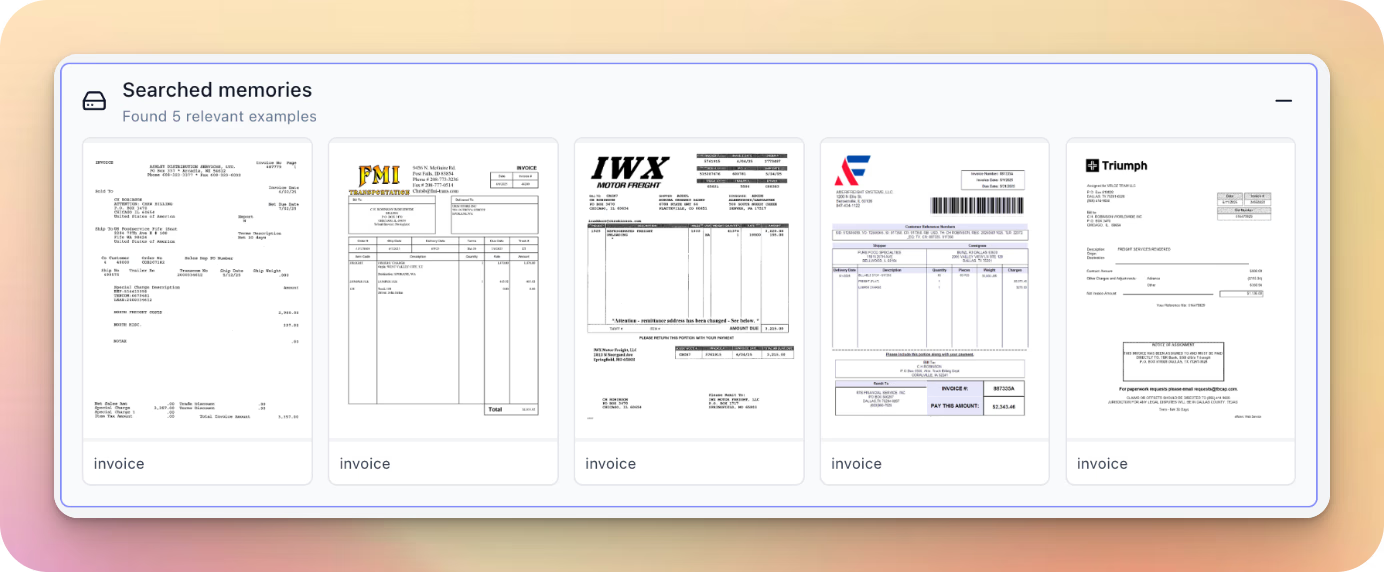
Memory is a multimodal retrieval system that stores representations of how documents were previously classified, split, or extracted. When a new document arrives, Memory retrieves the most visually similar examples and uses them to guide processing decisions.
Traditional retrieval systems match on meaning. Memory searches by visual layout similarity, not semantic similarity. Memory matches on spatial arrangement of elements, presence of tables or headers, overall document structure. In document processing, layout is often the most reliable signal. Two utility bills from different months will have completely different numbers and dates, but the same provider always formats their bills identically. Memory recognizes that pattern.
Here's the flow:
- Automatic example collection. Every time you validate a result (through evaluation sets or by correcting outputs in the review UI), that document becomes a potential example for future processing.
- Retrieval. When processing a new document, Memory uses multimodal embeddings to find the most visually similar historical documents. This happens in milliseconds, adding minimal latency.
- Contextual learning. The retrieved examples and their validated results are added to the processor's context. For classification, that might be: "Here are five documents with similar layouts. Four were classified as Type A." For splitting: "Pages with this visual structure appeared at document boundaries 87% of the time."
- Continuous improvement. As you process more documents and validate results, your Memory bank grows. The system sees more edge cases, learns more vendor-specific patterns, builds a richer understanding of your document landscape.
Each processor can query Memory at decision points. The processor receives the retrieved examples and uses them as additional context when prompting the underlying model.
Why Memory Matters for Production
At its core, Memory serves as a generic, flexible, and scalable primitive for example-based improvement. Rather than building custom learning systems for each document type or processor, you get a unified infrastructure that works everywhere. It scales naturally as you process more documents, adapts to new formats as examples accumulate, and requires no special tuning or maintenance
For classification tasks, Memory handles cases where documents are visually similar but have subtle differences that are hard to capture in prompts. You might be classifying invoices from hundreds of vendors. Some use specific header layouts. Others have unique table structures or footer elements. Writing rules for each variant is impractical. Memory learns these patterns automatically by seeing examples.
For splitting, Memory learns to recognize document boundaries. When you receive a merged PDF containing multiple contracts, the splitter needs to know where one document ends and the next begins. Prompts can handle straightforward cases, but real-world documents include cover pages, signature pages, addendums, and exhibits that create ambiguity. Memory provides empirical evidence: "In past examples, pages with this centered title and increased whitespace marked new document starts."
For extraction, Memory will help identify where specific fields appear across different document formats. The account number might be in the top-right corner for one vendor and embedded in a table for another. Memory will learn these location patterns from validated examples.
Memory reduces the ongoing maintenance burden of prompt engineering. Instead of constantly tweaking prompts to handle new edge cases, the system learns automatically. New vendor formats adapt quickly as examples accumulate. Engineers can focus on building downstream product experiences instead of maintaining document processing infrastructure. The system gets smarter over time without code changes. More documents processed means more examples in Memory, which means better accuracy on edge cases. This creates a compounding advantage: your document processing system becomes more valuable the longer you use it.
Memory in Action
Here's two real examples showing how Memory thrives at classifying logistics documents with highly specific requirements.
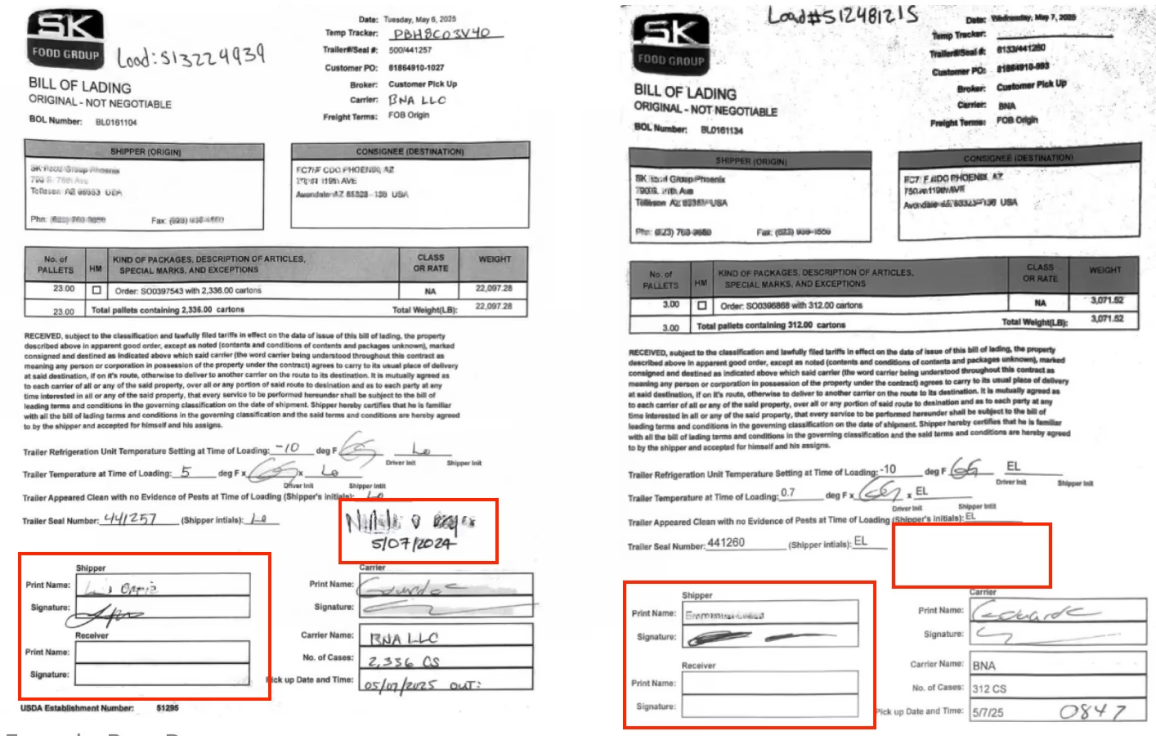
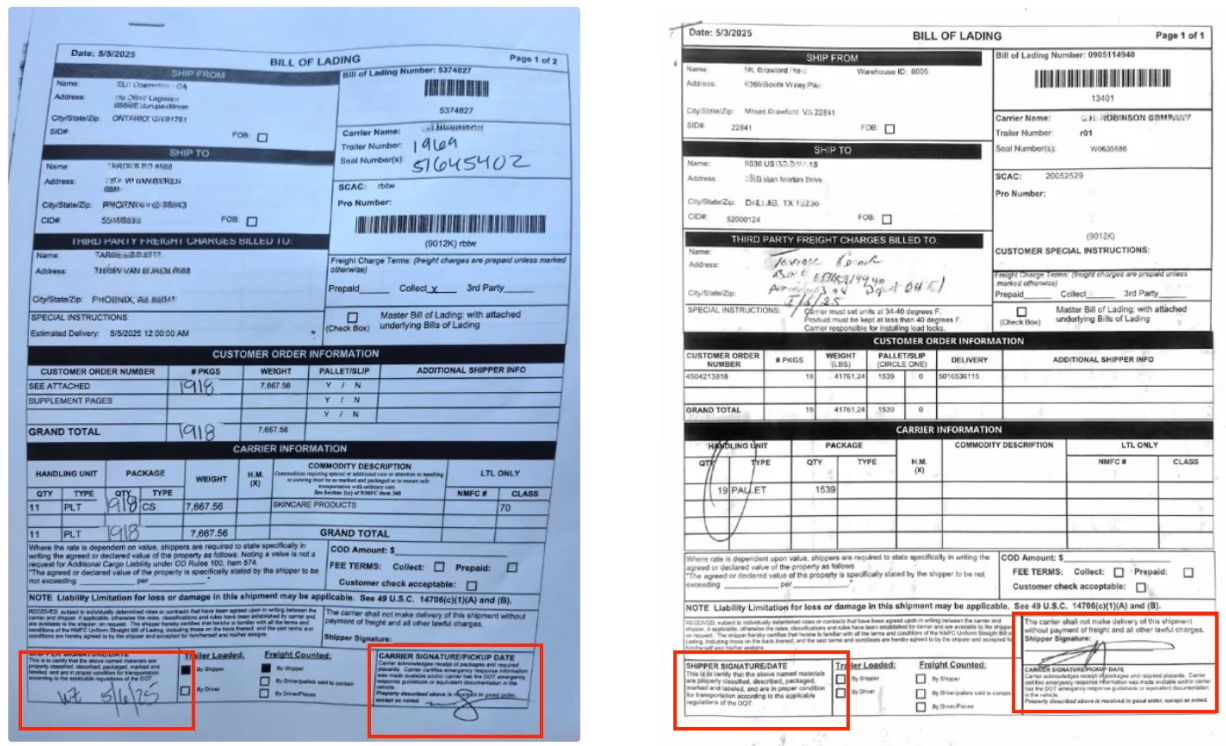
For bills of lading, the annotations indicate different class types that need to be routed to the right workflow for extraction and actioning. You could provide a human the above examples, and, with some explanation, they’d be able to classify the documents correctly. But it’s difficult to prompt for every scenario reliability and transfer that tacit knowledge into a automated process.
However, Memory performs well on these types of classification problems because the semantic differences are mostly based on visual categories, as opposed to the text. Thus, we can feed Memory examples of what visual layouts to look for, and teach, akin to a human looking at the above differences, how to classify different document layouts.
The flexibility of Memory means you can keep adding and removing historical examples as your system ingests new document types, without endlessly adjusting prompts or writing increasingly complex rules.
Memory and Composer: Better Together
Both Memory and Composer help optimize processors, but they work in fundamentally different ways.
Composer uses an AI agent to automatically reverse engineer optimal prompts when provided with ground truth data. It's most useful when the classification or extraction task is primarily semantic. The agent learns rules and crafts robust prompts for downstream reasoning models.
Memory is most useful when documents are visually similar but have subtle differences that are hard to capture in prompts, even with the best reasoning models. It provides concrete examples rather than language-based instructions.
They often should be used together:
- Create a large evaluation set for your processor
- Let Composer optimize the prompts
- Iterate until you hit a wall
- Enable Memory and sync validated examples
- Watch accuracy improve on the remaining edge cases
Composer gives you the rules. Memory gives you the examples. Together, they create a system that combines explicit instructions with learned patterns.
Available Today
Memory is currently available in public beta for Classifiers. Support for Extractors and Splitters is coming soon.
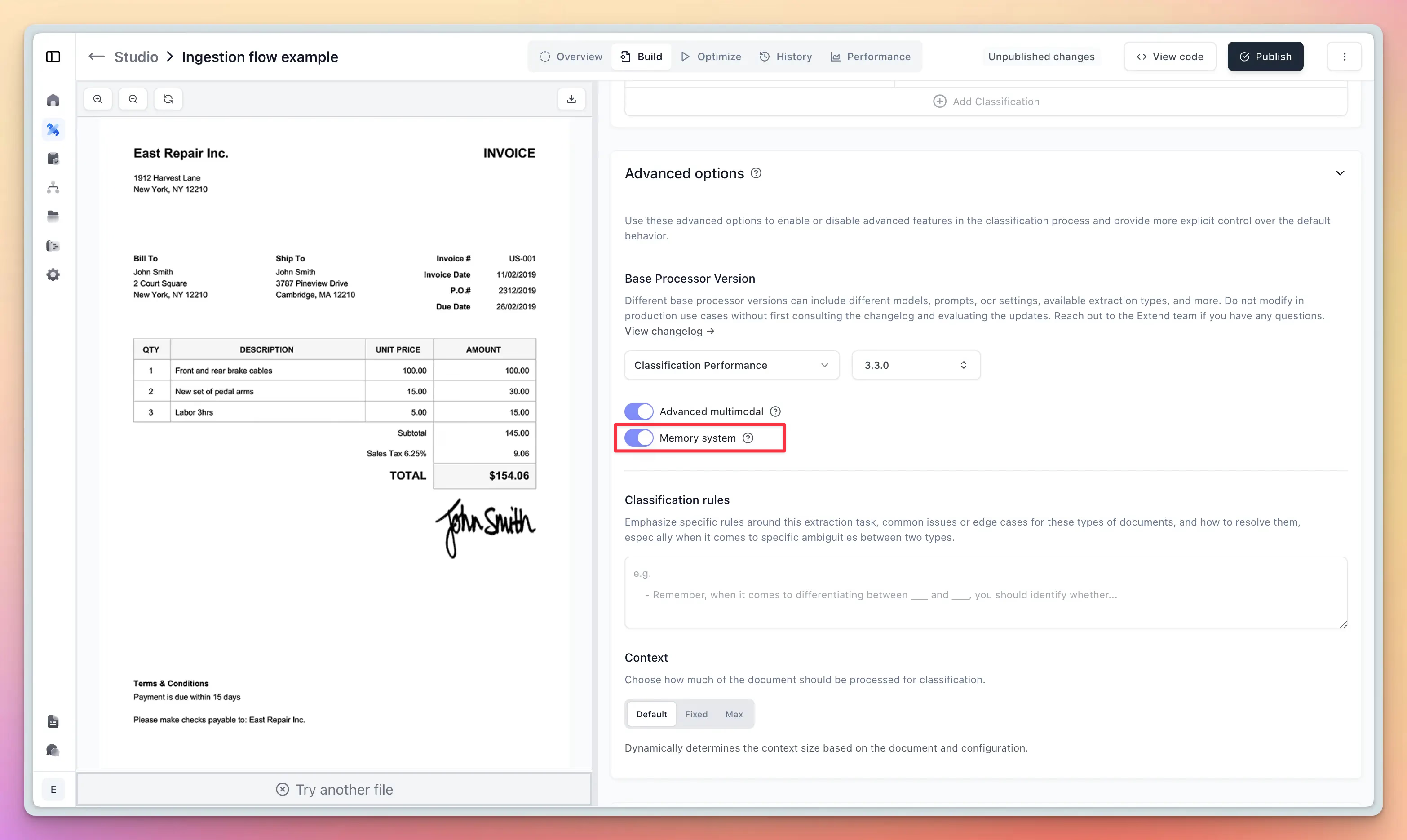
To enable Memory for a Classifier:
- Navigate to your Classifier's configuration page
- Expand the Advanced options section
- Enable the Memory system toggle
Once enabled, Memory starts learning from validated results immediately. You can manage your stored examples by clicking the "Manage memory" button, where you can view all examples, edit classifications, disable examples temporarily, or delete examples that are no longer relevant.
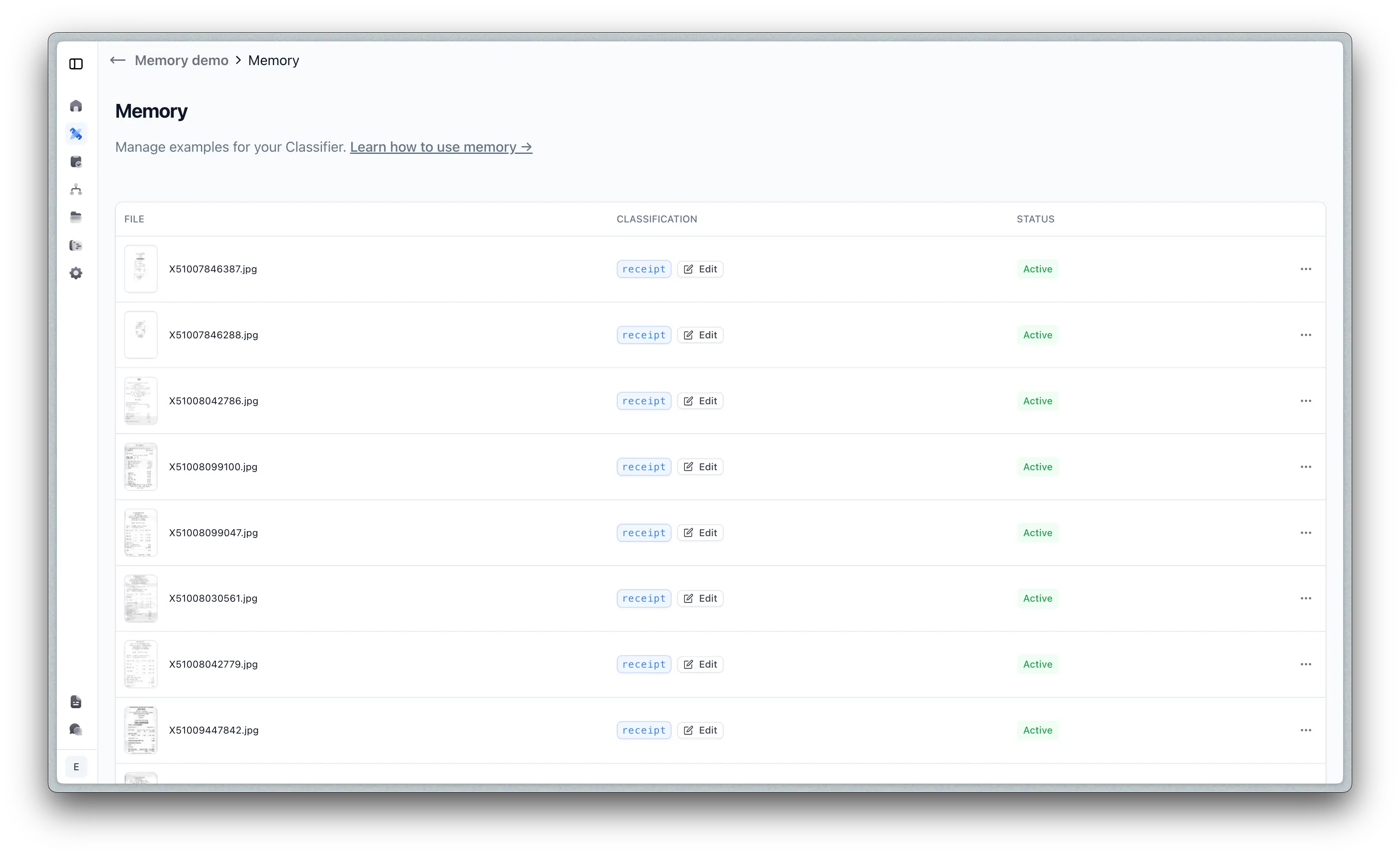
For convenience, you can also create and sync Memory examples directly from evaluation sets, making it easy to bootstrap your Memory bank with validated data.
If you're building document processing systems and struggling with edge cases that prompting alone can't solve, Memory can help you achieve production-grade accuracy faster. Our team can work with you to identify use cases where Memory will have the biggest impact, optimize your processors to leverage Memory effectively, and monitor accuracy improvements as Memory learns from your documents.
Talk to us about getting started with Memory or try it yourself at extend.ai