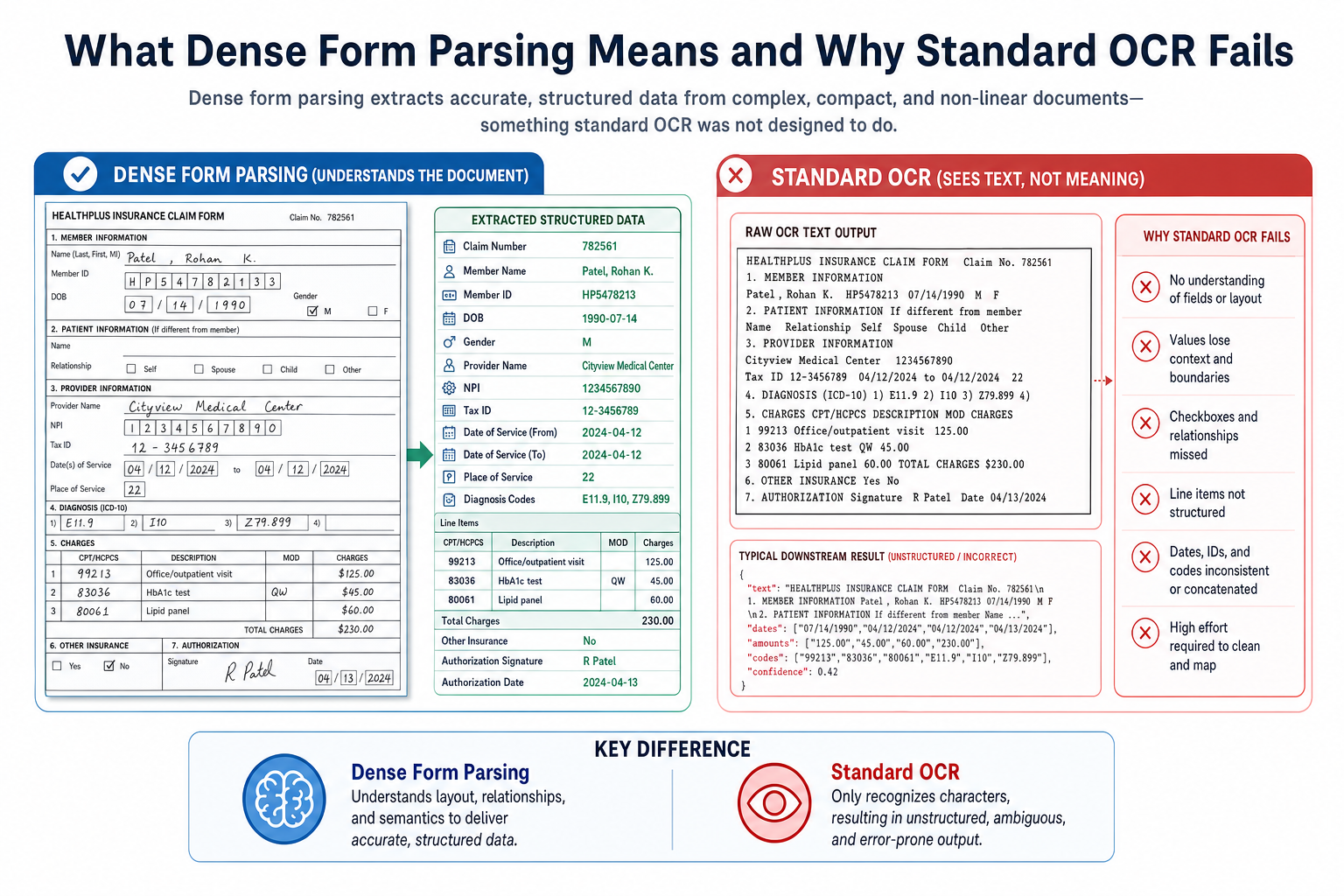
A standard OCR pipeline fails on a 40-column remittance grid for a structural reason: it reads left-to-right, top-to-bottom, placing tokens from columns one, two, and three into a single interleaved sequence before any field mapping runs. Tax schedules, customs declarations, and prior authorization forms all share this failure mode. Each compresses multiple logical fields into a single visual cell, wraps labels mid-column, and stacks checkboxes inside ruling-line grids. Template matchers assign fixed bounding box coordinates per field, so any print registration shift or new form variant resets extraction accuracy to zero with no recovery path. Dense form parsing is the problem of extracting structured data from these layouts: packed grids, cramped checkbox clusters, and multi-column label-value pairs built for human readers, not machines. Layout models solve it by running a structural detection pass first, building a spatial region graph from ruling lines, cell boundaries, and checkbox clusters that extraction then walks instead of reading order, keeping field-to-value associations intact regardless of column compression or grid density.
TLDR:
- OCR reads left-to-right, top-to-bottom, so dense multi-column forms produce interleaved token sequences where field values systematically misassign to wrong labels.
- Layout models run a structural detection pass first, producing a spatial region graph that extraction walks so field values stay bound to correct labels regardless of proximity to neighboring fields.
- Checkboxes under 20x20 pixels on scanned documents fall below OCR confidence thresholds; vision models classify fill patterns directly from pixel data, bypassing the OCR layer for that field type.
- Three production pipeline patterns handle dense forms: two-stage OCR plus layout stack, document-scoped context graph, and per-field confidence scoring that routes low-confidence regions to human review.
- Extend's Parse 2.0 scored 0.847 Adjusted F1 across 1,500 samples on the RealDoc-Bench layout benchmark covering dense grids, merged headers, and multi-column forms across logistics, healthcare, financial services, and real estate.
What Dense Form Parsing Means and Why Standard OCR Fails
Dense form parsing is the extraction of structured data from documents where fields are compressed, visually ambiguous, or arranged in non-linear layouts. Tax schedules, insurance applications, and customs declarations are the canonical examples: fields share horizontal bands, checkboxes sit inside tables, and labels wrap mid-cell. The failure mode is architectural: standard OCR pipelines treat a document as a flat token sequence read left-to-right, top-to-bottom. A dense insurance intake form with staggered label-value pairs produces interleaved token sequences where field labels and values from adjacent columns mix. Downstream document extraction logic misassigns values to fields systematically. A standard OCR model outputs the character nearest a filled region, so a checked box and its label frequently tokenize out of order or merge entirely, requiring full manual review queues at volume. Template-based systems encode layout assumptions at configuration time; any deviation from the expected grid resets extraction accuracy to zero for that document region. Correct extraction requires a model that reasons about spatial relationships beyond reading order.
Layout Detection as the First Pass
Detection models trained on document corpora learn to distinguish several region types that appear frequently in dense forms. The document layout analysis survey covers how structural detection underpins field extraction across packed grid formats:
- Checkbox clusters: the bounding box of the mark and the bounding box of its label must be associated by proximity, not by document order
- Ruling-line grids: cell boundaries define field scope even when no explicit label is present inside the cell
- Multi-column label-value pairs: horizontal alignment across a row carries semantic meaning that linear text extraction drops entirely
- Stacked fields with shared borders: two adjacent fields share a ruling line and the model must assign that line to one or both without double-counting
Extraction models that skip structural detection fall back on reading-order heuristics. On dense forms, reading order fails: a left-to-right, top-to-bottom pass through a multi-column grid produces interleaved field values from different logical records. The detection pass produces a region graph that PDF extraction then walks, so field values stay bound to the correct label regardless of physical proximity to neighboring fields.
Reading Order in Dense Multi-Column and Grid Layouts
Reading order breaks first in the grid cell containing three stacked checkboxes and a 6-point label. OCR engines assign reading order across the full page width, placing grid cells from columns one, two, and three into a single interleaved sequence. A checkbox from row one in column three gets assigned before the label from row two in column one; extracted data becomes structurally meaningless before any field mapping runs. Layout models trained on grid documents treat cell boundaries as atomic units, assign reading order within each cell first, then sequence cells by grid position, preserving the logical grouping the form was designed around.
Where Column Detection Fails Without Cell Boundary Awareness
Two failure modes show up consistently across dense grid forms:
- Column bleed: a model detects two vertical text regions and treats them as independent columns, then merges mid-column text into an adjacent column's sequence when a field label spans more than one line.
- Row interleaving: row height varies across a grid, which causes a model without explicit row segmentation to pull values from row three into the sequence for row two, producing field-value mismatches that pass confidence thresholds but carry wrong data.
Both failures are architectural. A model without cell-boundary detection cannot recover from them through post-processing alone. When cell borders render at sub-pixel widths on scanned documents, OCR produces a flat token stream with no spatial metadata; layout models score each token's positional relationship to its neighbors, so a 40-column remittance grid outputs as a structured matrix instead of a line of concatenated strings.
The Checkbox Problem in Dense Forms
Checkboxes are among the hardest elements for layout models to parse reliably. In dense forms, checkboxes appear in tight clusters, sometimes with labels that wrap across lines, sometimes with no visible separation between options.

The core failure mode is state detection. A 2025 arXiv study on checkbox detection in real-world forms confirms that current vision models struggle with interpreting checkable content across legal, finance, and healthcare documents. A checkbox that is checked, unchecked, or partially filled requires the model to interpret a small visual region, often under 20x20 pixels on low-resolution scans (e.g., 150 DPI), where JPEG compression and scan skew corrupt the signal. Template matchers assign fixed bounding boxes per checkbox position; any print registration shift causes misclassification with no recovery path. Layout models reason over the full visual context, reading checkbox state relative to surrounding label text and adjacent field structure, so partial fills and lightly marked boxes recover correctly where pixel-threshold detectors fail.
Pipeline Architectures for Dense Form Parsing
| Pattern | How It Works | What It Solves | Key Tradeoff |
|---|---|---|---|
| Two-stage OCR + layout model stack | A base OCR layer lifts raw text and bounding boxes; a layout model runs a second pass to assign spatial roles to each detected region. | Field adjacency, column membership, and checkbox state detection across packed grids. | Text extraction layer stays swappable, but two-pass latency is higher than single-model approaches. |
| Document-scoped context graph | A context graph sits between the layout model and field extraction, tracking spatial relationships across the full page instead of resolving each field in isolation. | Orphaned labels in cramped grids resolve to their values through positional inference, bypassing regex proximity rules. | Graph construction adds memory overhead; pays off on dense multi-column forms where field adjacency is ambiguous. |
| Per-field confidence scoring with human-in-the-loop review | Confidence scoring runs per field; any field below a set threshold gets flagged before output commits. | Error rates stay bounded when layout variation exceeds training distribution; no hard extraction decision on ambiguous regions. | Requires a review queue and SLA for flagged fields; throughput depends on reviewer capacity for low-confidence volume. |
How Extend's Parse 2.0 Handles Dense Form Parsing
Extend is the complete document processing toolkit comprised of the most accurate parsing, extraction, and splitting APIs to ship the hardest use cases in minutes, not months. Extend's suite of models, infrastructure, and tooling is the most powerful custom document solution, without any of the overhead. Agents automate the entire lifecycle of document processing, allowing engineering teams to process the most complex documents and optimize performance at scale. Extend's Parse 2.0 engine handles dense form parsing through a combination of OCR, specialized computer vision models, and VLMs that treat document layout as a first-class input, not a preprocessing artifact. The computer vision layer maps spatial relationships between fields before extraction begins, so a checkbox 3 pixels from its label in a cramped grid resolves correctly instead of orphaning the value.
The per-field confidence scoring pattern described above is more than a theoretical architecture choice: it's built into the platform. Extend exposes per-field confidence, including both OCR- and language-model-generated scores, that can be routed through conditional workflow steps, and a multi-pass review agent flags potential errors before output ships, so low-confidence regions on dense forms get caught before they reach downstream systems, not after.
Parse 2.0 was validated on the RealDoc-Bench benchmark, which measures parsing performance on complex, real-world documents across logistics, healthcare, financial services, and real estate. It leads on layout accuracy with an Adjusted F1 of 0.847 across 1,500 samples and hits 95.7% accuracy on document Q&A across 1,359 prompts and 581 documents. These gains on structure-heavy documents reflect the architecture's ability to hold spatial context across dense field regions without losing field-to-value correspondence when layout varies between form versions.
Final Thoughts on Layout-Aware Dense Form Parsing
Teams selecting a layout model for production need three things from it: spatial region detection before extraction runs, per-field confidence scoring so low-confidence regions route to human review before output commits, and benchmark validation on real document types, not synthetic layouts. Parse 2.0 delivers on all three, validated on RealDoc-Bench against the same document types that break template-based extractors. Run your documents through Extend to see how Parse 2.0 performs on your dense form layouts.
FAQ
What's the difference between layout-aware parsing and standard OCR for dense forms?
Standard OCR reads documents as flat token sequences left-to-right, top-to-bottom, which causes field labels and values from adjacent columns to interleave into garbled output on packed layouts. Layout-aware parsing runs a structural detection pass first, mapping bounding boxes, ruling lines, and checkbox clusters into a spatial graph, so extraction walks that graph instead of reading order, keeping field-to-value associations intact regardless of column compression or grid density.
How do I assess whether a layout model handles dense grid forms accurately?
Test on Adjusted F1 for layout accuracy across real production documents, not synthetic layouts or character-level OCR scores. Character-level metrics report text correctness while field-level misassignment goes undetected: a model reads every character correctly but assigns values to the wrong fields across a 40-column remittance grid. Extend's Parse 2.0 scored 0.847 Adjusted F1 across 1,500 samples on the RealDoc-Bench benchmark, which tests against dense grids, merged headers, and multi-column form layouts drawn from production documents across logistics, healthcare, financial services, and real estate.
Best pipeline architecture for dense form parsing in production?
The most reliable production pattern combines a two-stage OCR plus layout model stack with per-field confidence scoring and human-in-the-loop routing for low-confidence regions. The OCR layer lifts raw text and bounding boxes; the layout model assigns spatial roles independently; confidence scoring runs per-field and flags anything below threshold before output commits, keeping error rates bounded when layout variation exceeds training distribution. This is the pattern Parse 2.0 runs by default.
Can I parse checkbox grids without custom templates for each form version?
Yes. Vision models trained on checkbox states classify fill patterns and border artifacts directly from pixel data, bypassing the OCR layer for that field type entirely. Template matchers assign fixed bounding box coordinates per checkbox position, so any print registration shift causes misclassification; no recovery path exists without rebuilding the template. A layout-aware model reads checkbox state relative to surrounding label text and adjacent field structure, which is why partial fills and lightly marked boxes at sub-20x20 pixel resolution resolve correctly across form versions without per-template configuration.
Why does reading order fail on multi-column dense forms even when OCR text extraction looks clean?
OCR assigns reading order across the full page width, which places grid cells from columns one, two, and three into a single interleaved sequence. A checkbox from row one in column three gets sequenced before the label from row two in column one, so extracted data becomes structurally meaningless before any field mapping runs, even when every individual character extracted correctly. Layout models trained on grid documents treat cell boundaries as atomic units, assign reading order within each cell first, then sequence cells by grid position, preserving the logical grouping the form was designed around.