
A customs clearance invoice records what crossed a border, who shipped and received it, and what duties and taxes were charged. Brokers, freight forwarders, and importers re-key these fields into customs, ERP, and audit systems. At Nuvocargo, a cross-border freight platform, one missing document, incorrect HTS code, or mismatched consignee could hold a truck at the US-Mexico border for weeks. A customs invoice extraction API reads each document, scanned or digital, and returns those fields as structured data. This guide lists the fields that matter, compares five APIs, and shows how to start from a ready-made schema.
The short answer
Extend is the best fit for brokers, forwarders, and importers whose customs documents vary by broker and country, and who need the fields they file, such as HS codes and declared values, with evidence for each value.
- Your fields, not a fixed invoice model. You define the schema, so HS codes, declared values, origin, and each duty line are fields like any other. Extract returns them as JSON.
- Every value is traceable. With
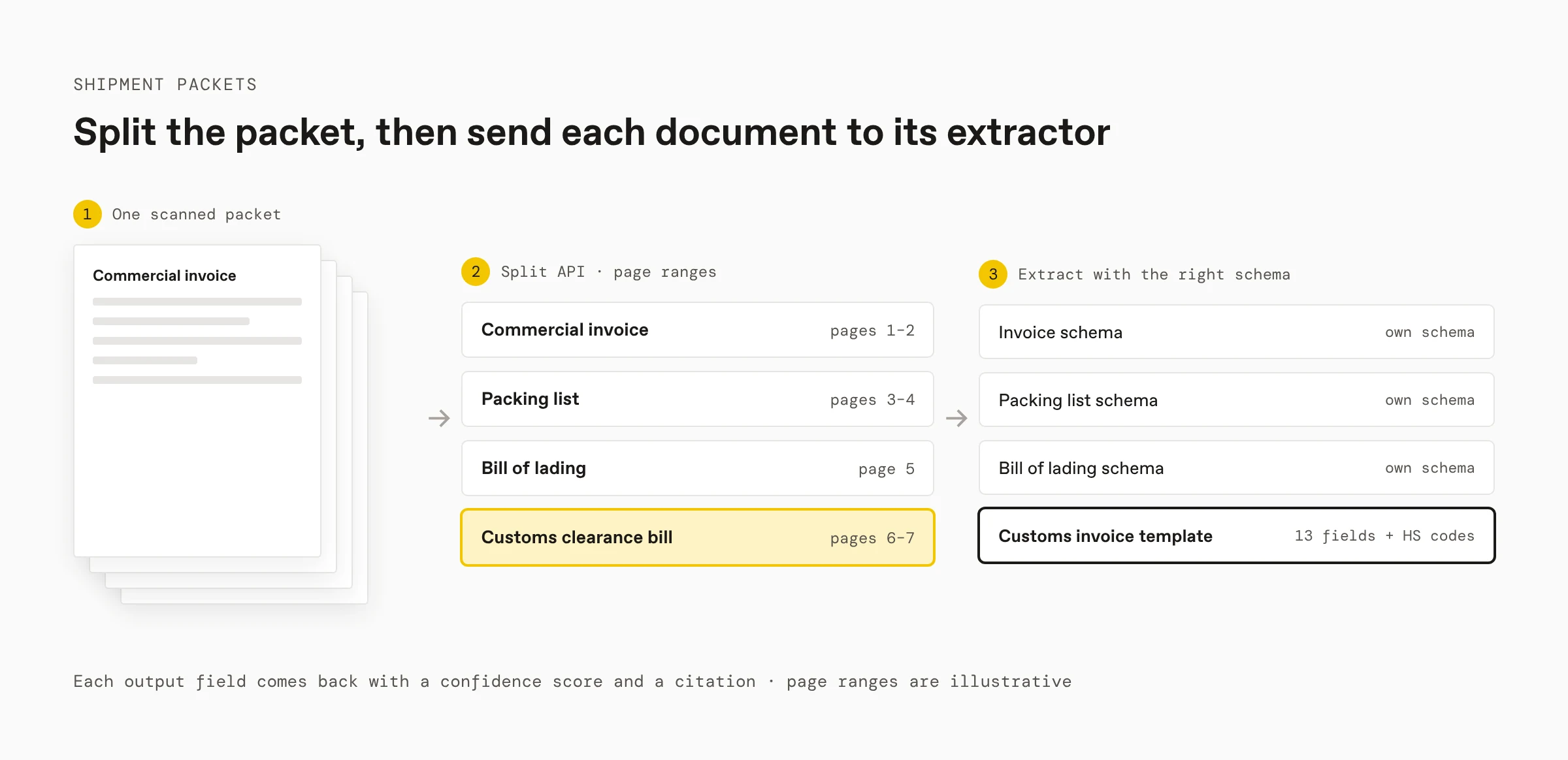
citationsEnabled: true, each field comes back with an OCR confidence score and a citation to its place on the page. - Packets become documents. The Split API separates a shipment packet into its invoice, packing list, and bill of lading before extraction.
- A schema to start from. The customs clearance invoice template runs Parse then Extract with a 13-field schema.
Nuvocargo uses Extend's classification and extraction APIs to pull consignee, SKU, invoice number, HTS codes, quantities, unit values, and currency from invoices, pedimentos, packing lists, and customs forms, reaching 97–99% accuracy across classification, extraction, and shipment attribution.
Other options fit teams with different starting points:
- Azure AI Document Intelligence for teams on Azure that want a pre-built invoice model across 27 languages, with custom models for customs fields.
- Google Document AI for teams on Google Cloud that want the Invoice Parser plus a Custom Extractor for customs fields.
- Veryfi for freight teams that also process bills of lading and freight invoices.
- Mindee for teams that want a pre-built invoice API plus a custom data extractor, with a free trial.
Fields in a customs clearance invoice
| Field | Where it appears | Notes |
|---|---|---|
| Invoice and customs declaration numbers | Header | The declaration number links the invoice to the filed entry |
| Shipper, consignee, and customs agent | Header or parties block | Agent address is often separate from the agent name |
| Origin and destination countries | Header or per line | Drives duty rates and trade agreement eligibility |
| Goods: description and quantity | Line-item table | Quantity may be units, weight, or volume |
| HS code | Line-item table | Often 6 to 10 digits |
| Declared value and currency | Line-item table and totals | Declared value per line and in total |
| Customs charges | Charges table | Each import duty, VAT, processing, or inspection fee, with its amount |
| Total customs charges and payment status | Totals block | Whether duties are paid, pending, or deferred |
Start from the template, then add tariff fields
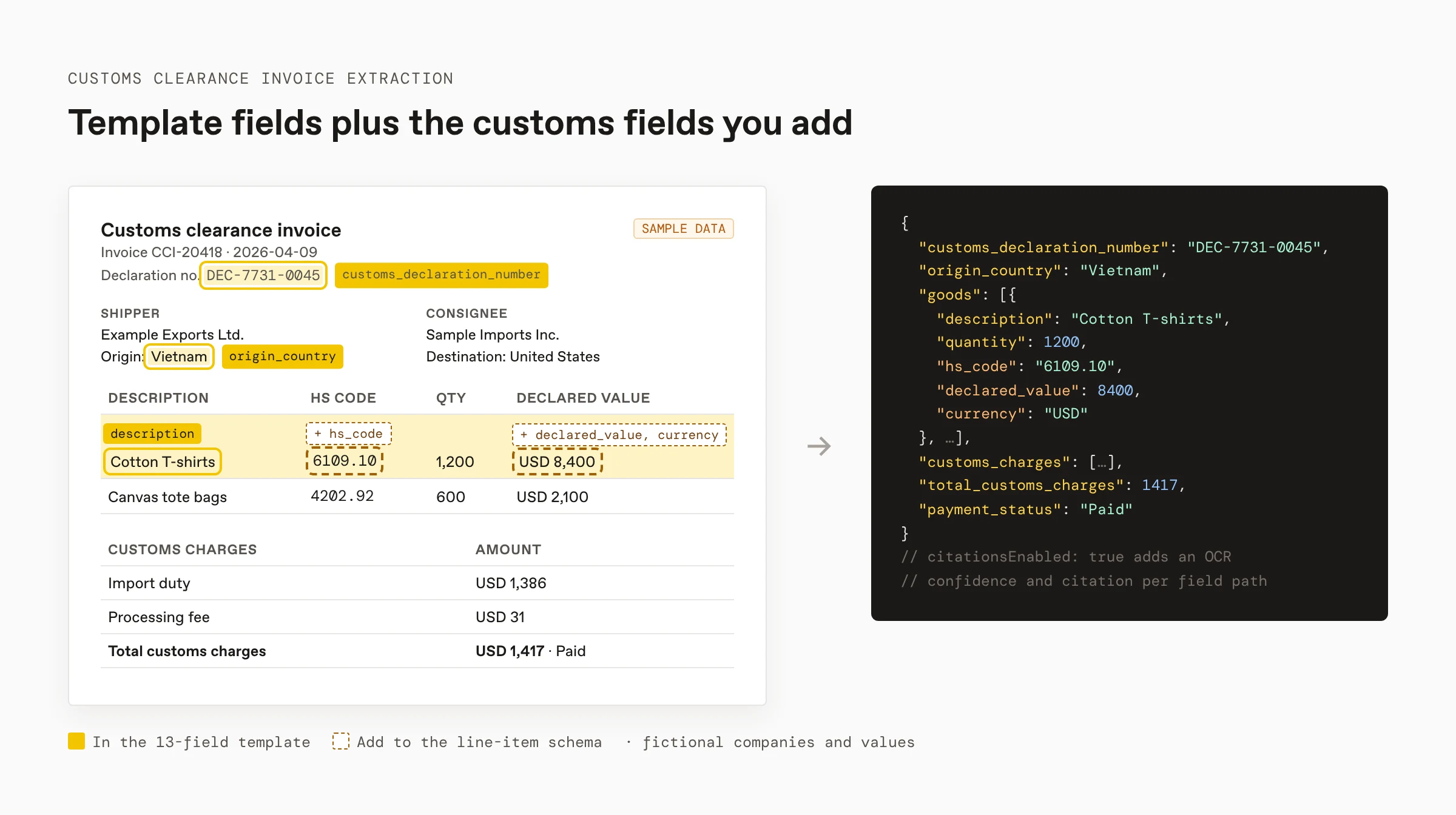
The customs clearance invoice template targets the broker's clearance bill: the document that lists the goods cleared, the duties charged, the customs agent, and whether the charges are paid. It returns goods with description and quantity, invoice date and number, shipper, consignee, origin and destination countries, payment status, customs charges, customs agent name and address, total customs charges, and customs declaration number.
Because the schema is yours, tariff fields are a small edit. Add three properties to the goods line items:
"goods": {
  "type": "array",
  "items": {
    "type": "object",
    "properties": {
      "description": { "type": ["string", "null"] },
      "quantity": { "type": ["number", "null"] },
      "hs_code": { "type": ["string", "null"], "description": "Harmonized System code for this line, as printed" },
      "declared_value": { "type": ["number", "null"], "description": "Declared customs value for this line" },
      "currency": { "type": ["string", "null"], "description": "ISO 4217 currency code of the declared value" }
    }
  }
}
Commercial invoices, where HS codes and declared values usually originate, use the same approach with a schema for their own fields.
Customs clearance invoice extraction APIs compared
Extend publishes this guide and makes Extend, one of the tools compared. Every claim below comes from the vendor's public documentation or pricing page, checked in November 2026.
| Extend | Azure AI Document Intelligence | Google Document AI | Veryfi | Mindee | |
|---|---|---|---|---|---|
| Best for | Variable customs documents with fields you define | Teams on Azure wanting a pre-built invoice model | Teams on Google Cloud combining pre-built and custom extraction | Freight teams also processing bills of lading | A pre-built invoice API with a custom extractor |
| Approach | Parse and Extract with your schema; customs template included | Prebuilt invoice model, plus custom extraction models | Invoice Parser, plus Custom Extractor | Freight and customs document OCR with line items | Pre-built invoice model, plus a custom data extractor |
| Customs-specific fields | Any field you define, such as HS code, origin, and duties | Custom model for fields outside the invoice model | Custom Extractor for fields outside the Invoice Parser | Line-item cargo detail for customs declarations | Custom extractor for fields outside the invoice model |
| Multi-document packets | Split returns page ranges and a file per document | Custom classification models | Custom classifier and custom splitter | PDF split into document page ranges | Splitter for multi-page files |
| Evidence per value | OCR confidence and citation with citationsEnabled: true | Confidence scores with bounding boxes | Confidence per entity | Optional confidence details and bounding boxes | Confidence score and position per field |
| Price | About 1.2¢ (Light) to 5¢ (Performance) per page for Extract, parsing included | See pricing | 3¢ per page (Custom Extractor) | 16¢ per invoice on Starter ($500 monthly minimum) | See pricing |
Extend
Best for: brokers, forwarders, and importers whose customs documents vary by country and broker.
- Schema: any field you define, starting from the customs clearance invoice template, which parses with agentic OCR before extraction.
- Inputs: 35 file types, including PDFs, scans, images, spreadsheets, and email files.
- Split: page ranges for each sub-document in a shipment packet.
- Evidence: OCR confidence and citations per field when
citationsEnabledis on. - Volume: batch processing and asynchronous runs.
Azure AI Document Intelligence
Best for: teams on Azure that want a pre-built invoice model.
The Azure invoice model extracts key fields and line items from invoices, utility bills, sales orders, and purchase orders, including phone photos and scans, in 27 languages, with confidence scores and bounding boxes. Custom extraction models cover fields the invoice model doesn't return, and custom classification models sort mixed files.
Google Document AI
Best for: teams on Google Cloud that want a pre-built invoice parser plus custom extraction for customs fields.
Google Document AI offers an Invoice Parser, a Form Parser for key-value pairs and tables, a Custom Extractor that uses generative AI or trained models, and custom classifier and splitter processors, with a confidence score per extracted entity.
Veryfi
Best for: freight and logistics teams that process bills of lading, freight invoices, and customs forms together.
Veryfi's freight and customs OCR extracts line-item detail such as cargo descriptions, SKUs, quantities, and weights for freight auditing and customs declarations. Its document API can return confidence details and bounding boxes, and a split endpoint breaks a PDF into document page ranges.
Mindee
Best for: teams that want a pre-built invoice API and will add a custom extractor for customs fields.
Mindee's invoice API extracts supplier, totals, taxes, and line items, and every field carries a confidence score and its position on the page. Mindee lists customs clearance among its use cases and offers a custom data extractor and a splitter for fields and files its invoice model doesn't cover, with a 14-day free trial.
How to choose
- List the fields you file. If you need HS codes, origin, and duty lines, pick a tool where you define the schema, or plan for a custom model.
- Check your packets. If invoices arrive bundled with packing lists and bills of lading, you need splitting or classification before extraction.
- Plan the review step. Customs errors are costly, so prefer per-field confidence and evidence that let a reviewer check values against the page.
- Test on your own documents. Run every candidate on 50 to 100 documents from your real brokers and countries, including scans, and score HS codes and declared values separately.
FAQ
What is the best API for extracting data from customs clearance invoices?
Extend is the best fit for brokers, forwarders, and importers whose customs documents vary by broker and country and who need fields they define, such as HS codes and declared values, with evidence for each value. Extend Extract returns the schema you define as JSON, with an OCR confidence score and a citation per value when citations are enabled, Split separates shipment packets into individual documents, and the customs clearance invoice template gives you a 13-field schema to start from. Nuvocargo uses Extend's classification and extraction APIs on invoices, pedimentos, packing lists, and customs forms. Azure's invoice model and Google's Invoice Parser fit teams that want a pre-built model on their cloud, with custom models for customs fields, and Veryfi fits freight teams that also process bills of lading.
Can an API extract HS codes from a customs invoice?
Yes, if HS codes are in the schema. HS codes usually sit in the line-item table next to the description, quantity, and value. In Extend you add an hs_code property to the goods line items, and with citations enabled each extracted code comes back with a citation so a reviewer can check it against the page. Pre-built invoice models without a tariff field need a custom model to return HS codes.
How do you split a shipment packet into separate customs documents?
Split before extraction. Extend's Split API returns page ranges and a file for each sub-document, so a packet holding a commercial invoice, packing list, bill of lading, and customs clearance bill becomes separate files, each sent to the schema that fits it. Google offers a custom splitter processor, Azure offers custom classification models, and Veryfi offers PDF splitting into document page ranges.
How should customs invoices be reviewed before filing?
Route on evidence. Send any field below a confidence threshold, such as an unreadable HS code or declared value, to a reviewer with the citation that shows where the value came from, and auto-approve the rest. Check that line values add up to the invoice total and that the consignee matches the shipment before filing.
What does the customs clearance invoice template extract?
Extend's customs clearance invoice template targets the broker's clearance bill. It parses the file with agentic OCR, then extracts 13 fields: goods with description and quantity, invoice date and number, shipper, consignee, origin and destination countries, payment status, customs charges, customs agent name and address, total customs charges, and customs declaration number. Commercial invoices use the same approach with a schema for their own fields.
Sources
Checked in November 2026:
- Extend: Customs clearance invoice template, Nuvocargo case study, Extraction overview, Extraction response format, Splitting overview, Batch processing, How credits work
- Microsoft: Document Intelligence invoice model, Pricing
- Google Cloud: Document AI processors, Custom extractor, Pricing
- Veryfi: Freight and customs documents, Process a document, Split a PDF, Pricing
- Mindee: Invoice OCR API, Pricing
More guides
- Nuvocargo case study
- Best cargo manifest extraction tools for logistics
- How to parse scanned PDFs
- Extend for logistics
Get an API key to run the customs clearance invoice template on your own documents.

