
A certificate of liability insurance, usually the ACORD 25, is how a vendor, tenant, or subcontractor proves it carries the coverage a contract requires. Compliance, property, and procurement teams receive thousands of them, and someone has to read each one: which insurers, which policies, which limits, until when, and whether the certificate holder and additional insured are right. This guide covers what a COI holds, how to extract it by API, and how four tools compare.
The short answer
Extend is the best fit for teams that build COI intake, tracking, or vendor onboarding into their own product or pipeline.
- A ready-made COI pipeline. The Certificate of Liability Insurance Extractor template runs Parse, then Extract, with a schema for the producer, insured, insurers and NAIC numbers, each policy with its dates, limits, and additional insured and subrogation flags, the description of operations, and the certificate holder.
- Checkbox-heavy forms are where Extend's parser is strongest. On RealDoc-Bench, Extend's open benchmark of 581 real-world documents that includes ACORD 125 and 126 applications, Extend Performance Parse scored 95.7% on document Q&A.
- Every value is traceable. With
citationsEnabled: true, each field returns the page and region it came from and an OCR confidence, so a reviewer checks only the fields that need it. - Checks beyond extraction. Extend Verify checks the same certificate for signs of editing, and the Split API pulls certificates out of vendor packets.
The other tools fit different teams:
- Docsumo for operations teams that want a hosted platform that reviews exceptions.
- Sensible for teams that want configurable extraction on a monthly document plan.
- Reducto for teams parsing many insurance document types through one API.
What a certificate of liability insurance holds
| Section | Fields | Extend template field |
|---|---|---|
| Certificate | Date, certificate number, revision number | certificate_date, certificate_number, revision_number |
| Producer | Agency name, contact, phone, email | producer_name, producer_contact_name, producer_phone, producer_email |
| Insured | Name and address | insured_name, insured_address |
| Insurers | Letter A through F, insurer name, NAIC number | insurers[]: insurer_letter, insurer_name, naic_number |
| Policies | Insurer letter, type of insurance, policy number, effective and expiration dates | policies[]: insurer_letter, type_of_insurance, policy_number, policy_effective_date, policy_expiration_date |
| Limits | Each limit on a policy, such as each occurrence or general aggregate | policies[].coverage_limits[]: coverage_type, limit_amount |
| Endorsements | Additional insured, waiver of subrogation | policies[].additional_insured, policies[].subrogation_waived |
| Description of operations | Project, location, and additional insured language | description_of_operations |
| Certificate holder | Name and address | certificate_holder_name, certificate_holder_address |
| Signature | Authorized representative | authorized_representative |
The hard parts are not the labeled fields. Policies name their carrier by letter, so each policy has to be joined to the insurers block. The ADDL INSD and SUBR WVD checkboxes decide what's covered. And additional insured language often sits in free text under description of operations.
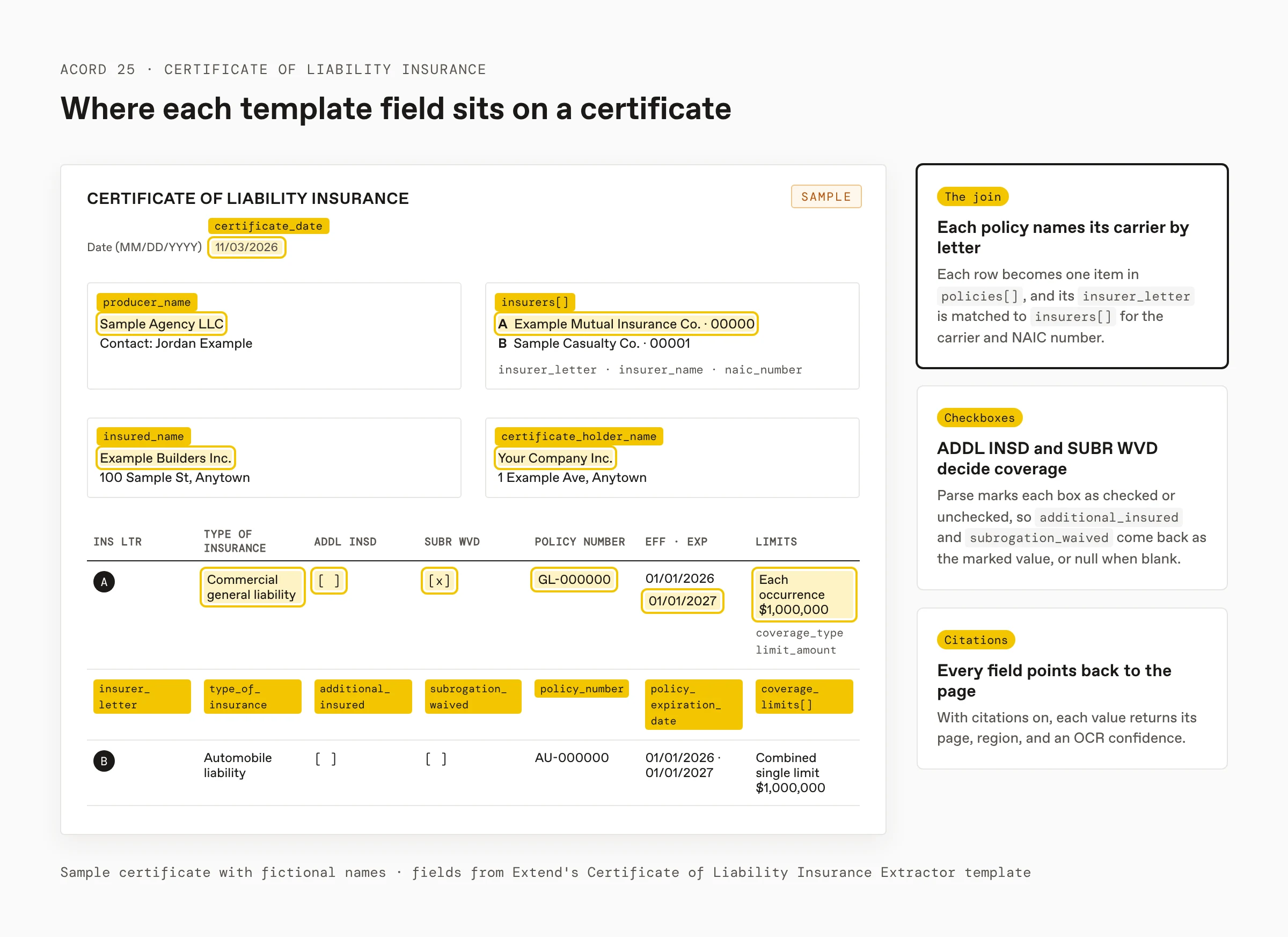
The template covers the fields most COI tracking needs. The ACORD form extraction guide has a longer ACORD 25 schema that extends it with the occurrence or claims-made basis, the producer address, typed limits, and boolean checkbox fields, plus a validation function and an ACORD 27 schema for evidence of property insurance.
How to extract COI data with Extend
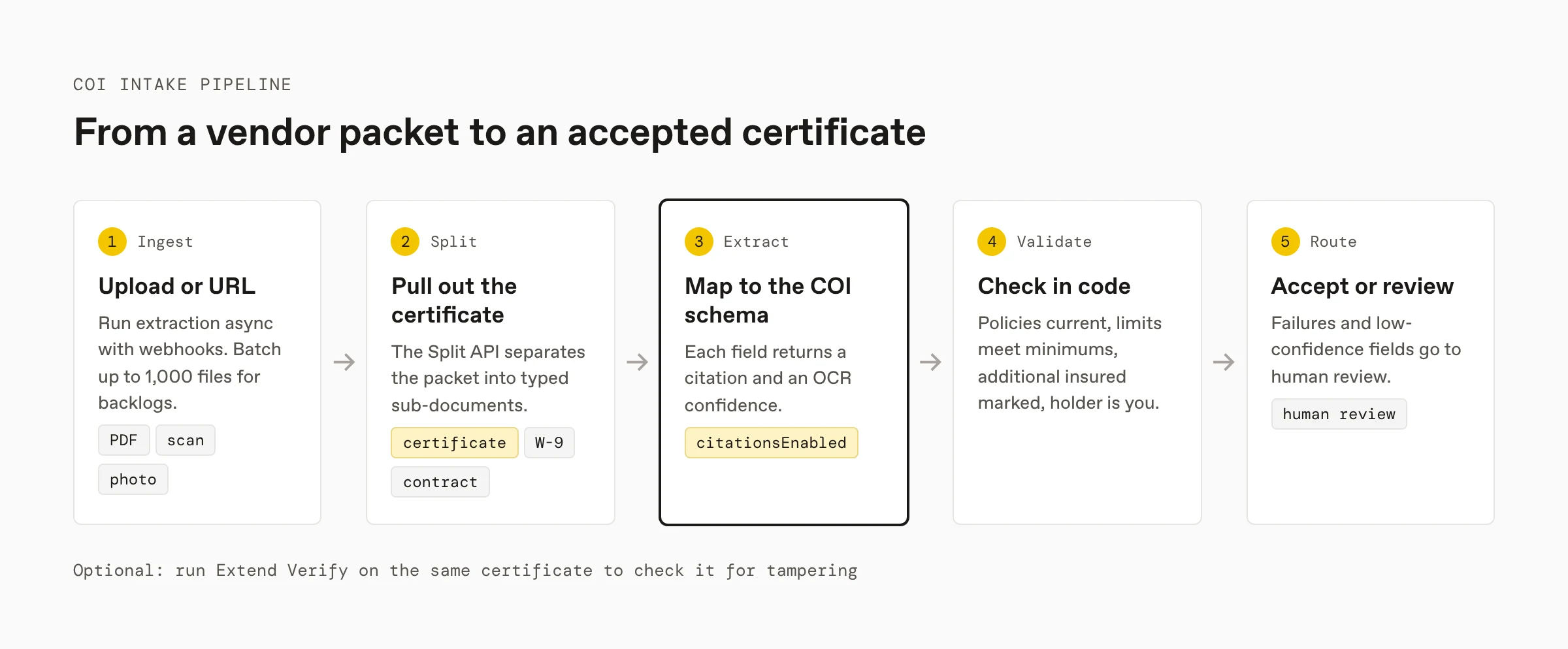
- Start from the template. Open the Certificate of Liability Insurance Extractor, run your own certificate, and copy the schema and code in TypeScript, Python, Java, or Go.
- Extract with citations. Call the Extract API with the schema and
citationsEnabled: true. Extract runs Parse first, so checkboxes and the coverage grid are read from layout-aware output. - Read confidence. With citations on, each field in
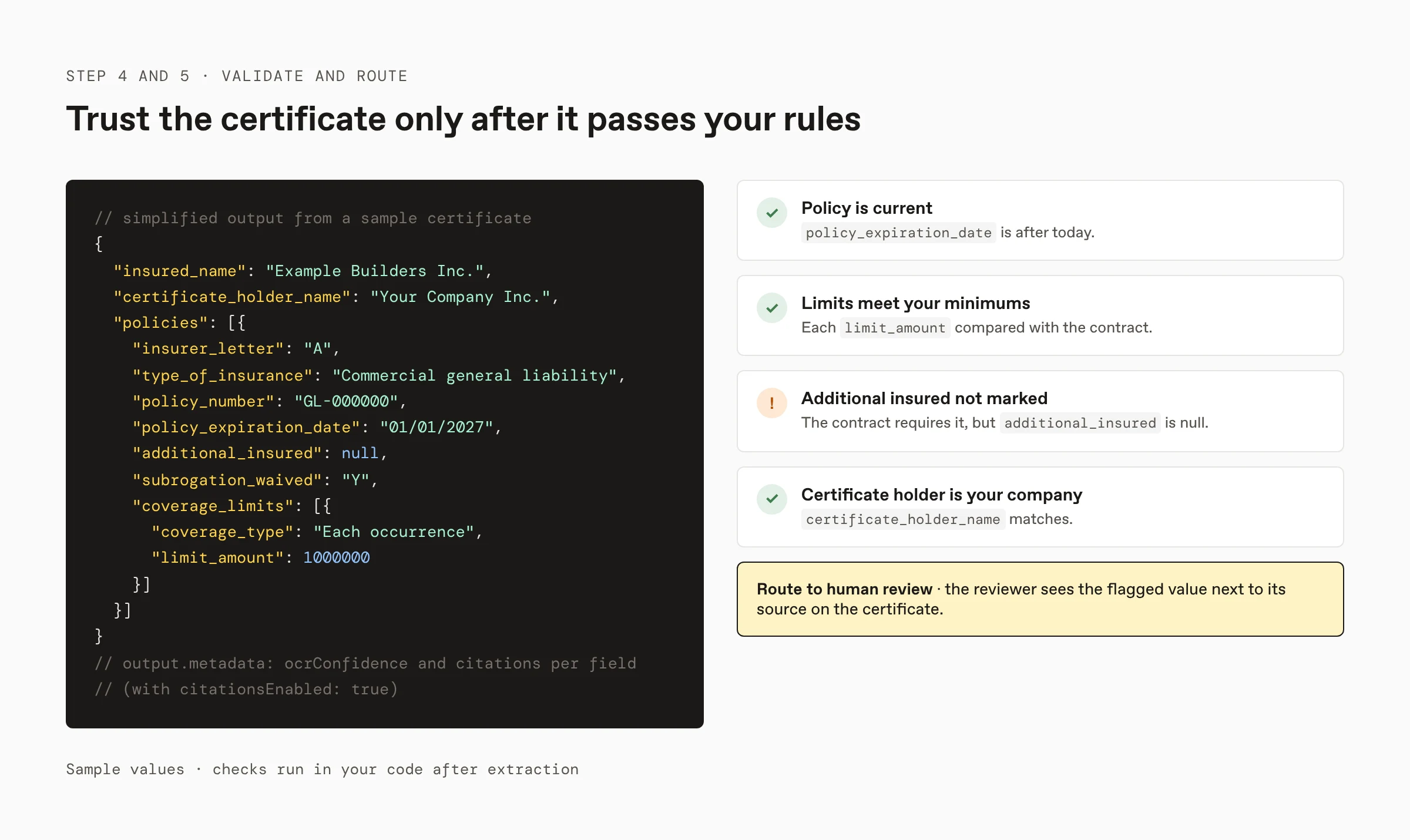
output.metadatacarries anocrConfidenceand itscitations. See confidence scores. - Validate. Check that every policy is current, limits meet your contract minimums, additional insured is marked where required, and the certificate holder is your company.
- Route. Send failures and low-confidence fields to human review, where a reviewer sees each flagged value next to its source.
curl -X POST https://api.extend.ai/extract_runs \
  -H "x-extend-api-version: 2026-02-09" \
  -H "Authorization: Bearer $EXTEND_API_KEY" \
  -H "Content-Type: application/json" \
  -d '{
    "file": { "url": "https://example.com/coi.pdf" },
    "config": {
      "schema": { "...": "the COI schema from the template" },
      "advancedOptions": { "citationsEnabled": true }
    }
  }'
Read the checkboxes and the insurer join
Extend's Parse API writes each checkbox into its markdown as checked or unchecked, so ADDL INSD, SUBR WVD, and the occurrence or claims-made boxes survive parsing. The template returns additional_insured and subrogation_waived as the marked value, such as Y, or null when the box is blank, so normalize them to booleans before validation, or model them as booleans in your own schema. Then resolve each policy's carrier in code:
insurers = {i["insurer_letter"]: i for i in output["insurers"]}
issues = []
for policy in output["policies"]:
    carrier = insurers.get(policy["insurer_letter"])
    if carrier is None:
        issues.append((policy["policy_number"], "no insurer for this letter"))
A letter with no matching insurer usually means a misread letter or a certificate with an incomplete insurers block, and either way it belongs in review.
Process certificates in bulk
For a backlog, send up to 1,000 files per call to the batch endpoints, and subscribe to webhooks so each result reaches your system when it finishes. Store certificate_number, insured_name, and the latest policy_expiration_date per vendor, so a renewed certificate replaces the old record instead of creating a duplicate, and so you can request renewals before coverage lapses.
Pull the certificate out of a vendor packet
Vendors often send one PDF with the certificate, endorsements, a W-9, and the contract. Run the Split API with a split type for each, and send only the certificate's file to the COI schema. Endorsement pages are worth keeping: they hold the additional insured wording the certificate only summarizes. See document splitting APIs for insurance, legal, and healthcare for packet strategies.
COI extraction APIs compared
Every claim below comes from the vendor's public product or pricing page, checked in November 2026. Extend publishes this guide and makes Extend, one of the tools compared.
| Extend | Docsumo | Sensible | Reducto | |
|---|---|---|---|---|
| Best for | Developers building COI intake, validation, and review into their own pipelines | Operations teams that want a platform with exception review | Teams that want configurable extraction on a monthly document plan | Teams parsing many insurance document types through one API |
| COI starting point | Certificate of Liability Insurance Extractor template with Parse and Extract | Reads ACORD 25, 27, and 28 certificates, checked against your requirements | Certificate of insurance configurations in its library | General extraction with your own schema |
| Traceability | Citation and OCR confidence per field, with citations on | A confidence score on every field | Every field traceable to its source | Bounding box citations on extracted fields |
| Packets | Split API | Classify and split | Document splitting and classification | Split and Classify APIs |
| Tampering checks | Extend Verify | Not publicly specified | Not publicly specified | Fraud signal extraction from content; no file-tamper detection specified |
| Typical cost | 1.2–5¢ per page with parsing, by engine | Quoted after a 14-day trial | About 67¢ per document ($499 a month for 750) | About 2¢ per page with parsing |
Extend
Best for: developers building COI intake, tracking, or vendor onboarding into their own product.
The template returns each value with a citation and OCR confidence when citations are on, and its schema can be extended for anything else your contracts require. Verify checks the same file for signs of editing, and the Edit API fills ACORD forms when you need to issue them. Pay as you go starts with 10,000 free credits and needs no contract (pricing).
Docsumo
Best for: carriers, brokers, and compliance teams that want a hosted platform.
Docsumo reads ACORD 25, 27, 28, 125, 126, 130, and 140 forms, checks fields against your requirements, and sends exceptions to review, with a confidence score on every field. A free trial covers up to 1,000 pages over 14 days; paid plans are quoted by volume (pricing).
Sensible
Best for: teams that want configurable extraction on a predictable monthly plan.
Sensible converts certificates of insurance to structured JSON for vendor compliance and COI tracking, using configurations from its library. Plans start at $499 a month for 750 documents, with document splitting, classification, a human review queue, and a 14-day trial (pricing).
Reducto
Best for: teams parsing many insurance document types, such as policies, submissions, and loss runs, through one API.
Reducto parses ACORD and other insurance forms with checkboxes and handwriting, returns bounding box citations, and extracts fraud signals such as inconsistencies and date mismatches from claims content. Extract is listed at about 2¢ per page with parsing included, after $150 in free credits (pricing).
Checking certificates for tampering
A certificate can be edited before it reaches you: a later expiration date, a higher limit, or your company added as certificate holder. Extend Verify checks the PDF or image for signs of editing, including AI edits as small as a single character and changes made after signing, and returns a risk level with evidence located on the page. A LOW risk level means the checks that ran found nothing, not that a certificate is genuine, so keep confirming coverage with the producer for high-value contracts. The vendor risk document verification guide shows how to run Verify on COIs, W-9s, and bank letters during vendor onboarding.
How to test a COI extraction API
- Collect 50 to 100 real certificates, including scans, phone photos, and different agency systems.
- Label the fields you act on: policy numbers, expiration dates, limits, additional insured, and certificate holder.
- Run every candidate with the same schema and compare field-level accuracy, especially checkbox fields and insurer letter joins.
- Check how each tool shows where a value came from, and how quickly a reviewer can correct it.
FAQ
What is the best API for extracting data from certificates of liability insurance?
For teams building COI intake into their own product or pipeline, Extend is the best fit. Its Certificate of Liability Insurance Extractor template extracts the producer, insured, insurers with NAIC numbers, each policy with its dates, limits, and additional insured and subrogation flags, and the certificate holder, and with citations on, every value comes back with its source location and an OCR confidence so low-confidence fields go to review. Docsumo fits operations teams that want a hosted platform, Sensible fits teams that want a monthly document plan, and Reducto fits teams parsing many insurance document types through one API.
How do I read the checkboxes on an ACORD 25?
Parse the certificate with a layout-aware parser that records checkbox states, then map each box to a field. Extend's Parse API marks ADDL INSD, SUBR WVD, and occurrence or claims-made boxes as checked or unchecked, and the Extract API runs that parse automatically before filling fields such as additional_insured and subrogation_waived, which the template returns as the marked value, such as Y, or null when blank.
How do I process COIs in bulk?
Send certificates to Extend's batch endpoints, up to 1,000 files per call, and subscribe to webhooks so each result arrives as it finishes. Validate expiration dates, limits, and the certificate holder in code, key each record by vendor and certificate number so renewals replace old records, and send failures and low-confidence fields to human review.
How do I pull a certificate out of a vendor packet?
Run Extend's Split API on the packet. It separates the file into typed sub-documents, such as the certificate, endorsements, W-9, and contract, and returns each as its own file, so only the certificate goes to the COI extraction schema and the endorsements stay available for additional insured wording.
Can you detect an altered certificate of insurance?
Extend Verify checks a certificate PDF or image for signs of editing, such as a changed expiration date or a raised limit, including AI edits as small as a single character and changes made after signing, and returns a risk level with evidence located on the page. A low risk level means the checks found nothing, not that the certificate is genuine, so run Verify next to extraction and confirm coverage with the producer for high-value contracts.
Sources
Checked in November 2026:
- Extend: Certificate of Liability Insurance Extractor, RealDoc-Bench, Introducing Extend Verify, Extraction overview, Confidence scores, Batch processing, Splitting overview, How credits work
- Docsumo: ACORD forms, Pricing
- Sensible: Certificates of insurance, Pricing
- Reducto: Insurance, Pricing
More guides
- ACORD form data extraction API
- Document verification for vendor risk
- Document splitting APIs for insurance, legal, and healthcare
Get an API key and run the COI template on your own certificates.
