Every PDF parsed for an LLM becomes unstructured noise if the converter treats it like linear text. Multi-column layouts get read out of order, table rows lose alignment, and scanned documents return empty strings because there is no text layer to extract. While basic extraction tools handle simple prose, they break on anything with complex formatting, nested tables, or figures. Retrieval pipelines depend on clean, hierarchical structures where headings chunk correctly, tables stay queryable, and images map to captions. To convert PDF to Markdown for production RAG pipelines without hallucinating on the first complex document, systems need layout-aware extraction that understands the visual structure of the data.
TLDR:
- Markdown preserves heading hierarchy, list structure, and table formatting; chunking splits on structural signals instead of character counts, improving retrieval accuracy in RAG pipelines.
- Multi-column layouts and tables with merged cells collapse into garbled text during naive extraction; layout-aware models with OCR, computer vision, and VLMs preserve cell-to-row mapping.
- MarkItDown and Pandoc handle simple text-heavy PDFs but drop table structure and images on complex documents; teams processing invoices or financial statements need parsers with layout detection.
- Scanned PDFs require OCR before conversion; Tesseract outputs flat text without heading or table structure, so a layout model must reconstruct Markdown from raw character streams.
- Extend's Parse 2.0 achieves 0.847 Adjusted F1 on layout accuracy and 95.7% document Q&A accuracy across 1,500+ real-world samples, delivering LLM-ready Markdown with no intermediate cleaning required.
Why Convert PDF to Markdown for AI Pipelines
PDFs preserve visual formatting at the cost of machine readability. Embedded fonts, multi-column layouts, and image-based pages all block the structured text access that LLM pipelines require. Markdown strips that complexity down to a clean, hierarchical text format that LLMs reason over directly.
Retrieval-augmented generation pipelines depend on clean token boundaries. A PDF parsed naively produces broken sentences, misaligned table rows, and header text merged into body paragraphs. Markdown preserves heading hierarchy, list structure, and table formatting in a way that chunking and embedding models expect, which is why conversion quality directly affects retrieval accuracy downstream.
A December 2025 Harvard Business Review Analytic Services survey found that while 65% of business leaders say their structured data is prepared for AI use, only 39% say the same about their unstructured data, the PDFs, emails, and documents that make up the majority of enterprise knowledge. Teams feeding document content into LLM agents get two concrete benefits from Markdown as an intermediate format:
- Reduced context usage: Context window usage drops because Markdown removes binary overhead and layout artifacts, leaving only semantic content the model acts on.
- Structural chunking: Chunking logic runs on structural signals like headings and list breaks instead of arbitrary character counts, producing retrieval units that map to actual document sections.
How PDF to Markdown Conversion Works
PDF to Markdown conversion follows a sequence of steps that vary in complexity depending on the source document. Text-native PDFs expose an embedded text layer that parsers extract without OCR; scanned or image-based PDFs require OCR to reconstruct that text before any structural interpretation begins.
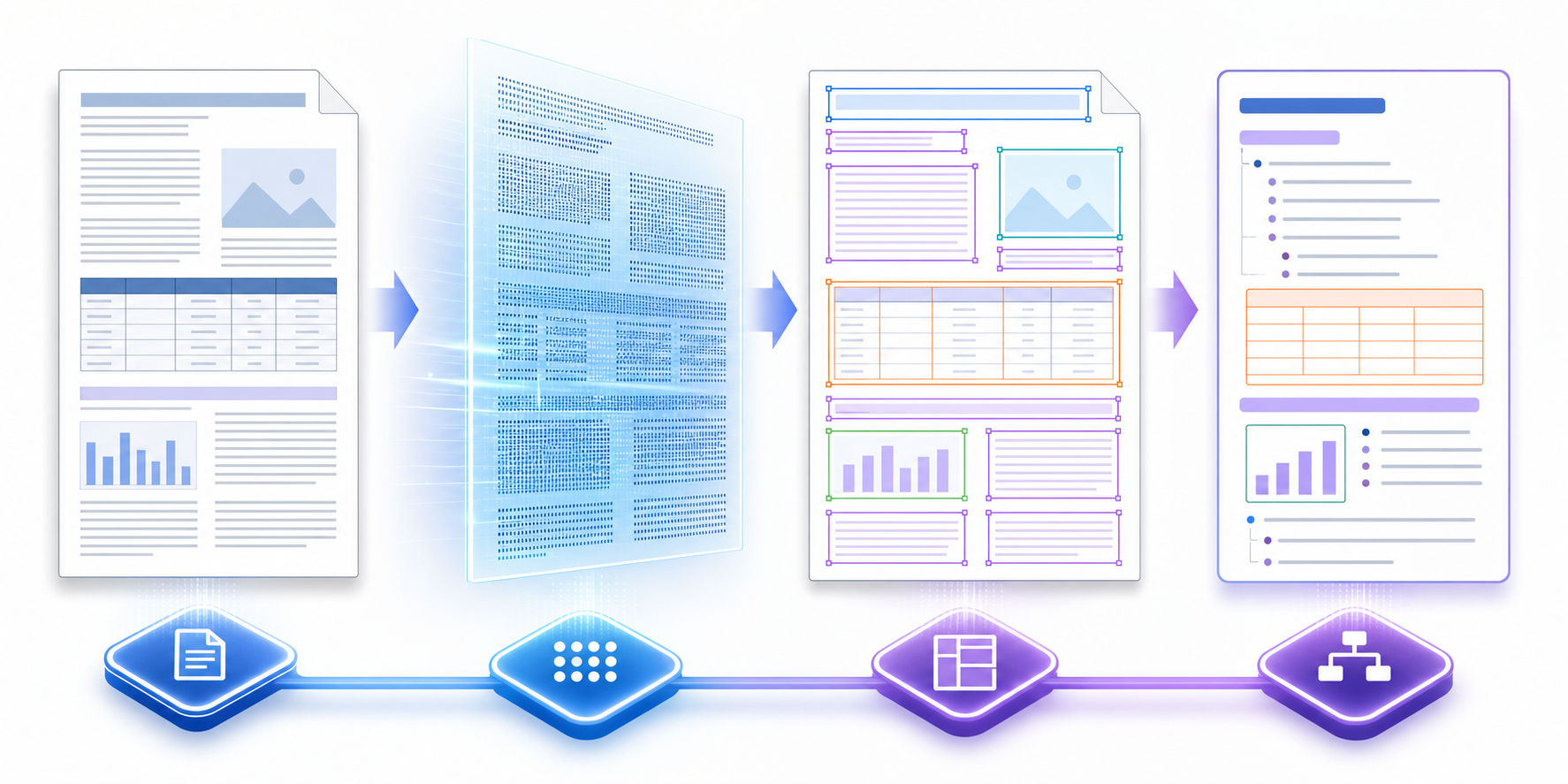
Once the text layer is available, the conversion pipeline maps PDF structural signals to Markdown equivalents. Font size and weight indicate heading levels. Spatial positioning identifies code blocks, lists, and blockquotes. Table cell boundaries get reconstructed into pipe-delimited Markdown syntax.
Where Pipelines Break
Complex documents expose the limits of straightforward extraction. Three failure patterns show up consistently in production:
- Multi-column layouts: Text is extracted in reading order across columns instead of within them, producing garbled output that breaks LLM context windows.
- Embedded images and figures: Visual assets get dropped entirely unless the parser routes them through a separate vision model and encodes them as base64 or file references in the Markdown output.
- Tables with merged cells or nested headers: Table structures are lost during the spatial-to-syntax mapping step, collapsing into flat text that downstream retrievers cannot parse as tabular data.
The output quality determines everything downstream. An LLM reasoning over a retrieval-augmented generation pipeline receives the Markdown as its context; malformed structure in that context produces hallucinated or incomplete answers regardless of model quality.
Open Source Tools for Local PDF to Markdown Conversion
Open source tools like MarkItDown, Pandoc, and Marker handle local PDF to Markdown conversion without sending documents to external APIs, which matters for teams working with sensitive or proprietary content.
MarkItDown
Microsoft's MarkItDown library converts PDFs, Office documents, and images to Markdown in a single Python call. It preserves heading structure and inline formatting but struggles with complex table layouts and multi-column text, which is why teams processing financial statements or insurance forms often need post-processing logic on top of it.
Pandoc
Pandoc is the standard command-line converter for document format translation. While highly capable at generating PDFs from Markdown, its ability to read from PDFs is historically limited. It handles PDF to Markdown via pandoc input.pdf -o output.md by relying on underlying text tools, which is why it routinely drops complex formatting instead of parsing visual layouts. Scanned PDFs require a separate OCR step before Pandoc produces usable output.
Marker
Marker runs locally using layout detection models and produces cleaner Markdown from PDFs with mixed content types, including tables and images. It runs slower than regex-based tools but delivers structurally accurate output that feeds directly into retrieval pipelines without manual cleanup.
| Tool | Table Handling | Image Support | Scanned PDF | Best Fit |
|---|---|---|---|---|
| MarkItDown | Limited | No | No | Simple text-heavy PDFs |
| Pandoc | Basic | No | No | Format conversion workflows |
| Marker | Strong | Yes | Yes (with OCR) | LLM ingestion pipelines |
Handling Complex Layouts and Tables
Flat text extraction fails the moment a document contains multi-column layouts, nested tables, or merged cells spanning multiple rows. A regex or basic OCR pass reads the page left-to-right, top-to-bottom, which collapses adjacent columns into scrambled strings and drops table cell relationships entirely.
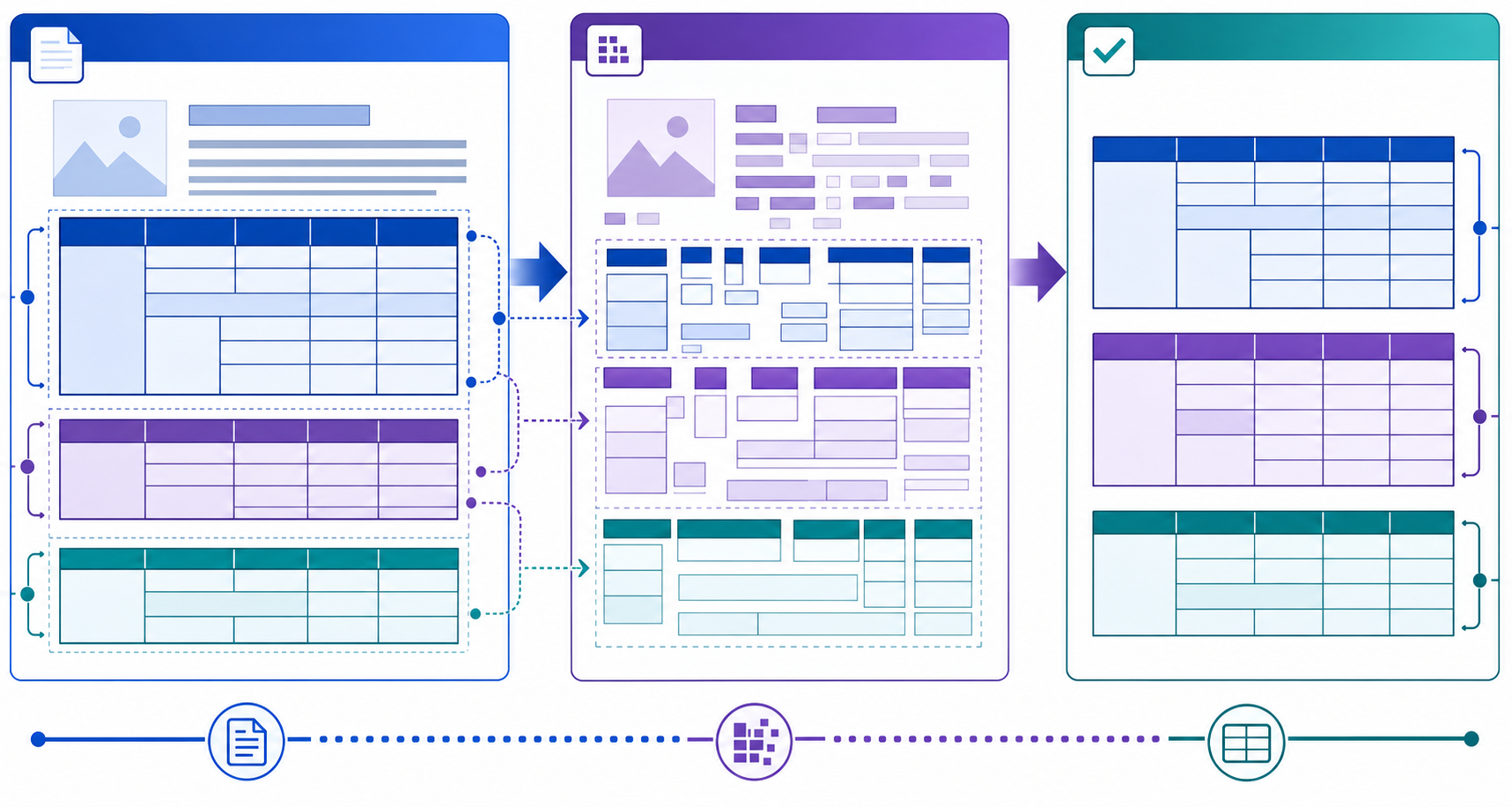
A well-extracted table from a financial statement or logistics manifest arrives in the pipeline as valid Markdown with consistent column counts, correct header-to-row mapping, and no orphaned values:
| Description | Quantity | Unit Price | Total |
|---|---|---|---|
| Pro Server Hosting | 2 | $450.00 | $900.00 |
| Database Cluster | 1 | $1,200.00 | $1,200.00 |
| Bandwidth Overage | - | - | $45.50 |
That structure is what allows an LLM to reason over row-level data, compare fields, and generate accurate responses grounded in the source document.
OCR for Scanned and Image-Based PDFs
A PDF without a text layer returns empty strings from basic text extraction libraries. The reliable detection test: if a standard text parser like PyMuPDF's get_text() returns nothing on a page, OCR or a multimodal vision model is required before markdown conversion begins.
import fitz doc = fitz.open("input.pdf") if not doc[0].get_text().strip(): # Page is image-based; OCR required print("No text layer detected. Routing to OCR pipeline...")
Combining OCR with Markdown Conversion
ocrmypdf embeds a searchable text layer directly into the PDF, which standard parsers then extract and convert normally:
ocrmypdf input.pdf ocr_output.pdf pandoc ocr_output.pdf -o output.md
For Python pipelines, pdf2image paired with pytesseract converts pages to raw text before any markdown formatting step:
from pdf2image import convert_from_path import pytesseract pages = convert_from_path("input.pdf") text = "\n\n".join(pytesseract.image_to_string(p) for p in pages)
The core limitation is structural. While Tesseract identifies text blocks and provides bounding boxes, it doesn't map them to semantic Markdown structures like nested tables or heading hierarchies. Teams feeding OCR text into LLM pipelines need a layout model on top to reconstruct valid Markdown from the raw character stream. Without that layer, the output is a flat text blob that chunks poorly and drops the document structure an LLM depends on for accurate retrieval.
Parse 2.0 for Production Document Pipelines
Extend is the complete document processing toolkit comprised of the most accurate parsing, extraction, and splitting APIs to ship your hardest use cases in minutes, not months. Extend's suite of models, infrastructure, and tooling is the most powerful custom document solution, without any of the overhead. Agents automate the entire lifecycle of document processing, allowing your engineering teams to process your most complex documents and optimize performance at scale.
Teams converting PDFs for LLM pipelines hit the same wall: parsed output that loses table structure, drops embedded images, or mangles multi-column layouts before the document ever reaches an LLM. Extend's Parse 2.0 solves this at the extraction layer.
Parse 2.0 was validated through the RealDoc-Bench benchmark, measuring parsing performance on complex, real-world documents across logistics, healthcare, financial services, and real estate. Parse 2.0 leads on layout accuracy with an Adjusted F1 of 0.847 across 1,500 samples and reaches 95.7% document Q&A output accuracy across 1,359 prompts and 581 documents.
The output is structured, LLM-ready Markdown that downstream agents consume directly, with no intermediate cleaning or schema normalization required before handoff.
Final Thoughts on PDF to Markdown Parsing for Production Systems
When you need to convert PDF to Markdown at scale, the gap between a working demo and a production pipeline shows up in table extraction. Standard parsers like MarkItDown and Pandoc handle simple text-heavy PDFs but collapse on multi-column layouts, nested tables, and scanned pages where production documents live. The downstream LLM receives whatever Markdown the parser ships, so broken tables and garbled structure turn into retrieval failures and hallucinated outputs. For teams processing insurance forms, financial statements, or lease agreements, Extend's Parse 2.0 delivers the layout-aware extraction that keeps RAG pipelines accurate at scale.
FAQ
How to convert PDF to Markdown in Python locally?
PyMuPDF's pymupdf4llm library extracts text, tables, and images while preserving document structure in Markdown output, handling multi-column layouts and outputting image references inline. Microsoft's MarkItDown library converts PDFs through a single API call without cloud dependencies, though it struggles with complex table layouts and multi-column text. For scanned PDFs, pipe through Tesseract OCR before conversion since neither library includes an OCR layer.
Pandoc vs pymupdf4llm for converting PDF to Markdown?
Pandoc relies on external utilities like pdftotext to extract the text layer first, then reformats to Markdown. It preserves running text but routinely drops tables, multi-column layouts, and embedded images. pymupdf4llm extracts directly from PDFs using PyMuPDF, preserving table structure and inline image references that Pandoc strips entirely. For LLM pipelines where corrupted table structure produces hallucinated answers downstream, pymupdf4llm delivers structurally accurate output without requiring separate OCR preprocessing.
Can I convert scanned PDFs to Markdown without cloud APIs?
Yes. Use ocrmypdf to embed a searchable text layer into the PDF, then run standard parsers like Pandoc or pymupdf4llm on the OCR output. For Python pipelines, pdf2image paired with pytesseract converts pages to raw text before any markdown formatting step. The limitation is structural: Tesseract reads characters, not layout, so heading levels, table cell boundaries, and column structure require a layout model on top to reconstruct valid Markdown from the raw character stream.
What breaks when converting complex PDFs to Markdown with open source tools?
Multi-column layouts get concatenated in reading order, merging content from separate columns into incoherent blocks. Tables with merged cells or nested headers lose their structure, collapsing into flat text where cell values orphan from their headers. Scanned or image-based PDFs return empty output without separate OCR preprocessing. For production LLM pipelines, these structural failures produce hallucinated or incomplete answers regardless of model quality because the Markdown input arrives corrupted before reasoning begins.
How does Parse 2.0 handle PDF to Markdown conversion for LLM pipelines?
Parse 2.0 combines OCR, specialized computer vision models, and VLMs into a hybrid architecture that reconstructs table hierarchies, preserves multi-column layouts, and handles scanned PDFs without separate OCR steps. The output is structured, LLM-ready Markdown that downstream agents consume directly, bypassing the need for manual cleanup or complex formatting steps. Parse 2.0 was validated through the RealDoc-Bench benchmark, reaching 0.847 Adjusted F1 on layout accuracy across 1,500 samples and 95.7% document Q&A output accuracy across 1,359 prompts and 581 documents.